
Highwings 50 ft HDMI Cable
4.5Editor score
In wall CL3 rated cable
Supports 4K 120Hz gaming
Slim and durable design
This guide compares the top ten HDMI Fiber Optic Cable models for 8K performance, gaming, and long distance transmission to help you choose the right one.
Finding the right connection for your home theater or gaming setup can be challenging. You need a cable that supports high resolutions and refresh rates without signal loss over distance. An HDMI Fiber Optic Cable is the modern solution for these demanding requirements.
We have reviewed ten top rated models available this month. Our analysis focuses on bandwidth, build quality, and compatibility with next generation devices. We look at features like 8K support and active signal transmission to ensure clarity.
Each pick below highlights a specific strength like budget friendliness or extreme durability. We include detailed specs and pros to help you decide quickly. Remember that availability and stock levels change frequently on retailer sites.
4.5Editor score

4.3Editor score

4.4Editor score
The table below offers a side by side look at the ten featured models. You can compare their lengths, bandwidth specs, and key features to find the best match for your specific setup needs.


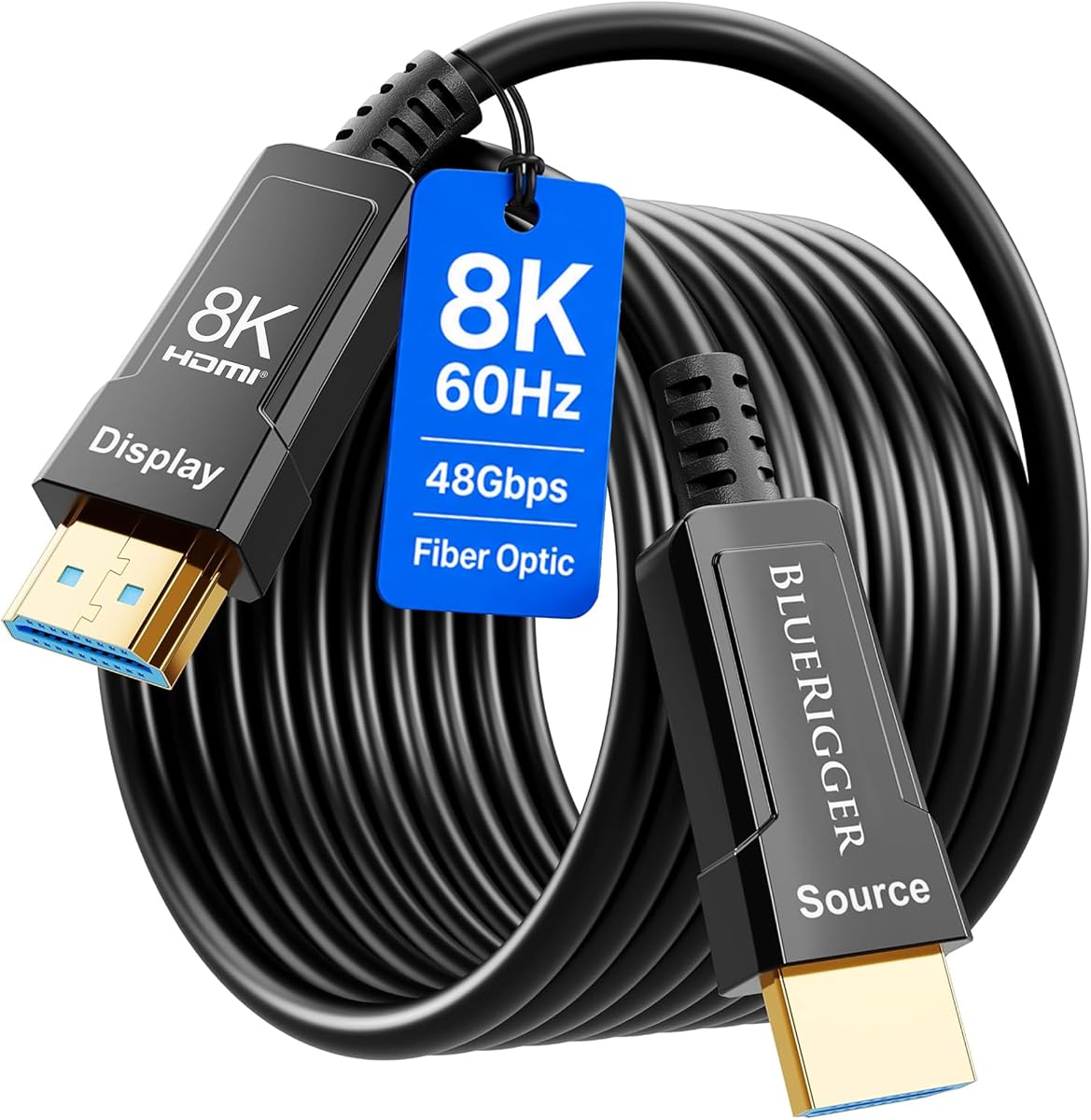


This Fiber Optic HDMI Cable leads our list with robust support for next generation video. It offers 48Gbps bandwidth for 8K 60Hz and 4K 120Hz playback. The slim design makes it easy to install in tight spaces.
We may earn a commission when you buy through this link, at no additional cost to you.
The cable uses fiber optics to minimize signal loss over long distances. It supports Dynamic HDR and eARC for immersive audio. Gold plated connectors ensure durability. It is ideal for PS5 and Xbox Series X users.
Some users report compatibility issues with LG OLED displays. The unidirectional nature requires careful setup to avoid signal errors. Despite this, it remains a top choice for high bandwidth needs.
Buy this if you need a reliable 50ft connection for your gaming setup. It balances performance and flexibility well. Check your TV compatibility before purchasing to avoid issues.
The 48Gbps bandwidth ensures smooth 8K streaming without lag.
Gold plated connectors and zinc alloy housing protect against wear.
We may earn a commission when you buy through this link, at no additional cost to you.
Highwings offers a premium cable designed for serious gamers. It features variable refresh rate for smoother gameplay. The build quality includes military grade nylon for extra durability. It meets the 2.1 standard for full bandwidth.
We may earn a commission when you buy through this link, at no additional cost to you.
The 48Gbps bandwidth delivers sharp 8K visuals. Signal transmission is fast with no interference. The aluminum alloy shell adds strength. It is compatible with major consoles like PS5.
The unidirectional design means you must plug it correctly. Some users find it pricey compared to other options. Still, the performance justifies the cost for high end setups.
Choose this for your next gen gaming console. It ensures your hardware performs at its best. Check your setup to confirm compatibility.
Variable refresh rate reduces screen tearing for better visuals.
Military grade materials extend the life of the cable.
We may earn a commission when you buy through this link, at no additional cost to you.
RUIPRO provides a unique detachable design for flexibility. If a connector fails, you can replace just that part. It uses full fiber optics for clear signal. The stainless steel armor protects against physical damage.
We may earn a commission when you buy through this link, at no additional cost to you.
The 33ft length is great for standard setups. It supports 48Gbps for high resolutions. The flexible cable makes it easy to route in walls. It fits well in home theater projects.
The price reflects the premium build quality. The length may not suit very large rooms. For specialized setups, the detachable feature is a huge plus.
Pick this for installations where connectors may be accessed. It saves money on future replacements. Check your room layout for length needs.
Detachable connectors allow for easy repair or upgrades.
Stainless steel armor ensures high durability and protection.
We may earn a commission when you buy through this link, at no additional cost to you.
This model is a great budget pick for in-wall installs. It carries a CL3 rating for safety. The slim fiber design makes routing easy. It offers solid 48Gbps performance for the price.
We may earn a commission when you buy through this link, at no additional cost to you.
The cable supports 4K 120Hz for smooth gaming. It includes high bitrate audio support. The lifetime service adds peace of mind. It fits well for home renovation projects.
It lacks some premium features like armor. The unidirectional setup requires care. But for value, it stands out as a top choice.
Use this for safe in-wall wiring. It offers quality without breaking the bank. Confirm the CL3 rating for your needs.
CL3 rating ensures safe use inside walls without hazards.
Affordable price without sacrificing core performance specs.
We may earn a commission when you buy through this link, at no additional cost to you.
Snowkids offers an impressive 100ft reach. It supports 48Gbps for 8K content. The gold plated ports prevent corrosion. It is flexible enough for long routes. Ideal for large rooms or offices.
We may earn a commission when you buy through this link, at no additional cost to you.
The 8K 60Hz support is top tier. Ethernet support adds versatility. The military grade tensile nylon ensures strength. It works well with many devices.
The unidirectional feature requires careful setup. It may be bulkier than shorter cables. However, the length provides unmatched versatility for distant connections.
Choose this for long distance setups. It bridges large gaps with ease. Check your device ports before buying.
The 100ft length covers large spaces without signal loss.
Military grade materials ensure the cable stays durable over time.
We may earn a commission when you buy through this link, at no additional cost to you.
iBirdie is great for 4K setups needing long runs. It supports ARC even at long distances. It includes a USB cable for stable power. The active signal ensures quality.
We may earn a commission when you buy through this link, at no additional cost to you.
The 18Gbps bandwidth fits 4K 60Hz needs. Dolby Atmos support adds audio depth. It is compatible with many sources. Great for older consoles or PCs.
It needs a USB power source. It does not support 8K speeds. But for 4K, it is a strong performer.
Buy this for 4K setups needing power. It works well for standard home theaters. Ensure you have a USB source available.
The USB cable ensures the active HDMI has stable power.
Optimized for 4K 60Hz HDR and Dolby Atmos.
We may earn a commission when you buy through this link, at no additional cost to you.
BlueRigger supports high refresh rates for gaming. It offers 4K 144Hz for fast-paced action. The CL3 rating is safe for walls. The warranty adds extra value.
We may earn a commission when you buy through this link, at no additional cost to you.
The 4 optical fiber strands boost speed. It handles HDR10+ well. The zinc alloy shell protects ports. It works with major consoles.
The higher cost reflects the speed. The unidirectional nature requires care. But for competitive gaming, it is worth it.
Select this for PC gaming setups. It handles high refresh rates well. Check your TV for 144Hz support.
The 144Hz support eliminates blur in fast games.
A lifetime warranty shows confidence in the cable quality.
We may earn a commission when you buy through this link, at no additional cost to you.
Cratree offers an amazing 150ft range. It keeps 8K performance over long distances. The slim profile is easy to hide. Multi-layer shielding cuts interference.
We may earn a commission when you buy through this link, at no additional cost to you.
The aluminum shell is durable. It supports HDR10 and high speed audio. It is plug and play. Ideal for large venues or halls.
It is on the premium side. The unidirectional design needs setup. But the length is hard to beat.
Use this for massive spaces. It connects distant rooms easily. Verify your setup needs.
The 4mm profile makes it easy to run through conduits.
Multi-layer shielding ensures zero signal degradation.
We may earn a commission when you buy through this link, at no additional cost to you.
This cable is great for complex setups. It avoids interference from other wires. The thin design is easy to manage. Zero oxidation keeps it stable.
We may earn a commission when you buy through this link, at no additional cost to you.
The active HDMI tech ensures smooth 8K. It supports VRR for gaming. It works with Xbox Series X. Ideal for professional racks.
The LG OLED issue is noted. The unidirectional setup requires care. But for interference, it is top notch.
Pick this for cluttered rooms. It works well in AV racks. Ensure compatibility with your TV.
Zero interference from power cables or routers.
No copper parts mean it stays reliable for decades.
We may earn a commission when you buy through this link, at no additional cost to you.
Highwings offers a classic 4K fiber cable. It has a reliable SR joint design. The gold connectors prevent oxidation. It supports 18Gbps well.
We may earn a commission when you buy through this link, at no additional cost to you.
The 100ft length is great for large setups. It is plug and play. It works with older devices. Good for budget friendly setups.
It is not 8K ready. The unidirectional feature needs care. But for standard HD, it is reliable.
Choose this for older setups. It covers long distances well. Check your device requirements first.
SR joint design prevents cracking and wear.
Reliable 4K performance at an affordable price.
We may earn a commission when you buy through this link, at no additional cost to you.
Choosing the right fiber optic cable involves several factors. We list key aspects to help you match the cable to your setup.
Check if the cable supports 48Gbps for 8K or 18Gbps for 4K. Higher bandwidth means better speed for new devices like PS5.
Always match the cable bandwidth to your TV or console to avoid bottlenecks.
Measure the distance between your device and TV. Fiber optic cables can reach up to 150ft without signal loss, unlike copper ones.
Pick a length that fits your room exactly to avoid messy excess cable.
Most fiber cables are unidirectional. You must plug the SOURCE end into your device and DISPLAY end into the TV.
Double check the labels before installation to prevent signal failure.
Look for gold plated connectors and aluminum or zinc alloy shells. These materials resist corrosion and physical damage over time.
Durable connectors extend the life of the cable and ensure stable signal.
Slim and flexible cables are easier to route through walls or tight spaces. Look for thin profiles for in-wall installs.
Flexibility helps you hide cables better and avoid sharp bends.
If you run the cable inside a wall, ensure it has a CL3 fire rating. This prevents fire hazards inside walls.
Never use standard cables for in-wall runs as they may not be safe.
Check for eARC support if you have a soundbar or AV receiver. Some long cables may lose audio return features.
Ensure the cable supports the audio formats your home theater uses.
Verify the cable works with your specific TV brand. Some OLED models have issues with certain cables.
Read product details to confirm compatibility before purchasing to avoid returns.
Start by identifying the SOURCE and DISPLAY ends on the cable. Plug SOURCE into your console or PC and DISPLAY into your TV. This ensures the active signal works correctly.
Avoid sharp bends or kinks in the cable. Although flexible, extreme angles can damage the internal fibers. Route it gently behind your TV or through conduits.
Keep the connectors clean and dry. Dust can affect signal quality. Wipe them gently if needed and store spare cables in a cool, dry place.
Yes, it is worth it for long distances or 8K setups. Copper cables lose signal over 15ft, but fiber maintains quality. For modern consoles, it ensures you get full performance.
No, fiber cables are plug and play. They do not need software. Just connect the ends correctly and your device will detect the signal.
Yes, if it supports eARC. Make sure the cable is not too long as some features fade over distance. Shorter cables work better for audio return.
Fiber uses light instead of electricity. This means no interference and less signal loss. It is thinner and can carry more data over longer distances than copper.
Only if they have a CL3 rating. Check the product specs. Standard cables can be unsafe for in-wall use due to fire risks.
The ends are labeled SOURCE and DISPLAY. SOURCE goes to your player and DISPLAY goes to your TV. Follow the labels to avoid signal issues.
We have reviewed ten top models with various strengths. The RUIPRO and Highwings cables stand out for specific needs. Each offers solid support for 8K and 4K content.
Prioritize length and bandwidth for your setup. If you need in-wall use, check for CL3 ratings. For gaming, focus on refresh rate support.
Prices and availability change often. Always check the latest stock on the retailer site. Verify compatibility with your devices before finalizing your purchase.