
HDMI Extender Over Ethernet 1080P 60Hz 164FT PoC EDID HT202P
4.4Editor score
Supports 1080P at 60Hz
Power over Cable technology included
EDID copy for compatibility
This guide compares the top HDMI over Ethernet extenders for long distance signal transmission across homes offices and commercial setups.
Extending HDMI signals over long distances often requires specialized solutions beyond standard cables. HDMI over Ethernet extenders use existing network cabling to transmit high definition video and audio reliably without signal degradation.
We evaluated ten top rated models based on resolution support distance capabilities and ease of installation. Our comparison focuses on real world performance factors like power over cable features and compatibility with common source devices.
Each product pick highlights key specifications and ideal use cases for different environments. Please note that prices and availability can change so verify current details before making your final purchase decision.
4.4Editor score

4.6Editor score

4.6Editor score
The following table provides a side by side overview of all ten models reviewed. Compare key specifications such as maximum distance resolution support and special features to find the right fit for your setup.



This OREI extender stands out for its reliability and versatile features. With a high rating and support for up to 4K at 30Hz it handles most home entertainment needs effectively.
We may earn a commission when you buy through this link, at no additional cost to you.
The inclusion of an HDMI Loop Out makes it ideal for dual display setups where you want to monitor the source locally while sending the signal to a remote screen. Its PoC technology reduces cable clutter significantly.
While it does not reach 60Hz at 4K which limits its use for high refresh rate gaming the stability and clarity for standard content are excellent. Users report consistent performance across long cable runs.
This is a strong recommendation for home theaters or small office setups requiring clean installation without compromising on visual quality. The included adapter ensures easy power management.
Perfect for wall mounted displays where running long HDMI cables is impractical.
Power over Cable means only the transmitter needs an outlet reducing clutter.
We may earn a commission when you buy through this link, at no additional cost to you.
This model is a cost effective solution for extending Full HD signals over long distances. It is perfect for basic classroom or office environments where 1080P is sufficient.
We may earn a commission when you buy through this link, at no additional cost to you.
The EDID copy function is particularly helpful in ensuring the source device recognizes the remote display correctly. This prevents resolution mismatches that could result in black screens or distorted images.
While it lacks 4K support it delivers sharp and clear visuals at 1080P. The PoC feature simplifies installation by allowing power to be sent through the Ethernet cable to the receiver.
Buyers looking for a simple and affordable way to extend HDMI signals without breaking the budget will find this unit highly practical. It meets basic needs without unnecessary complexity.
Supports projectors and monitors for educational presentations effectively.
PoC technology means less cable clutter around the receiver unit.
We may earn a commission when you buy through this link, at no additional cost to you.
This premium extender offers high fidelity performance for enthusiasts who demand the best video quality. It supports 4K at 60Hz which is crucial for smooth playback and gaming.
We may earn a commission when you buy through this link, at no additional cost to you.
The inclusion of HDR and Dolby Digital ensures that the audio visual experience remains immersive even over long distances. This makes it suitable for high end home theaters.
Users report that the image quality remains crisp and vibrant even near the maximum range. The compact design and rugged metal housing help with heat dissipation and durability.
For those willing to invest in top tier performance this model delivers on all fronts. It is the ideal choice for setups requiring the highest standards of video and audio quality.
Dolby Digital pass through keeps sound immersive for movies.
YUV 4:4:4 support ensures precise color reproduction on screens.
We may earn a commission when you buy through this link, at no additional cost to you.
This unit solves the challenge of sending one source to multiple displays. It is perfect for conference rooms or bars where the same content must appear on several screens.
We may earn a commission when you buy through this link, at no additional cost to you.
The IR remote control support allows you to control the source device from a central location. This convenience saves time when managing presentations or media playback.
While the resolution limit to 30Hz at 4K might not suit fast paced gaming it is perfectly adequate for static displays or video presentations. The setup is plug and play.
If you need to broadcast one signal to four screens this is an excellent all in one solution. It simplifies cabling and power requirements significantly compared to buying separate extenders.
One signal drives multiple displays for meetings efficiently.
All receivers draw power from the transmitter via cable.
We may earn a commission when you buy through this link, at no additional cost to you.
This model is engineered for high bandwidth applications that need the full potential of modern HDMI standards. It supports 4K at 60Hz with full color sampling.
We may earn a commission when you buy through this link, at no additional cost to you.
The EDID management helps resolve compatibility issues automatically ensuring the source sends the correct signal to the remote display. This reduces troubleshooting time significantly.
It is not compatible with network switches meaning it must be connected directly between source and display. This limits flexibility but ensures signal integrity for point to point connections.
Best for home theaters or gaming rooms where bandwidth is critical. The 18Gbps capacity ensures you get the most out of high-end sources and displays.
Handles high bandwidth features required by latest devices.
EDID management simplifies setup for non technical users.
We may earn a commission when you buy through this link, at no additional cost to you.
This extender is designed for environments where distance is a priority. It allows 1080P signals to travel up to 230 feet which is useful for large spaces.
We may earn a commission when you buy through this link, at no additional cost to you.
The inclusion of IR remote cables allows control of the source from the receiver side. This makes it easy to manage media players or cable boxes remotely.
At 4K the range is limited to 131 feet but remains solid for most home setups. The uncompressed transmission ensures the video quality remains sharp throughout the distance.
If your main requirement is distance and you do not need 4K at 60Hz this is a robust option. It is well built and reliable for standard content playback.
IR cables included for easy source control from the display.
Keeps visual quality intact across long cable runs.
We may earn a commission when you buy through this link, at no additional cost to you.
This model stands out because it allows you to control your PC remotely via keyboard and mouse at the receiver end. This is invaluable for server rooms or secure setups.
We may earn a commission when you buy through this link, at no additional cost to you.
It also includes a 3.5mm stereo audio output which allows for analog speaker connections at the remote location. This adds flexibility for audio delivery without needing digital audio processing.
The video quality supports 4K at 60Hz and includes HDR for enhanced visuals. However the KVM feature requires specific attention to USB connections during setup.
If you need to manage a computer from another room this is a specialized tool that saves time. It combines video extension with physical input control.
Control your computer input from another location easily.
Stereo audio output helps for legacy speaker setups.
We may earn a commission when you buy through this link, at no additional cost to you.
This extender is built with physical installation in mind featuring mounting holes that help secure it to walls or racks. This is helpful for permanent setups where stability is key.
We may earn a commission when you buy through this link, at no additional cost to you.
It supports both mirroring and extended display modes which gives flexibility in how you use dual screens. The dual voltage support makes it suitable for international travel or use.
The transmission is zero latency which is important for live monitoring or presentations. Although HDR is not native at 4K the color clarity remains good for standard content.
If you need a solution that is easy to mount and versatile in display modes this unit is a strong choice. It balances price and functionality well.
Built-in holes make permanent installation straightforward and stable.
Dual voltage adapter ensures use in different regions.
We may earn a commission when you buy through this link, at no additional cost to you.
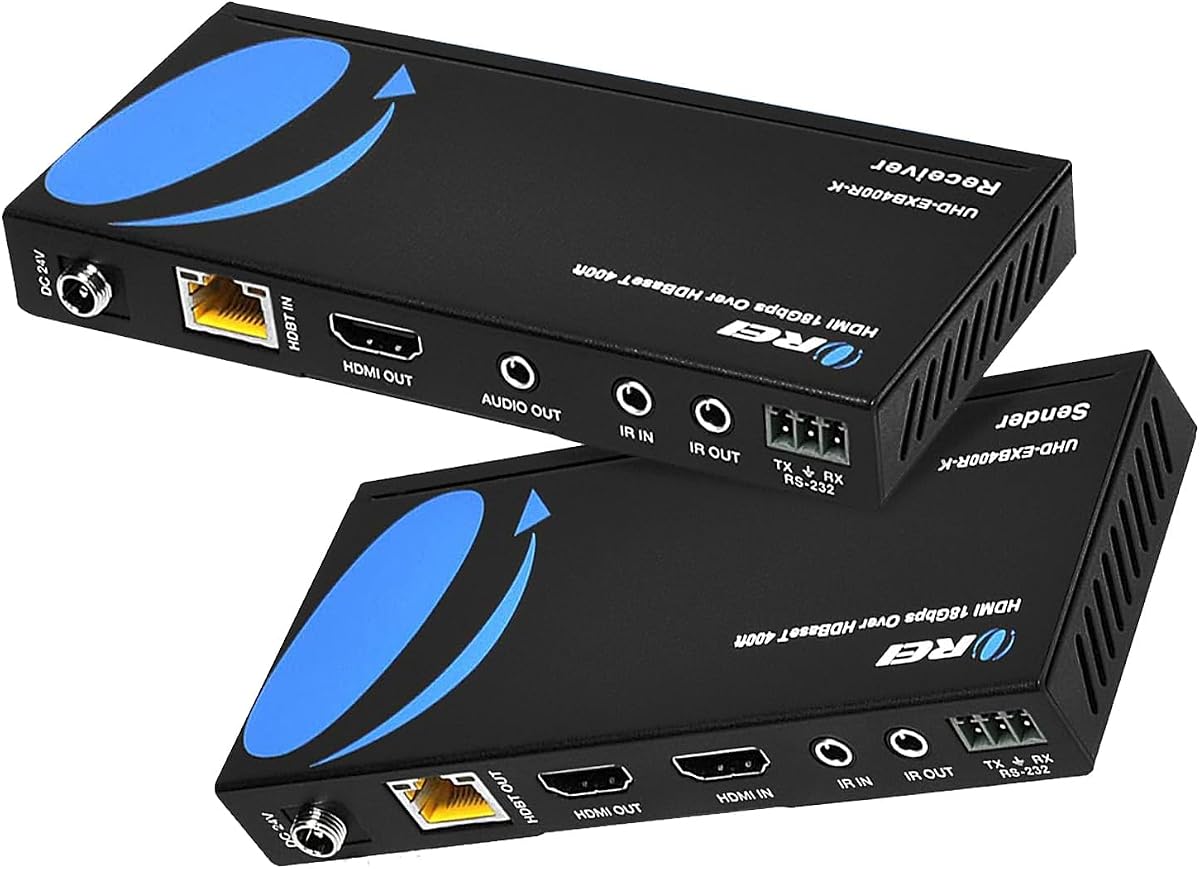
This professional grade extender is designed for large installations where distance is a major factor. It supports up to 400 feet which covers almost any commercial or large residential space.
We may earn a commission when you buy through this link, at no additional cost to you.
The RS-232 port allows for command control which is useful for integrated home automation systems. This makes it compatible with smart home setups that need to switch inputs.
The two-way IR control adds flexibility allowing control from the source or the display end. This ensures that the remote can work regardless of where the source device is located.
If you need maximum range and integration capabilities this is a top choice. It is built for professional environments where reliability and control are essential.
RS-232 port enables control via home automation systems.
IR works from both source and display for convenience.
We may earn a commission when you buy through this link, at no additional cost to you.
This model is a straightforward solution for extending HDMI signals without complex configurations. It supports both mirror and extended modes which adds versatility for productivity.
We may earn a commission when you buy through this link, at no additional cost to you.
The high rating reflects its reliability and ease of use. Installation is simple and the included cables ensure you have everything you need to get started immediately.
The mounting holes allow for secure placement which is helpful for permanent setups. While it does not offer high end specs it performs well for standard video playback.
If you want a reliable and simple extender that gets the job done this is a good fit. It balances cost and functionality for most users.
Mirror and extended modes allow flexible display usage.
Mounting holes ensure the unit stays in place.
We may earn a commission when you buy through this link, at no additional cost to you.
Selecting the right HDMI over Ethernet extender involves understanding key factors that affect performance and compatibility in your specific setup.
Ensure the extender supports the resolution you need. Some models max out at 1080P while others support 4K at 30Hz or 60Hz.
For high quality visuals choose a model that matches your source and display capabilities.
Check the maximum range the device supports. Common limits are 164 feet or 230 feet depending on the model and cable quality.
Measure your run distance and choose an extender that exceeds it for safety.
Most units work with Cat5e Cat6 or Cat7 cables. Ensure you have the right cabling installed for optimal performance.
Higher quality cables reduce signal loss over longer distances.
PoC technology allows the receiver to be powered through the Ethernet cable from the transmitter. This simplifies power management.
Look for PoC support to avoid needing extra outlets at the remote location.
If your source device needs remote control from the display end ensure the extender includes IR cables.
This feature lets you change channels or adjust playback from the remote screen.
A Loop Out port allows you to connect a local monitor at the source side.
This is useful for monitoring content without needing the remote display active.
Check audio support if you need surround sound. Some units pass through Dolby Digital or DTS.
Ensure the audio format matches your system capabilities for best sound.
Verify that the extender is compatible with your specific devices and HDMI version.
Some units may not work with certain network switches or routers so check requirements.
Connect the HDMI source to the transmitter and the display to the receiver. Run a single Ethernet cable between the transmitter and receiver.
Plug the power adapter into the transmitter. If using PoC the receiver will draw power through the Ethernet cable.
Test the connection on the display. Adjust IR cables if you need remote control. Clean ports with a soft cloth to maintain connection quality.
Most HDMI over Ethernet extenders require a direct point-to-point connection without switches. Using a switch can cause signal loss or instability.
Cat6 or Cat7 cables are recommended for 4K transmission to ensure sufficient bandwidth and reduced signal interference.
Some models support HDR but you must check the specific product specs. Not all extenders pass through HDR signals.
Most packages include the required power adapter. However always verify the contents before purchasing to be sure.
Yes but latency should be low for fast paced games. Check for zero latency claims if you plan to use this for gaming.
A damaged cable can cause signal loss. Replace any damaged Ethernet cables immediately to restore proper function.
We found that the OREI models offer strong performance across various needs from budget to premium. The budget option covers 1080P well while premium units support 4K at 60Hz.
Prioritize resolution and distance requirements when making your decision. Features like PoC and IR support add significant convenience to your setup.
Always check current prices and availability before purchasing. Product details may change over time so verify specs on the manufacturer page.