
Guermok Video Capture Card
4.4Editor score
USB 3.0 high speed
Low latency streaming
Portable plug and play
HDMI recorders allow you to capture high-definition video directly without needing a computer. These devices are essential for archiving footage or streaming content seamlessly.
We evaluated ten top-rated models based on video quality, ease of use, and compatibility. Our list includes standalone units and USB capture cards for various needs.
Each pick highlights key features, pros, and cons to help you decide. Please note that prices and availability may change frequently over time.
4.4Editor score
4.0Editor score

4.1Editor score
As an Amazon Associate we earn from qualifying purchases.
The following table compares all ten selected HDMI recorders side by side. Look at specifications and features to find the right fit for your setup.





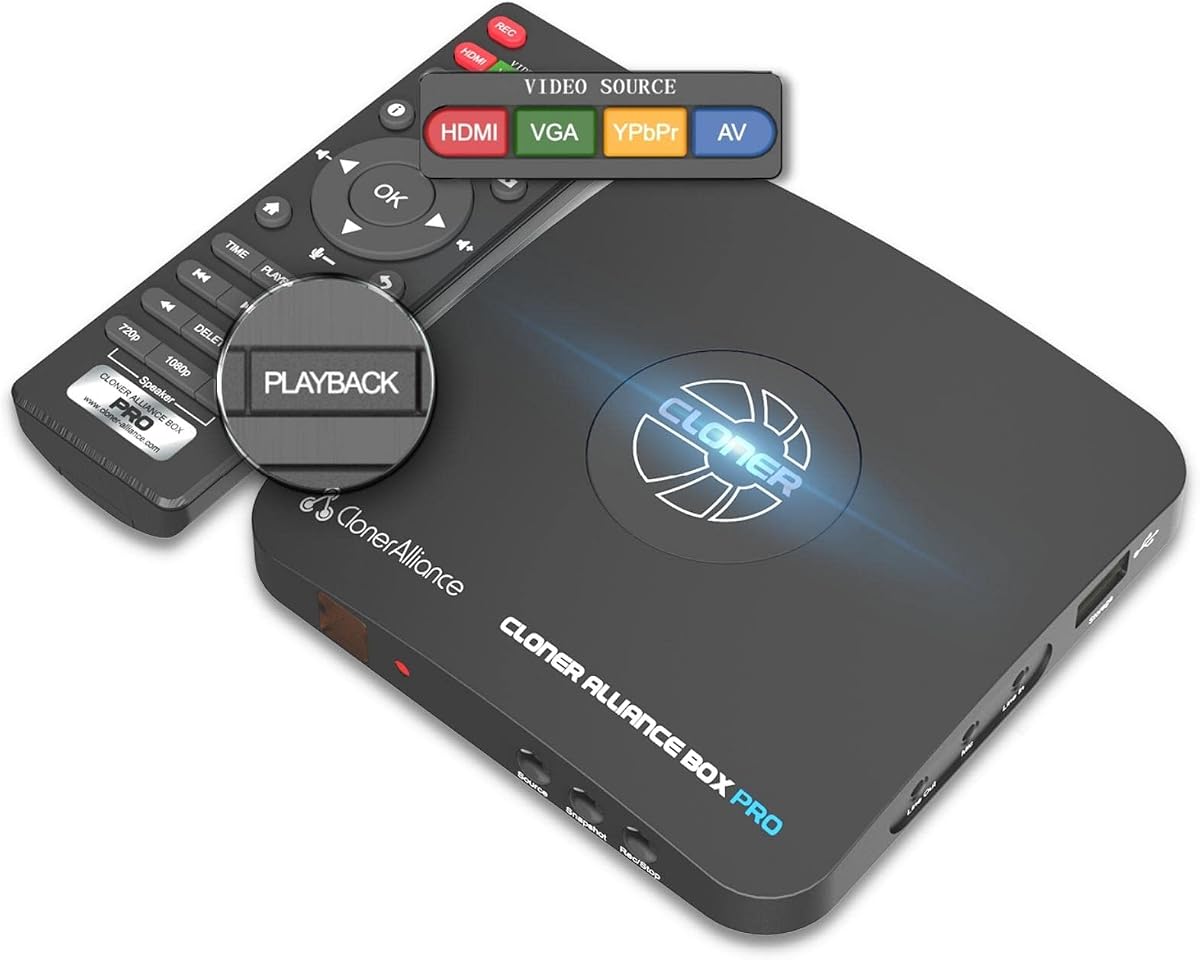
The ClonerAlliance Box Pro stands out as a top choice for standalone video recording. It captures 1080p at 60fps without needing a computer attached to it.
We may earn a commission when you buy through this link, at no additional cost to you.
Its ability to handle analog inputs like RCA and VGA makes it perfect for archiving old tapes or connecting legacy devices directly to modern screens.
While it lacks support for HDCP protected content, the low latency and schedule recording features make it highly reliable for gaming and live feeds.
This device is ideal for users who want a simple plug-and-play solution for recording from consoles or cable boxes without complex software setups.
Record directly to USB storage while watching playback on a TV without needing a PC attached.
Convert old VHS or camcorder signals to digital MP4 files for easy storage and viewing.
We may earn a commission when you buy through this link, at no additional cost to you.
The Guermok Video Capture Card offers excellent value for those needing high-speed data transfer on a budget. It supports 1080p at 60fps via USB 3.0 connections.
We may earn a commission when you buy through this link, at no additional cost to you.
Its compact design allows for easy portability, making it suitable for travelers who need to stream or record from various devices like cameras or consoles.
Although it requires external software to function, the ultra-low latency ensures smooth live gaming or video recording sessions without frustrating lag or delays.
This card is perfect for streamers or students looking for a reliable tool to capture content without spending a fortune on premium standalone recorders.
USB 3.0 ensures fast data transfer rates for high-quality video capture during live sessions.
Lightweight form factor makes it easy to pack in a bag for on-the-go recording needs.
We may earn a commission when you buy through this link, at no additional cost to you.
The ClonerAlliance UHD Pro delivers top-tier performance with true 4K recording capabilities. It supports modern codecs like H.265 for efficient storage and quality.
We may earn a commission when you buy through this link, at no additional cost to you.
Features like pause and resume recording give users more control over their files, ensuring that only the most important moments are captured in detail.
While the price is higher than standard capture cards, the standalone nature and high resolution make it a premium choice for serious content creators or archivists.
Ideal for users who need to archive UHD footage without a PC, this recorder offers robust features that justify the investment for professional workflows.
Capture ultra high definition videos at 30fps with advanced codec support for better compression.
Pause and resume recording to keep clips in one file without needing to stop and restart manually.
We may earn a commission when you buy through this link, at no additional cost to you.
This capture card provides solid performance for gamers needing 1080p at 60fps with a clean loop output. It is designed to work seamlessly with popular streaming software.
We may earn a commission when you buy through this link, at no additional cost to you.
The inclusion of a microphone input allows for adding commentary directly during gameplay, which is a useful feature for creators looking to build their audience.
While it does not support 4K recording, the reliability and ease of use make it a strong contender for those focusing on high frame rate streaming.
It is a practical choice for console players who want to record or stream without complex setups, offering plug and play functionality across systems.
Play games without lag while your audience watches the feed in real time via the loop out port.
Connect a headset to the mic input to add your voice commentary during recording sessions.
We may earn a commission when you buy through this link, at no additional cost to you.
The Audio Express AXHDCAP offers an entry-level solution for basic video capture needs. It supports 1080p at 30fps with a straightforward connection design.
We may earn a commission when you buy through this link, at no additional cost to you.
Its thermal dissipation design ensures the device stays cool during extended use, which is vital for maintaining stability during long streaming or teaching sessions.
Although the USB 2.0 limits bandwidth compared to newer standards, it works well for users who do not need ultra-high frame rates for their specific tasks.
This card is suitable for casual users or educators looking to record videos or broadcast feeds without the complexity of advanced hardware configurations.
Advanced thermal management keeps the device cool even during long periods of continuous recording.
Ideal for video conferencing and teaching where high frame rates are less critical than reliability.
We may earn a commission when you buy through this link, at no additional cost to you.
This capture card is built for gamers who need reliable performance for streaming and recording. It offers 4K passthrough while recording at 1080p 60fps.
We may earn a commission when you buy through this link, at no additional cost to you.
Its low latency ensures that what you see on screen matches your inputs, which is crucial for competitive gaming and live broadcasts to various platforms.
The compact design allows for easy transport, making it a great tool for content creators who stream from different locations or LAN parties regularly.
It is a solid choice for those who want a versatile card that works seamlessly with popular software and devices without needing extra drivers or power.
Minimize delay between gameplay and broadcast to ensure smooth and reliable live streams.
Lightweight and portable design allows you to stream or record from events or gaming sessions anywhere.
We may earn a commission when you buy through this link, at no additional cost to you.
This capture box is unique with two HDMI inputs and a built-in screen for monitoring. It allows for picture in picture functionality which is great for multi-source setups.
We may earn a commission when you buy through this link, at no additional cost to you.
The 7 inch screen means you can preview content directly on the device, making it easy to switch sources or manage feeds without needing a separate monitor.
While it is more expensive than single input cards, the added versatility for professional results and remote use justifies the cost for advanced users and teams.
It is best suited for setups where you need to switch between multiple consoles or cameras quickly while keeping an eye on the video quality directly.
Switch between two HDMI sources easily to capture content from different cameras or game consoles.
Preview your video feed on the device without needing a computer or external monitor at all.
We may earn a commission when you buy through this link, at no additional cost to you.
The ZowieREC 4K HDMI Recorder stands out with its premium aluminum design and standalone recording capabilities. It allows for true 4K recording without a PC connection.
We may earn a commission when you buy through this link, at no additional cost to you.
Features like schedule recording help ensure you never miss important gameplay or conference sessions, automating the capture process for convenience.
While the build quality is excellent, users should be aware of its limitations with certain content protection standards which may affect compatibility with some devices.
This device is a good fit for users who value design and want a dedicated recorder for high-quality video capture without relying on a computer host.
Sleek one-piece molded silver casing offers durability and style for both home and professional use.
Supports both TF card and USB storage to give you flexibility based on your capacity needs.
We may earn a commission when you buy through this link, at no additional cost to you.
The ClonerAlliance ViewPro combines a large 7 inch screen with standalone recording to offer a portable solution. It supports 1080p at 60fps for smooth video capture.
We may earn a commission when you buy through this link, at no additional cost to you.
The built-in screen allows you to preview and playback videos anywhere without needing to connect to a TV or monitor for every review session.
While it is great for archival and local viewing, live streaming requires a PC connection and bundled software which limits its standalone broadcasting capabilities.
It is perfect for users who need to record from analog sources or consoles on the go and want to monitor playback immediately after recording.
The extra-large LCD screen allows you to preview and instantly playback recorded videos anywhere without a TV.
Convert and record from various analog inputs like AV, VGA, and YPbPr to digital files easily.
We may earn a commission when you buy through this link, at no additional cost to you.
The Blackmagic Design UltraStudio is a professional-grade device for serious video production. It supports SDI inputs and high speed data for reliable broadcast workflows.
We may earn a commission when you buy through this link, at no additional cost to you.
Its loop output ensures that you can send a clean feed to a monitor while capturing, making it essential for live events and studio setups.
This device is not for casual users but for professionals who need robust tools for recording, mixing, and streaming high-quality video content.
If you require industry standard performance and support for complex setups, this recorder delivers the stability and features needed for professional work.
Designed for broadcast and professional use with robust connectivity and high-speed data transfer.
Supports SDI inputs and loop outputs for seamless integration into production environments.
We may earn a commission when you buy through this link, at no additional cost to you.
Selecting the right HDMI recorder depends on your specific needs and budget. Consider resolution, connectivity, and standalone capabilities before purchasing.
Determine if you need 4K or 1080p recording. Higher resolutions offer better detail but require more storage space and processing power.
Choose a device that matches your source quality to avoid downgrading or limiting your capture capabilities unnecessarily.
Standalone recorders do not need a computer and are ideal for live feeds or remote recording. PC-based cards require software and a host system to function.
If you need to record without a computer nearby, look for devices that save directly to USB or SD cards internally.
Check if the device supports HDMI, RCA, or SDI inputs. Some recorders convert analog signals which is useful for archiving older equipment like VHS players.
Ensure the inputs match your source devices to prevent the need for extra adapters that may degrade video quality.
Recording to USB drives or SD cards varies by model. Look for support for large capacity storage to handle longer recording sessions comfortably.
Some devices allow you to choose between different file systems which ensures compatibility with various playback systems later.
Low latency is critical for live streaming and gaming to avoid noticeable delay. Capture cards with USB 3.0 generally offer better performance than older standards.
Test the delay during live preview to ensure it does not affect your ability to interact with the content in real time.
Be aware that many recorders do not support HDCP which prevents recording protected content from streaming services or new consoles.
Check the device specifications to see if it blocks protected signals to avoid black screens during your recording attempts.
Some capture cards rely on external software to run. Ensure you have the right operating system and applications installed before setting up your device.
Standalone units often include remote controls or menus that reduce the need for additional software on a computer.
Metal casing often provides better heat dissipation and durability compared to plastic. This helps maintain performance during long recording or streaming sessions.
A well-built device will withstand travel and daily use better than cheaper alternatives that may fail over time.
Connect your HDMI source to the recorder using a high-quality cable and ensure the device is powered. If using a standalone unit, insert your USB or SD storage first.
Select the desired resolution and start recording using the provided interface or software. For capture cards, open your streaming app and select the device as the video source.
Regularly clean the ports and keep the device cool to avoid overheating. Store in a dry place to maintain longevity and performance of internal components.
Not all models support 4K. Many budget options are limited to 1080p. Check the specifications to ensure 4K input or output support before buying.
Most standard recorders do not support HDCP which is used to protect copyrighted content. This usually results in a black screen or error when recording from these sources.
Standalone recorders do not need a PC for recording. They save directly to USB drives or SD cards and can play back video on a TV.
Capture cards need a computer to record video while standalone recorders work independently. Capture cards are better for streaming while standalone ones are for offline recording.
USB 3.0 provides faster transfer speeds and higher resolution support. If you need to record 1080p or higher, USB 3.0 is recommended for better performance.
Yes, many devices support live streaming through software like OBS. Standalone units may have limitations depending on their specific streaming features.
Most devices support FAT32, exFAT, or NTFS formats for storage media. Ensure your USB drive or SD card is formatted correctly to avoid errors during recording.
This often occurs due to HDCP protection on the source device. Ensure the content source does not have active DRM or switch to a non-protected signal.
We reviewed ten top HDMI recorders suitable for various needs from budget to premium. The ClonerAlliance Box Pro stands out as an all-around choice for standalone use.
Consider your resolution needs and whether you want to record without a computer. USB capture cards work best for PC setups while standalone units offer more flexibility.
Check the latest prices and availability before making a decision. Ensure the device meets your specific requirements for quality and ease of use.