
ASRock Intel Arc B570 Challenger 10GB OC GDDR6 Graphics Card
4.7Editor score
10GB GDDR6 memory
XeSS 2 technology
Dual fan cooling
This guide compares the top 10 Intel Arc GPU models for gaming, AI, and professional workloads to help you choose the right graphics card for your system.
Choosing the right graphics card can be challenging with many options available. Intel Arc GPUs offer strong performance and modern features for various tasks. This guide helps you find the best match for your needs and budget.
We compared ten top Intel Arc graphics cards based on performance, features, and user feedback. Each model offers unique strengths for gaming, AI workloads, or professional applications. Our list covers a wide range of configurations and use cases.
Each pick highlights key specifications and ideal users for clarity. Ratings reflect user satisfaction and expert analysis. Prices change often so check current listings before buying to ensure you get the best deal available today.
4.7Editor score

3.9Editor score

The following table provides a side-by-side comparison of all ten Intel Arc GPU models. Each entry highlights key specifications to help you evaluate performance, memory, and connectivity options quickly.



This card stands out for professional workloads needing large memory. It scores well for AI inference and rendering. The workstation orientation makes it unique.
We may earn a commission when you buy through this link, at no additional cost to you.
The 24GB VRAM enables large language models and complex 3D scenes. Xe2-HPG architecture offers 197 INT8 TOPS. Twin transcoders speed video export.
Blower style cooling fits multi-GPU setups but may be louder. Gaming performance is secondary here. The design suits servers over desktops.
Buyers focused on AI or engineering will appreciate this. Its multi-GPU scaling is key. Check system compatibility carefully.
Large memory and XMX engines optimize local LLM deployment and inference tasks.
Four DisplayPort 2.1 outputs support expansive professional display setups.
We may earn a commission when you buy through this link, at no additional cost to you.
This model balances price and performance well. It aims for 1440p gaming with modern features. User ratings reflect strong satisfaction.
We may earn a commission when you buy through this link, at no additional cost to you.
The Xe2-HPG architecture improves efficiency and AI upscaling. XeSS 2 enhances visuals. Metal backplate adds durability.
Power use is efficient with one 8-pin. It may need latest drivers. 0dB cooling keeps it quiet when idle.
Ideal for gamers on a budget. It supports next-gen displays. Check your PSU before buying.
10GB memory and XeSS 2 provide smooth high-resolution gaming experiences.
Advanced architecture ensures excellent performance per watt for lower power use.
We may earn a commission when you buy through this link, at no additional cost to you.
This card fits the mid-range gaming niche. It offers overclocked speeds out of the box. Ratings show solid user satisfaction.
We may earn a commission when you buy through this link, at no additional cost to you.
Xe HPG microarchitecture supports 384 XMX engines. 256-bit memory interface gives strong bandwidth. DX12 Ultimate ready.
Dual fans maintain thermal stability. 0dB silent mode stops fans at low loads. Requires clearance and PSU.
Gamers needing reliable performance will like this. It handles creative tasks too. Verify case space before purchase.
Dual-fan design with heatpipes ensures efficient cooling during intense sessions.
Full DX12 Ultimate and XeSS support enable cutting-edge visuals.
We may earn a commission when you buy through this link, at no additional cost to you.
This model pushes clock speeds higher. Cooling design aims for stability. It fits performance-focused gamers.
We may earn a commission when you buy through this link, at no additional cost to you.
12GB memory handles textures well. Torn Cooling 2.0 with axial fan improves airflow. Metal backplate supports structure.
Breathing light adds style. Performance depends on drivers. Check support for your region.
Buyers wanting extra clock speed may like it. Compare with similar models first. Ensure power supply is ready.
Factory boost clock aims for smooth high-frame-rate gaming.
Advanced cooling maintains temps under heavy workload.
We may earn a commission when you buy through this link, at no additional cost to you.
This card targets advanced AI deployments. It combines two GPUs for 48GB total. Ideal for local model inference.
We may earn a commission when you buy through this link, at no additional cost to you.
Dual 2400 MHz chips offer 394 TOPS. Supports 70B quantized models. PCIe 5.0 x8 works with bifurcation.
Turbo cooling suits server environments. SR-IOV virtualization adds flexibility. Very niche and expensive.
Buyers needing local LLMs will value this. Check motherboard compatibility. It lowers cloud service need.
Massive VRAM enables running large models locally without cloud.
Dual-GPU design delivers massive parallel processing for inference.
We may earn a commission when you buy through this link, at no additional cost to you.
Another strong AI-focused option. Combines two cards in one slot. Aims for professional rendering and inference.
We may earn a commission when you buy through this link, at no additional cost to you.
48GB memory fits complex visual tasks. Dual-GPU allows parallel workloads. Turbo fan exhausts heat efficiently.
Fits standard expansion space. Requires powerful PSU. Driver support critical for AI.
Professionals needing local compute should consider. Compare features with similar. Check ISV support.
Dual-GPU design supports complex visual computing and inference tasks.
Compact dual-slot form factor fits standard chassis easily.
We may earn a commission when you buy through this link, at no additional cost to you.
This bundle offers GPU and power. It simplifies new builds. Rating shows high user approval.
We may earn a commission when you buy through this link, at no additional cost to you.
10GB memory suits high-detail gaming. XeSS 2 improves frames. Gold PSU ensures stable power.
Quiet cooling works well. Check other parts compatibility. Good value for complete setup.
First-time builders will find it helpful. It covers essentials. Verify your case fits.
GPU and power supply together simplify system assembly.
80 PLUS Gold PSU delivers efficient and stable power.
We may earn a commission when you buy through this link, at no additional cost to you.
Ideal for small form factor builds. It offers 16GB in low-profile. Good for edge workstations.
We may earn a commission when you buy through this link, at no additional cost to you.
Xe2 architecture delivers compute power. No external PCIe power needed. Metal shroud protects well.
Cooling depends on airflow. Check clearance. Perfect for mini towers.
Buyers with SFF cases should like this. It fits tight spaces. Verify driver support.
Slim dimensions fit compact mini-tower and edge workstation cases.
70W draw needs no external connector for easy upgrade.
We may earn a commission when you buy through this link, at no additional cost to you.
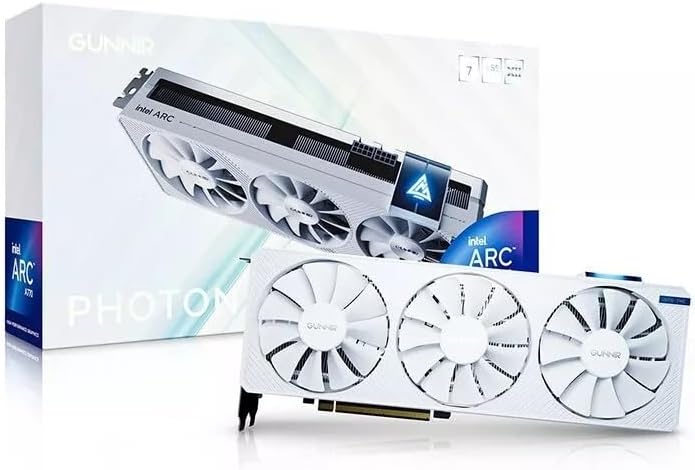
This card stands out with white color. It uses A770 performance. Triple fans help cooling.
We may earn a commission when you buy through this link, at no additional cost to you.
8GB memory and PCIe 4.0 support 4K. Triple fan design stabilizes temps. Good for aesthetics.
Check availability. Ensure case matches style. Drivers matter for gaming.
Buyers wanting style plus performance may like this. It handles creative tasks well. Verify your setup.
Distinctive white finish matches themed builds.
Triple fan design maintains stable temps under load.
We may earn a commission when you buy through this link, at no additional cost to you.
Perfect for multi-monitor office work. It offers four HDMI ports. Extremely low power draw.
We may earn a commission when you buy through this link, at no additional cost to you.
Single slot fits tight spaces. 50W design needs minimal power. Good for light tasks.
Not for heavy graphics. Ideal for digital signage. Check your display cables.
Buyers needing displays on a budget will like it. It saves space and power. Confirm OS support.
Four HDMI outputs enable expansive display setups easily.
Low 50W draw reduces system energy consumption.
We may earn a commission when you buy through this link, at no additional cost to you.
Selecting the right Intel Arc graphics card involves weighing several factors. This section breaks down key considerations to match your needs.
VRAM size determines how much data the GPU can hold at once. For gaming at 1440p, 8GB to 10GB is standard. AI workloads benefit from 24GB or more. Ensure the memory bus width supports your resolution needs.
Pick enough memory for your target resolution and workload size.
Intel uses Xe HPG and Xe2-HPG architectures. Newer models offer better AI acceleration with XMX engines. Look for XeSS upscaling for gaming. Check media engines for encoding tasks like AV1.
Prioritize newer architecture for better software support and features.
Cooling affects noise and thermal stability. Dual fans offer balance; blowers suit multi-GPU setups. Check case clearance. Zero-decibel modes help silent operation at idle.
Choose a cooler matching your case and noise tolerance.
Power draw varies from 50W to 200W+. Verify PSU capacity and connectors. Some low-profile cards need no external power. Higher performance models require 8-pin or dual connectors.
Ensure your PSU can handle the GPU plus system load.
Display outputs matter for monitors. Modern cards offer DP 2.0 or 2.1 with HDMI 2.1a. Multi-monitor setups need enough ports. Check your monitor inputs match the card.
Match card outputs to your display connections and quantity.
Gaming needs DX12 and driver maturity. Workstation needs ISV certification and memory. AI tasks need XMX and large VRAM. Identify your main goal before selecting.
Focus on the primary use case to narrow choices effectively.
Card length and slot count must fit your case. Low-profile models suit mini-towers. Standard designs may need large chassis. Measure clearance carefully.
Verify case dimensions before buying to avoid fit issues.
Intel updates drivers regularly. Check compatibility with your OS and apps. Professional cards have ISV drivers. Gaming benefits from recent stability patches.
Ensure driver support exists for your software and system.
Install the card securely in a PCIe slot. Connect required power cables. Install the latest drivers from Intel before testing.
Keep your system clean from dust. Monitor temperatures during load. Ensure case fans maintain airflow for cooling.
Update firmware and drivers regularly for stability. Adjust settings like fans or power limits in software tools if needed.
Intel Arc GPUs have improved significantly. They offer strong 1440p performance with XeSS. Driver support is better now. Check specific game compatibility for best results.
Yes. Models with large VRAM like 24GB or 48GB support local LLM inference. Tools like PyTorch work well. It reduces cloud costs.
Most modern motherboards work. PCIe 5.0 is ideal but 4.0 suffices. Ensure BIOS supports Resizable BAR for best performance.
Cards with strong media engines like dual transcoders help. Look for models supporting AV1 and HEVC encoding. Workstation GPUs handle multi-rendering well.
Durability depends on build and use. Metal backplates add protection. Proper cooling extends life. Expect similar lifespan to other GPUs.
Yes. Linux support is growing especially for workstations. Multi-GPU setups are optimized. Check community and Intel docs for distro specifics.
On features and value, often yes. XeSS and AV1 are strong. Gaming drivers are catching up. Compare benchmarks for your specific games.
Efficiency has improved. High-end models use more power but offer performance. Low-profile ones are very efficient. Balance needs with your PSU.
This list covers top Intel Arc options for many users. The top picks balance gaming, AI, and workstation needs. Check specs carefully.
Prioritize memory and cooling for your main tasks. Ensure your system matches the card. Drivers and software matter.
Prices and availability change often. Verify current listings before buying. Select the model that fits your budget and goals today.