
HDMI KVM Switch 4 Port Share Single Monitor
4.2Editor score
Affordable price point
Simple button switching
Plug and play setup
This guide compares ten top KVM switch for 4 computers models featuring 4K support, USB 3.0 ports, and dual monitor options for efficient workspace management.
Managing multiple computers on a single desk can quickly become cluttered with cables and peripherals. A KVM switch for 4 computers streamlines this setup by allowing you to control four systems with one keyboard, mouse, and monitor. This consolidation reduces desk space usage and simplifies your workflow significantly.
We have evaluated ten leading models based on resolution support, port variety, switching mechanisms, and build quality. Our analysis focuses on features that matter most for productivity, such as EDID emulation, high refresh rates, and reliable connectivity. Each product was reviewed against real-world usage scenarios.
Every pick in this list highlights specific strengths like budget-friendliness, premium video quality, or multi-monitor capabilities. While prices may fluctuate over time, the core features and performance ratings remain consistent indicators of value. Read on to find the perfect match for your specific multi-PC environment needs today.
4.2Editor score
4.8Editor score

4.7Editor score
This side-by-side comparison highlights the key specifications and unique selling points of each reviewed model to help you make an informed decision for your multi-computer workstation setup.


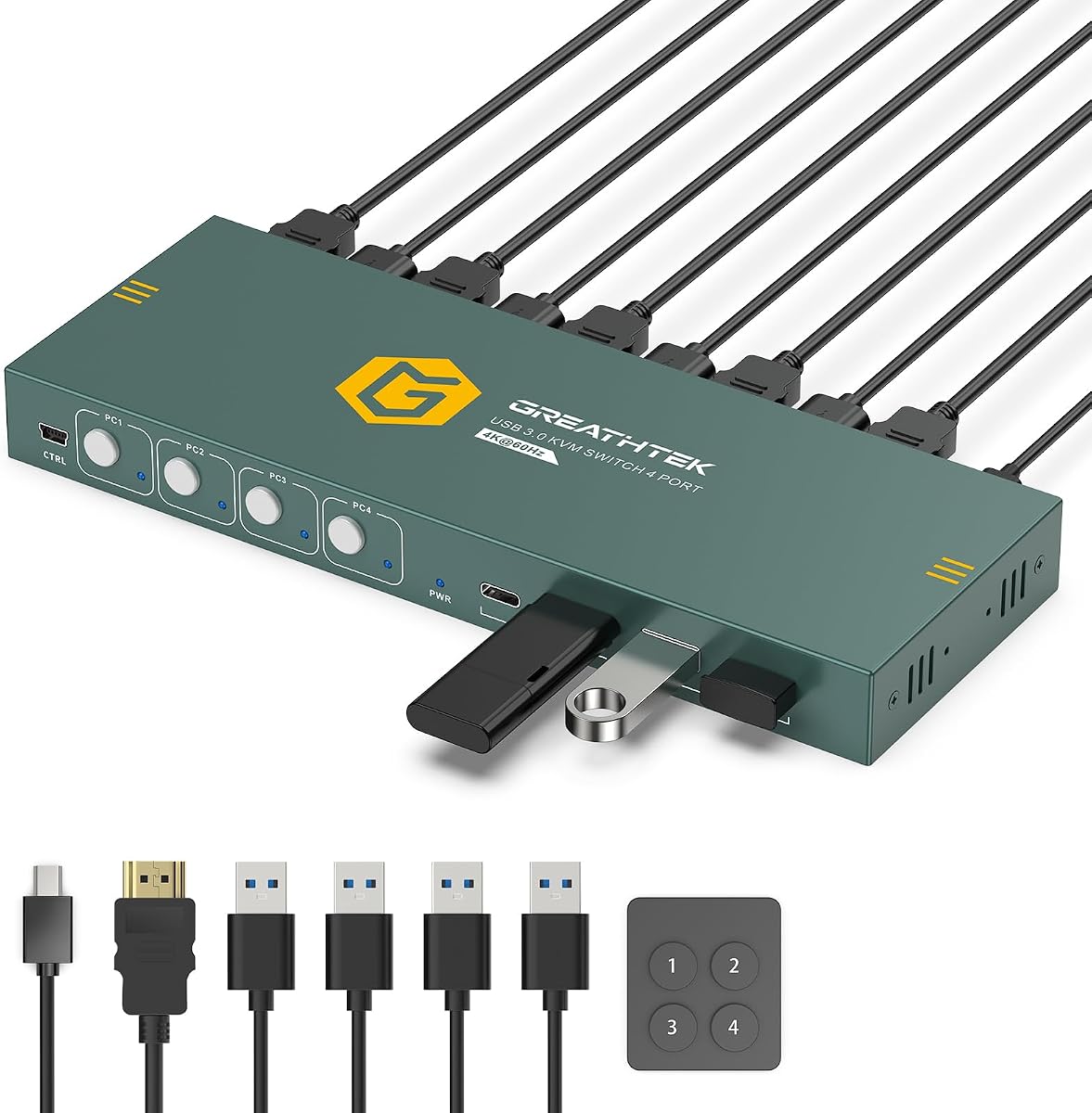
This HDMI KVM switch stands out as the top choice for users needing reliable 4K support across four computers. It offers a clean workspace by consolidating inputs onto one monitor and peripheral set. The high rating reflects consistent performance and user satisfaction with its core functionality.
We may earn a commission when you buy through this link, at no additional cost to you.
The switch delivers smooth video up to 3840×2160@60Hz using HDMI 2.0 bandwidth. EDID Adaptive technology ensures connected displays match resolution settings automatically when switching PCs. Three USB-A 3.0 ports and one USB-C data port allow sharing keyboards, mice, and drives without lag or interruption.
While it lacks keyboard hotkey switching, the included wired remote and front panel buttons provide intuitive access to each PC. Users must connect an external power source for stable operation. These minor trade-offs are acceptable given the price reliability and feature set offered for multi-PC workspaces.
Ideal for home offices or IT test benches, this model simplifies complex setups effectively. It is best for those prioritizing 4K clarity and organized cable management over advanced keyboard shortcuts. The included mounting hardware helps keep the unit secure under desks for a tidy look.
The four USB 3.0 ports enable seamless sharing of keyboards and mice across four systems without manual replugging.
Support for 4K@60Hz ensures sharp visuals for design work or media consumption on a single monitor setup.
We may earn a commission when you buy through this link, at no additional cost to you.
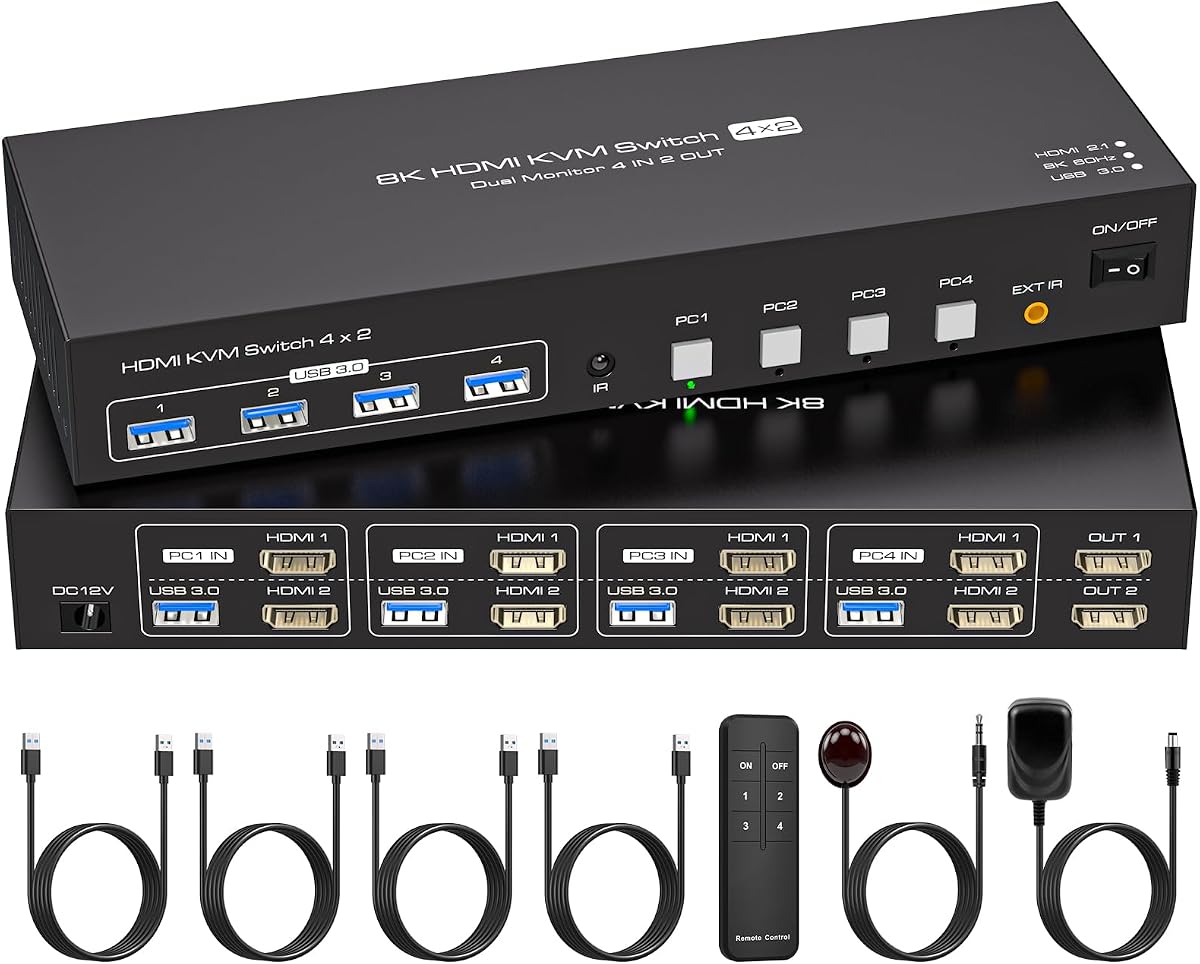
This unit caters to users needing two monitors to share across four computers simultaneously. It supports up to 8K@60Hz resolution making it suitable for high-end graphic design or monitoring tasks. The ability to switch between copy and extend modes adds significant flexibility for different workflows.
We may earn a commission when you buy through this link, at no additional cost to you.
Emulating EDID ensures that window arrangements stay consistent when switching between PCs avoiding annoying layout resets. Four USB 3.0 ports allow sharing printers and webcams across all connected systems. The infrared remote provides convenient access without needing to reach under the desk for the unit.
The requirement for each computer to have two HDMI ports can be a limiting factor for some older systems. External power must be connected for stable operation which adds a slight cable management consideration. Despite this it remains a powerful tool for dual-screen multi-PC environments.
Recommended for designers or traders using dual screens this KVM handles high-resolution video efficiently. It ensures smooth transitions between machines without losing display configurations. Users with adequate port availability will find this model delivers exceptional value for complex visual setups.
Support for copy and extend modes allows flexible display arrangements across two monitors when switching computers.
Compatibility with 8K and 4K@120Hz ensures future-proofing for high-resolution monitoring and creative tasks.
We may earn a commission when you buy through this link, at no additional cost to you.
The UGREEN HDMI KVM switch offers exceptional connectivity with six USB ports for diverse peripheral needs. It supports 4K@60Hz video quality ensuring crisp visuals for professional applications. EDID emulation keeps display settings stable avoiding flickering or window rearrangement when switching sources.
We may earn a commission when you buy through this link, at no additional cost to you.
Four USB 3.0 ports plus two USB 2.0 ports allow sharing hard drives and webcams alongside input devices. The wired controller enables neat placement of the switch away from the desk surface. It works seamlessly with Windows Mac and Linux systems without requiring driver installations.
Users should note that docking station compatibility is not supported which may limit some modern laptop setups. External power is required for stable operation and USB data cables must connect from each PC. These constraints are minor given the robust port options and reliable performance provided.
This model suits office environments needing multiple shared USB devices like printers and scanners. The mix of USB 3.0 and 2.0 ports balances speed and compatibility for varied hardware. For organized workspace control with high-resolution support this switch delivers strong results.
Six total USB ports ensure enough shared device slots for complex office setups needing printers and drives.
EDID emulation prevents screen flickering and maintains window order when switching between four different computers.
We may earn a commission when you buy through this link, at no additional cost to you.
This premium KVM switch enables four computers to share four monitors using HDMI and DisplayPort inputs. It supports high resolutions like 8K@60Hz or 4K@144Hz for professional-grade visual performance. The inclusion of an audio jack adds value for live streaming or remote meeting scenarios.
We may earn a commission when you buy through this link, at no additional cost to you.
Users can choose between copy and extend modes to manage window layouts across the four screens effectively. The upgraded wired control unit offers a comfortable touch feel and larger buttons for easier operation. A one-year professional warranty ensures support if any hardware issues arise during use.
Each computer needs three DisplayPort and one HDMI connection to utilize all four monitors fully which limits compatibility. The price reflects its advanced multi-display capabilities compared to standard single-monitor switches. It is a specialized tool for high-end visual workstations with specific port requirements.
Ideal for video editors or financial traders needing extensive screen real estate this unit delivers premium performance. The audio and high-resolution support make it versatile for both professional and entertainment use. Users with compatible graphics cards will find it a powerful central hub for their setup.
Support for four monitors allows users to maximize screen real estate for complex multitasking and analysis.
A 3.5mm audio jack provides sound for streaming and calls without needing separate audio hardware.
We may earn a commission when you buy through this link, at no additional cost to you.
Designed for smooth video playback this KVM supports up to 4K@120Hz for lag-free visual experiences. It works with HDMI 2.1 to deliver visible picture details suitable for gaming or video editing. The IR extension receiver allows flexible placement of the controller for convenient switching anywhere on the desk.
We may earn a commission when you buy through this link, at no additional cost to you.
Four USB 3.0 ports offer fast data transfer speeds up to 5Gbps for connecting peripherals efficiently. The package includes a controller IR cable and USB cables to ensure quick plug-and-play installation. A two-year after-sales service warranty provides added peace of mind for long-term use.
Conversion cables are not supported so all devices must have native HDMI ports for proper connection. Users need to ensure their computers monitors and cables support 8K or 4K@120Hz to achieve full resolution. These hardware requirements are necessary to realize the switch's high refresh rate capabilities.
Best for enthusiasts or professionals needing fluid motion clarity this model excels in performance. The extended warranty highlights the manufacturer's confidence in product durability. For setups prioritizing refresh rates and HDMI 2.1 features this switch is a compelling option.
4K@120Hz support ensures smooth dynamic scenes for gaming or professional video editing tasks.
A 24-month after-sales service warranty provides robust support for long-term reliability and peace of mind.
We may earn a commission when you buy through this link, at no additional cost to you.
This aluminum KVM switch supports up to 8K@60Hz resolution for future-proof visual quality. It is compatible with HDMI 2.0/1.4 and HDCP 2.3/2.2/1.4 ensuring broad device compatibility. The rugged metal enclosure helps dissipate heat and protects internal components during long hours of use.
We may earn a commission when you buy through this link, at no additional cost to you.
Four USB 3.0 ports including one USB-C allow sharing keyboards mice and drives across four systems. Users can switch via panel buttons or a desktop controller to keep desks tidy. It supports Windows Mac and Linux systems as well as consoles like PS5 and Xbox.
EDID emulation is not supported which may lead to display reconnection issues when switching computers. USB C charging to a power source is required when connecting high-power equipment for stability. These limitations are minor for users prioritizing resolution and build durability over advanced display features.
Ideal for tech enthusiasts or gaming setups needing high-resolution output this switch delivers. The aluminum body ensures longevity and consistent performance over time. Users with HDMI-compatible hardware and external power access will find it a robust choice.
A sturdy aluminum enclosure enhances heat dissipation and protects the unit for long-term daily use.
Support for PS5 Xbox and other HDMI devices makes it versatile beyond standard PC workstations.
We may earn a commission when you buy through this link, at no additional cost to you.
This budget-friendly KVM switch supports 4K@60Hz resolution for sharp visuals on a single monitor. It simplifies desk organization by allowing four computers to share one keyboard and mouse set. Adaptive EDID helps identify multiple display devices for stable output during source switching.
We may earn a commission when you buy through this link, at no additional cost to you.
Three USB 3.0 ports and one USB-C port offer sufficient shared peripheral connectivity. The front panel buttons and labeled wired remote provide intuitive switching between hosts. LED indicators clearly show which computer is active ensuring users know the current input source.
Hotkey switching via keyboard shortcuts is not supported so users rely on physical buttons. The USB count is limited to four which may be tight for setups needing multiple printers. However these trade-offs are acceptable given the affordable price and solid performance.
Perfect for home offices or study rooms this model balances cost and function well. It eliminates cable clutter and improves efficiency without a high price tag. Users seeking a simple reliable 4K KVM will appreciate its straightforward plug-and-play design.
Front panel buttons and a remote keypad ensure easy switching without needing complex software or drivers.
LED lights display the active PC so users always know which computer they are controlling.
We may earn a commission when you buy through this link, at no additional cost to you.
This KVM switch ensures secure content playback with HDCP 2.2 compliance for streaming services. It supports 4K@60Hz resolution delivering crystal-clear visuals for media and work. Adaptive EDID automatically optimizes display settings to maintain stable and smooth image transmission.
We may earn a commission when you buy through this link, at no additional cost to you.
Four USB 3.0 ports with data transfer speeds up to 5Gbps facilitate fast file sharing. The wired remote switch allows the main unit to be hidden under the desk for a tidy workspace. The package includes anti-slip pads and a user manual for easy setup.
Hotkey switching is not supported so users rely on the remote or panel buttons. While it lacks some advanced features the lifetime protection plan adds significant long-term value. This commitment to quality supports a risk-free purchase for multi-PC environments.
Best for users wanting reliable basic functionality without worrying about durability this model is ideal. The included protection plan offers peace of mind for years of use. It balances essential features with solid support for a practical multi-computer solution.
HDCP 2.2 compliance allows viewing protected content without interruptions or compatibility issues.
A lifetime protection plan ensures long-term support and confidence in the product's durability.
We may earn a commission when you buy through this link, at no additional cost to you.
This KVM allows four desktops to share three monitors using two DisplayPort and one HDMI connection per PC. It supports resolutions up to 8K@60Hz or 4K@144Hz for professional-grade performance. The included power adapter and four USB 3.0 cables ensure a complete ready-to-use package.
We may earn a commission when you buy through this link, at no additional cost to you.
Users must ensure their computers support triple display configurations for the KVM to function correctly. Extended and copy modes enable flexible window management across three screens simultaneously. A wired remote controller lets users switch computers without reaching under the desk.
Each computer needs two DisplayPort and one HDMI connection which may limit compatibility with some systems. Users should use HDMI 2.1 and DP 1.4 cables and keep cable lengths short for stability. These technical requirements are necessary to unlock the full triple-monitor potential.
Ideal for advanced workstations needing three displays this switch provides excellent resolution support. The driver-free operation simplifies installation across different operating systems. For those with compatible graphics cards it offers a powerful multi-screen productivity solution.
Support for three monitors maximizes workspace efficiency for multitasking and monitoring tasks.
Included cables and power adapter ensure all necessary components are ready for immediate setup.
We may earn a commission when you buy through this link, at no additional cost to you.
This switch enables four computers to share two displays with support for 8K@60Hz or 4K@144Hz. Its EDID emulation feature locks window orders preventing disruption when switching between computers. It also supports copy and extend modes for flexible screen arrangements across dual monitors.
We may earn a commission when you buy through this link, at no additional cost to you.
Four high-speed USB 3.0 ports allow data transfer up to 5Gbps for peripherals like printers and scanners. The IR remote control and panel keys provide intuitive switching options. A durable metal housing ensures the unit remains reliable and resistant to wear over time.
Each computer must have two HDMI ports for this dual-monitor setup to work properly. If ports are insufficient users may need active adapters to connect the hardware. These requirements are specific but manageable for users with compatible workstation configurations.
Perfect for power users needing dual screens this KVM delivers smooth high-resolution performance. The EDID feature adds significant convenience for maintaining workspace layouts. With a robust build and remote control it is a solid investment for complex setups.
EDID emulation locks window orders so your desktop looks the same after switching between PCs.
A high-quality metal enclosure ensures long-lasting performance and reliable heat dissipation during use.
We may earn a commission when you buy through this link, at no additional cost to you.
Choosing the right KVM switch requires matching its video and USB capabilities to your specific hardware needs.
The KVM switch must support the maximum resolution and refresh rate of your monitors. For 4K displays look for HDMI 2.0 or HDMI 2.1 models that support 60Hz or higher. Gaming or video editing may benefit from 120Hz or 144Hz support to reduce latency and motion blur.
Always verify that the switch's advertised resolution matches what your graphics cards and monitors can handle to avoid signal issues.
Most modern switches use HDMI but some models include DisplayPort inputs for higher bandwidth. Ensure each computer has the required video ports to connect directly without converters. Conversions can cause signal loss or resolution limits so native compatibility is always preferred.
Check your PC ports before purchasing to confirm HDMI or DisplayPort inputs are available on all four systems.
Count how many USB peripherals you need to share including keyboards mice printers and drives. USB 3.0 ports offer up to 5Gbps transfer speeds which are faster than USB 2.0 for large files. Some models mix USB 3.0 and 2.0 ports so confirm the total count meets your needs.
Ensure the KVM has enough ports to connect all shared devices simultaneously without requiring extra hubs.
Switching can be done via front panel buttons a wired remote or keyboard hotkeys. Hotkeys are fastest but not all models support them. Wired remotes add convenience if the switch is placed under the desk or out of reach.
Choose a switching method that fits your workflow and desk layout for quick access to all computers.
If you need more than one monitor single-monitor KVMs will not suffice. Dual or triple monitor models require each PC to have multiple video outputs. These switches are more complex but enable expanded workspace layouts for productivity.
Verify your computers can output to multiple screens before selecting a multi-monitor KVM switch.
EDID emulation keeps your display settings stable when switching PCs so windows don't rearrange. Without it screens may flicker or reset resolutions every time you change computers. This feature is vital for maintaining workflow continuity across devices.
Prioritize models with EDID emulation to avoid display issues and save time configuring windows.
Most reliable KVM switches need an external power supply for stable operation. Some models may work without power but performance can suffer. Always check if a power adapter is included in the package.
Ensure your desk has access to an outlet to plug in the power adapter for continuous use.
Confirm compatibility with your operating systems such as Windows macOS or Linux. Most modern switches are driver-free and plug-and-play. A longer warranty period indicates manufacturer confidence in product durability and reliability.
Look for units with at least a one-year warranty to protect against potential hardware failures.
Begin by connecting each computer to the KVM switch using an HDMI cable for video and a USB cable for data. Ensure that all cables are securely seated to prevent signal drops during switching. Connect your monitor keyboard and mouse to the KVM's output ports rather than directly to the PCs.
Plug the external power adapter into the KVM switch and then into a wall outlet to provide stable power. Turn on all connected computers and wait for them to boot fully before pressing a switch button. Use the front panel or remote to select the active PC and check the LED indicators.
Keep the KVM switch in a well-ventilated area to avoid overheating during long periods of use. Dust the exterior periodically to prevent debris from clogging the vents or ports. Store cables neatly to reduce clutter and strain on connectors for longer lifespan.
Most KVM switches do not support docking stations directly because docks often act as intermediaries. You should connect the PC's native HDMI and USB ports to the KVM for best results. This ensures stable video and data transfer without signal conflicts.
No most modern KVM switches are plug-and-play and do not require driver installation. They work automatically with Windows macOS and Linux operating systems. Simply connect the cables and power source to start using the switch.
Without EDID emulation the monitor may reset windows or change settings when switching PCs. Models with EDID emulation keep your display configuration stable during these transitions. This prevents screen flickering and saves time repositioning windows.
You can switch using buttons on the KVM front panel a wired remote or keyboard hotkeys. The method depends on the specific model you purchased. LED lights show which computer is currently active for easy identification.
Yes most USB 3.0 KVM switches support gaming keyboards and mice without issues. Ensure the KVM has enough USB ports for all peripherals. Some high-refresh models also support fast response times for gaming setups.
Yes it is safe to leave the KVM switch plugged in as long as it is in a ventilated area. The power adapter is designed for continuous use without overheating. This ensures you can switch to any computer at any time.
The top picks offer solutions ranging from budget-friendly single-monitor setups to premium multi-display configurations. Each model brings distinct features like EDID emulation 8K support or remote control options. Select the one that best aligns with your video resolution and port needs.
Prioritize compatibility with your hardware such as HDMI versions and USB speeds to ensure smooth performance. Consider the switching mechanism that fits your workflow whether buttons or hotkeys. Quality build and warranty coverage also play key roles in long-term satisfaction.
Prices and stock levels can change so verify current details on the product pages before purchasing. This guide provides a solid starting point for finding the right KVM switch for your four-computer setup. With the correct choice your workspace will become more organized and efficient.