
TECKNET Mouse Jiggler
4.6Editor score
Three smart jiggle modes
Color LED mode feedback
Compact portable design
Discover the top laptop jiggler devices for remote work and gaming. Compare undetectable mouse movers to keep your PC active without software installation.
Keeping your laptop awake during long tasks can be challenging. A laptop jiggler helps prevent sleep mode by simulating mouse movement. This ensures your applications stay active without draining your battery or interrupting your workflow.
We compared ten top-rated devices based on stealth, ease of use, and compatibility. Each option offers unique features like adjustable intervals, silent operation, and plug-and-play functionality. Our analysis focuses on reliability for remote work and online meetings.
Each pick highlights key specs, pros, cons, and real-world performance. Prices fluctuate frequently, so check current listings before purchasing. Find the perfect mouse mover to match your setup and professional needs today.
4.6Editor score

4.7Editor score

4.1Editor score
This side-by-side comparison evaluates all ten devices across key performance metrics. Use this table to quickly identify which mouse mover fits your specific workflow and device compatibility requirements.


The TECH8 USA Undetectable Mouse Mover is our top pick for its blend of functionality and design. With a 4.7 rating, users praise its patented 3D hologram disc and sleek ambient glow ring that fits modern desks.
We may earn a commission when you buy through this link, at no additional cost to you.
It simulates natural mouse movement without software, ensuring you stay active on platforms like Teams and Zoom. The device offers three motion levels and a built-in auto shut-off timer for convenience. Powering on is instant with just a click.
While it requires you to place your mouse on the disc, the stability prevents accidental drops. The price is higher than basic USB models, but the build quality and unique features justify the cost for many users.
Remote workers seeking a stylish yet effective solution should consider this jiggler. It keeps your PC awake without interfering with regular tasks. Place your mouse on the disc and power it up for instant operation.
Engineered and trademarked in the US, ensuring higher quality standards and reliable customer support from Austin.
The customizable LED ring adds a modern touch to your workspace while functioning as a status indicator.
We may earn a commission when you buy through this link, at no additional cost to you.
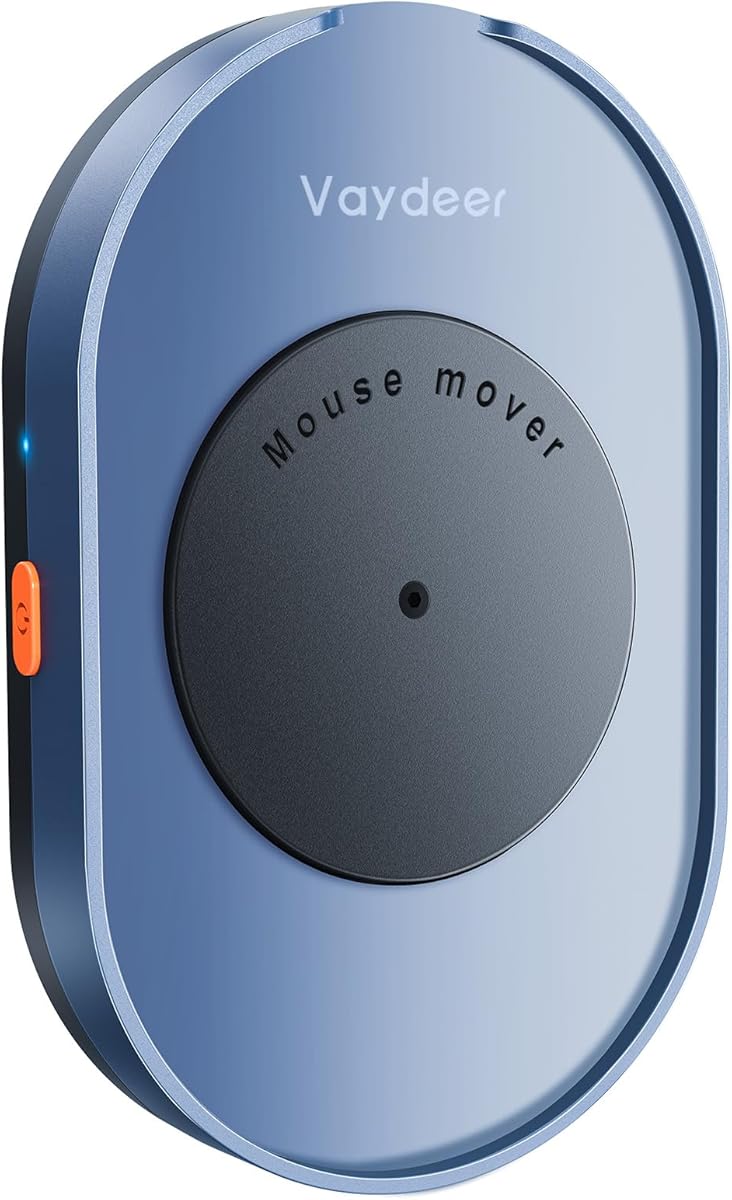
Vaydeer’s 2024 upgrade delivers exceptional silence with under 45dB noise levels, making it ideal for quiet offices. It is ISO certified for security and undetectable by IT scans thanks to its hardware-based movement simulation.
We may earn a commission when you buy through this link, at no additional cost to you.
The included switch allows you to toggle activity without unplugging. You can power it via USB or an external adapter for flexible placement. It is a thoughtful gift for colleagues needing long-hour productivity support.
Proper alignment of the mouse sensor over the spinning wheel is crucial for it to work. This requirement adds a slight setup step but ensures precision. It remains a top contender for noise-sensitive environments.
Choose Vaydeer if sound is your primary concern. Its certified security and silent motor keep your PC active without distraction. Just ensure your mouse sits correctly on the wheel before activation.
The ISO/IEC27001:2013 certification ensures the device meets high standards for trust and safety in corporate environments.
Power it directly from your USB port or use the included adapter for independent operation.
We may earn a commission when you buy through this link, at no additional cost to you.
The WFB 2 Pack offers the most budget-friendly option, providing two devices for a very low cost. It simulates a standard 2.4G mouse to stay undetectable, keeping your status green on Zoom and other platforms.
We may earn a commission when you buy through this link, at no additional cost to you.
Movement is limited to 1-2 pixels, ensuring it doesn't interrupt your actual work. It requires no software installation and works on Windows, Mac, and even Android systems. This versatility makes it great for multi-device users.
While the build feels basic compared to premium models, it gets the job done reliably. Having two units allows you to keep one at home and one for travel. It is the smart choice for cost-conscious buyers.
Select WFB if you need multiple affordable devices. The invisible movement keeps your PC awake without disruption. Simply plug one in and let it handle the idle detection automatically.
Get two units in one package, perfect for having backups or protecting multiple devices.
Its compatibility extends beyond Windows, supporting Android and Raspberry Pi for broader use cases.
We may earn a commission when you buy through this link, at no additional cost to you.
The AUEDROT model stands out by using a USB-C connector instead of traditional USB-A, fitting modern laptops perfectly. It is recognized as a trusted USB Composite Device, avoiding security flags from IT software.
We may earn a commission when you buy through this link, at no additional cost to you.
It features two modes: slight movement for minimal disruption and random movement for natural variance. A button switch lets you toggle modes or turn it off instantly. This flexibility helps avoid detection on strict systems.
The body is compact and simple, though made of plastic. Ensure your laptop has a free USB-C port. If you use hubs, check for compatible inputs as these devices need consistent power.
Choose AUEDROT for modern laptop setups without dongles. Its dual modes offer control over cursor movement frequency. Plug it in and press the button to keep your device active seamlessly.
Directly compatible with newer laptops, eliminating the need for bulky USB adapters.
Identified as a trusted device by the OS, ensuring smooth operation without security warnings.
We may earn a commission when you buy through this link, at no additional cost to you.
Yonktoo offers an ultra-slim design that fits neatly under mice or in tight spaces. It relies on physical rotation to move your mouse, ensuring undetectable operation that works independently of your software settings.
We may earn a commission when you buy through this link, at no additional cost to you.
The automatic start feature means it turns on as soon as you plug in. Use the built-in button to pause or resume without unplugging. The included 4.9 ft cable allows for flexible positioning across your desk.
While it lacks advanced mode switching, its simplicity is its strength. It keeps your desk clean and functions quietly. Just ensure the mouse sits flat on the rotating platform for smooth operation.
Pick Yonktoo if you want a discrete and simple solution. The long cable gives you room to route the unit out of sight. Press the button to control activity without breaking your workflow.
Uses a rotating platform to physically move your mouse, ensuring reliable movement without software drivers.
The 1.5-meter cable lets you position the device away from your immediate workspace.
We may earn a commission when you buy through this link, at no additional cost to you.
Meatanty uses a physical turntable to simulate real random mouse movement, ensuring 100% undetectability. The device includes a visual LED display to help you track and adjust the moving frequency easily.
We may earn a commission when you buy through this link, at no additional cost to you.
Its large turntable supports bigger mice and includes edge protection to prevent accidental falls. You can adjust the interval from 5 to 60 seconds using +/- buttons. This flexibility suits various workflows and meeting needs.
While the unit has a larger footprint, its durability is high due to repeated testing. It uses a silent motor to keep your environment quiet. Power it via USB or an adapter for independent use.
Choose Meatanty for precise control over movement intervals. The visual display confirms your settings clearly. Ensure your mouse sits securely on the table before pressing the switch.
Set the movement interval between 5 and 60 seconds to match your specific activity needs.
Designed with raised edges to prevent mice from sliding off during rotation.
We may earn a commission when you buy through this link, at no additional cost to you.
This device uses a premium aluminum alloy body for durability and a sleek look. It offers two jiggle modes: slight movement for minimal disruption and random movement for natural variance across the screen.
We may earn a commission when you buy through this link, at no additional cost to you.
A single button switch handles turning the device on and switching modes. It includes a USB-C adapter to ensure compatibility with newer laptops. Being recognized as a trusted USB device prevents IT flags.
The metal casing feels robust compared to plastic models, making it ideal for daily use. Ensure your mouse sits correctly on the shaker for smooth results. It keeps apps like Teams active without intervention.
Opt for this metal model if build quality is a priority. The included adapter adds value for modern setups. Plug it in and use the button to manage your status effortlessly.
Built with aluminum alloy for a more upscale and durable finish than standard plastic units.
Quickly switch between slight and random movement modes with a single press.
We may earn a commission when you buy through this link, at no additional cost to you.
TECKNET offers three smart modes, including pixel movement and random motion, all controllable by one button. Its color LED indicator discreetly shows which mode is active. At 4.6 stars, it is a favorite for remote workers.
We may earn a commission when you buy through this link, at no additional cost to you.
It is recognized as a standard USB mouse, ensuring IT safety and seamless operation. The compact design fits easily in a laptop bag. It keeps Teams and Zoom online without software interference.
The plastic body is basic, but it is lightweight and portable. The 18-month warranty adds peace of mind. Adjust your touchpad sensitivity for best results if using on laptops.
Choose TECKNET for a low-cost versatile solution. Its compact size and multiple modes offer excellent value. Just plug it in and use the button to manage your device status.
Different colors indicate active modes, helping you stay aware of the current movement pattern.
Small enough to fit in a laptop bag, making it ideal for travelers and remote users.
We may earn a commission when you buy through this link, at no additional cost to you.
Phiginoo is a tiny device recognized as a regular mouse to avoid detection. It keeps your system active without drivers or software, making it simple for any system to use. It supports Win 7 to 10, Mac, and Linux.
We may earn a commission when you buy through this link, at no additional cost to you.
Its small size makes it easy to carry for remote tasks. It works with Skype and Zoom to maintain your status online. The package includes a one-year warranty for peace of mind.
This unit lacks extra features like switches or mode toggles, but it is straightforward. You just plug it in and it starts working. It is ideal for those who want minimal intervention.
Select Phiginoo for absolute simplicity. The tiny footprint ensures it stays out of the way. Just connect it to your USB port and let it handle the idle detection.
A compact form factor that makes it easy to travel and carry in a laptop bag.
Works across Windows, Mac, and Linux systems with zero driver installation required.
We may earn a commission when you buy through this link, at no additional cost to you.
This device simulates finger movement on your laptop touchpad, removing the need for an external mouse. It runs on a single AA battery for up to six months, offering a clean and portable solution.
We may earn a commission when you buy through this link, at no additional cost to you.
You must adjust your touchpad settings for best results. The silent motor ensures your workspace stays quiet. It is undetectable by IT scans since it uses mechanical movement rather than digital signals.
Because it is premium-priced and requires battery, it suits users who value minimalism. Check your touchpad sensitivity settings to ensure reliable input. It is ideal for users who dislike cables entirely.
Choose this model for a truly wireless experience. It works with trackpads to keep screens awake. Adjust settings carefully and let the battery-powered device handle the cursor movement.
No USB or Bluetooth cables needed, using mechanical vibration to simulate trackpad touches.
Designed to run efficiently on one AA battery, lasting months on average daily use.
We may earn a commission when you buy through this link, at no additional cost to you.
Selecting the right laptop jiggler involves understanding how your device connects and operates. Consider these factors to ensure your mouse mover fits your workflow.
Devices connect via USB-A, USB-C, or battery. Ensure your laptop has available ports or choose a wireless option.
Check your ports before buying to avoid needing extra adapters.
Look for hardware-based movers that appear as standard mice to IT software. Avoid software apps if your company restricts downloads.
Hardware devices remain undetectable and safe for office use.
Some models simulate slight pixel shifts while others offer random movement. Choose one that aligns with your work activities.
Random movement better mimics natural user behavior than static shifts.
Consider devices with auto-timers or switches to control activity. This saves energy and prevents unintended usage.
Switches allow you to turn off the device without unplugging.
If you travel, pick a compact model that fits in a laptop bag. Some units are bulky or require large surfaces.
Slim units are easier to carry and store discreetly.
Verify support for your operating system, including Windows, Mac, or Linux. Some devices work across multiple platforms.
Cross-platform support offers flexibility for hybrid device users.
Aluminum or robust plastic builds last longer than cheap models. Durability matters for daily professional use.
High-quality materials ensure long-term reliability.
Select silent models if you work in shared spaces. Audible motors can distract coworkers during calls.
Silent operation preserves your professional environment.
To use, connect the device to your laptop’s USB port. Place your mouse on the rotating surface and press the switch if available. Ensure the sensor aligns with the spinning wheel.
Adjust settings like touchpad sensitivity if using a touchpad mover. Disable features like Palm Check to ensure the cursor stays active. This step prevents missed inputs during meetings.
Regularly check the device for dust or debris. Keep cables organized to avoid tangles. Replace batteries in cordless units every six months to ensure consistent performance.
Most hardware devices do not require software. They appear as standard USB mice to your system. This avoids triggering IT restrictions on your work computer.
Yes, they simulate movement to keep your status green. They are designed to work in the background. Just ensure you place your mouse correctly for reliable results.
Quality hardware devices mimic real mouse behavior and are undetectable. Software solutions might be blocked. Stick to hardware options for safety in corporate environments.
Battery units typically last up to six months on a single AA battery. This depends on daily usage hours. Always replace batteries promptly if performance drops.
Yes, especially for touchpad-specific jigglers. Disable rejection features like Palm Check to allow movement detection. This ensures the cursor stays active during long tasks.
Yes, if your dock supports USB power and data transfer. Ensure the dock provides stable power for the device. Most hubs work well for these simple peripherals.
Our top picks highlight diverse options for every setup, from stealth USB-C movers to silent mechanical models. Whether you choose TECKNET for budget or TECH8 for design, reliability is key.
Prioritize hardware solutions that simulate physical movement to avoid detection. Ensure compatibility with your operating system and adjust settings for optimal performance in meetings.
Prices and availability fluctuate, so always check current listings before purchasing. Verify return policies and support options to ensure you can get help if needed.