
Large Key Wired Telephone
4.2Editor score
Oversized physical keys
Adjustable ring tone
No battery power needed
Discover the top large button phones for seniors in October 2026. This guide compares ten reliable models featuring volume boost, photo dialing, and emergency
Finding the right communication device for elderly family members is crucial for safety and connection. Large button phones for seniors offer simplified interfaces designed to accommodate vision or hearing challenges. These devices prioritize ease of use, ensuring that staying connected with loved ones remains effortless and stress free for everyone.
We evaluated ten distinct models based on accessibility features, build quality, and reliability. Our comparison focuses on essential functionalities like adjustable volume, visual alerts, and one touch dialing. Each product was selected to provide a clear overview of options available for those seeking dependable landline communication solutions.
Every pick in this list highlights specific strengths tailored to different needs and preferences. Detailed breakdowns cover key specifications, pros, and cons to help you make an informed decision. Please note that product availability and pricing may change, so verify current details before purchasing your preferred model.
4.2Editor score

4.1Editor score
3.9Editor score
This side by side comparison highlights the key specifications and unique features of each selected model to help you find the perfect fit for your specific requirements.




The Uvital Big Button Phone is a top choice for seniors needing reliable communication. With a 4.1 star rating, it offers essential features like one touch dialing and emergency buttons designed for ease of use.
We may earn a commission when you buy through this link, at no additional cost to you.
Its standout qualities include customizable photo keys that allow users to call family by pressing an image instead of a number. The ring volume reaches an impressive 120dB ensuring calls are heard even in noisy environments.
While it lacks a screen for caller ID, the LED flash alert compensates by signaling incoming calls visually. This trade off is acceptable for those who prioritize simplicity and loud alerts over complex data.
This phone is ideal for seniors with memory loss or vision challenges who need to stay connected without frustration. The lack of battery dependency ensures it works during power outages making it a trustworthy household device.
Users can attach photos to buttons making it easy to identify contacts at a glance without reading numbers.
The bright red LED flashes when a call comes in helping those with hearing difficulties notice the phone rings.
We may earn a commission when you buy through this link, at no additional cost to you.
The SWISSVOICE Xtra TMAX10 is highly rated for its intuitive design and clear visual alerts. It features six photo memory keys that simplify the dialing process significantly for elderly users.
We may earn a commission when you buy through this link, at no additional cost to you.
Its key strengths lie in the adjustable listening and call alerts which allow users to set specific volumes for ringer and handset independently. The large separated keys reduce dialing errors for those with dexterity issues.
The limitation of only six photo keys might restrict users needing more frequent contacts but it keeps the interface simple. This simplicity is often preferred over complex menus that can cause confusion.
Buyers looking for a no fuss telephone with strong visual cues will find this model suitable. It provides a reliable way to stay in touch with essential contacts without overwhelming technical features.
The phone allows separate adjustment for the ringer and the handset ensuring comfort for hearing needs.
Users can pick up the handset and press a photo key immediately without navigating any menus.
We may earn a commission when you buy through this link, at no additional cost to you.
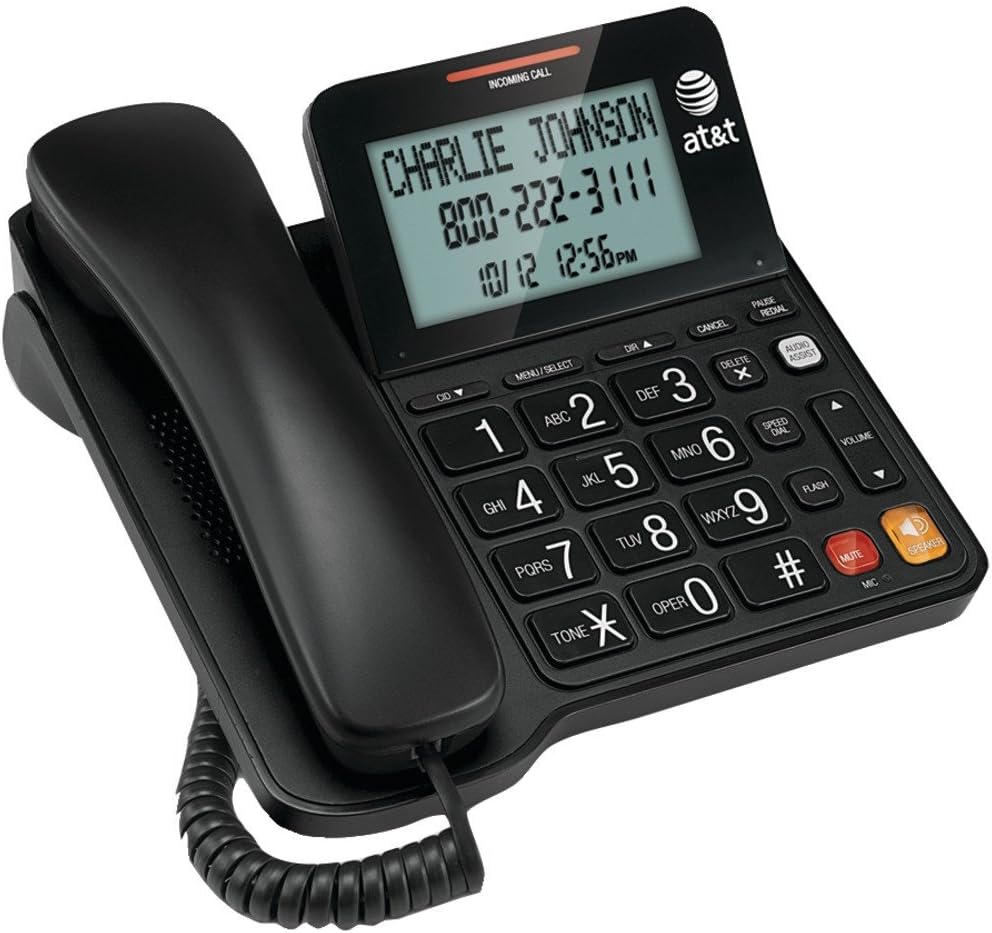
The AT&T CL2940 combines large buttons with a functional display for call information. It offers features like caller ID and call waiting which help screen calls effectively.
We may earn a commission when you buy through this link, at no additional cost to you.
Its standout features include the audio assist volume boost that amplifies incoming sound for users with hearing difficulties. The display tilts to make reading names easier from different angles.
A minor trade off is the requirement of batteries for the caller ID function though basic calls work without power. This adds a small maintenance task but enhances safety and communication clarity.
This model is perfect for seniors who want to know who is calling before answering. The combination of visual and auditory aids makes it a robust choice for home use.
The display tilts to provide a better viewing angle so users can read incoming call details easily.
Caller ID history allows users to review previous calls and screen incoming numbers before answering.
We may earn a commission when you buy through this link, at no additional cost to you.
The Large Key Wired Telephone provides essential functionality at an affordable price point. It is designed for seniors who need straightforward access without extra costs or complexity.
We may earn a commission when you buy through this link, at no additional cost to you.
Key strengths include its oversized physical keys and an adjustable earpiece volume that ensures clear listening. The warning light at the bottom helps users spot incoming calls quickly.
While it lacks advanced features like a speakerphone the simplicity ensures it is easy to use for everyone. The durable ABS body adds value by resisting everyday wear and tear.
This phone is an excellent choice for those on a budget who need a reliable backup or primary line. Its straightforward design eliminates confusion making it a safe pick for seniors.
A large warning light at the bottom activates when the phone rings to catch the user's attention.
The telephone keeps working even during power failures as it runs solely on the telephone line.
We may earn a commission when you buy through this link, at no additional cost to you.
The Large Button Landline Phone is designed for seniors with specific needs like safety and ease of dialing. It includes a dedicated SOS key for quick access to emergency contacts.
We may earn a commission when you buy through this link, at no additional cost to you.
Its standout feature is the bright flashing light that serves as a visual alert for incoming calls. The high contrast keys help users with fading vision dial accurately.
While the lack of a speakerphone limits hands free usage the simplicity and SOS function make it a strong safety device. It offers peace of mind for those living alone or with limited mobility.
Buyers prioritizing safety and visual alerts will find this model very effective. The simple design ensures that seniors can make calls quickly without navigating complex options.
A dedicated red SOS button allows users to instantly call pre programmed emergency contacts in a crisis.
The built in flashlight provides a clear visual signal that an incoming call is arriving.
We may earn a commission when you buy through this link, at no additional cost to you.
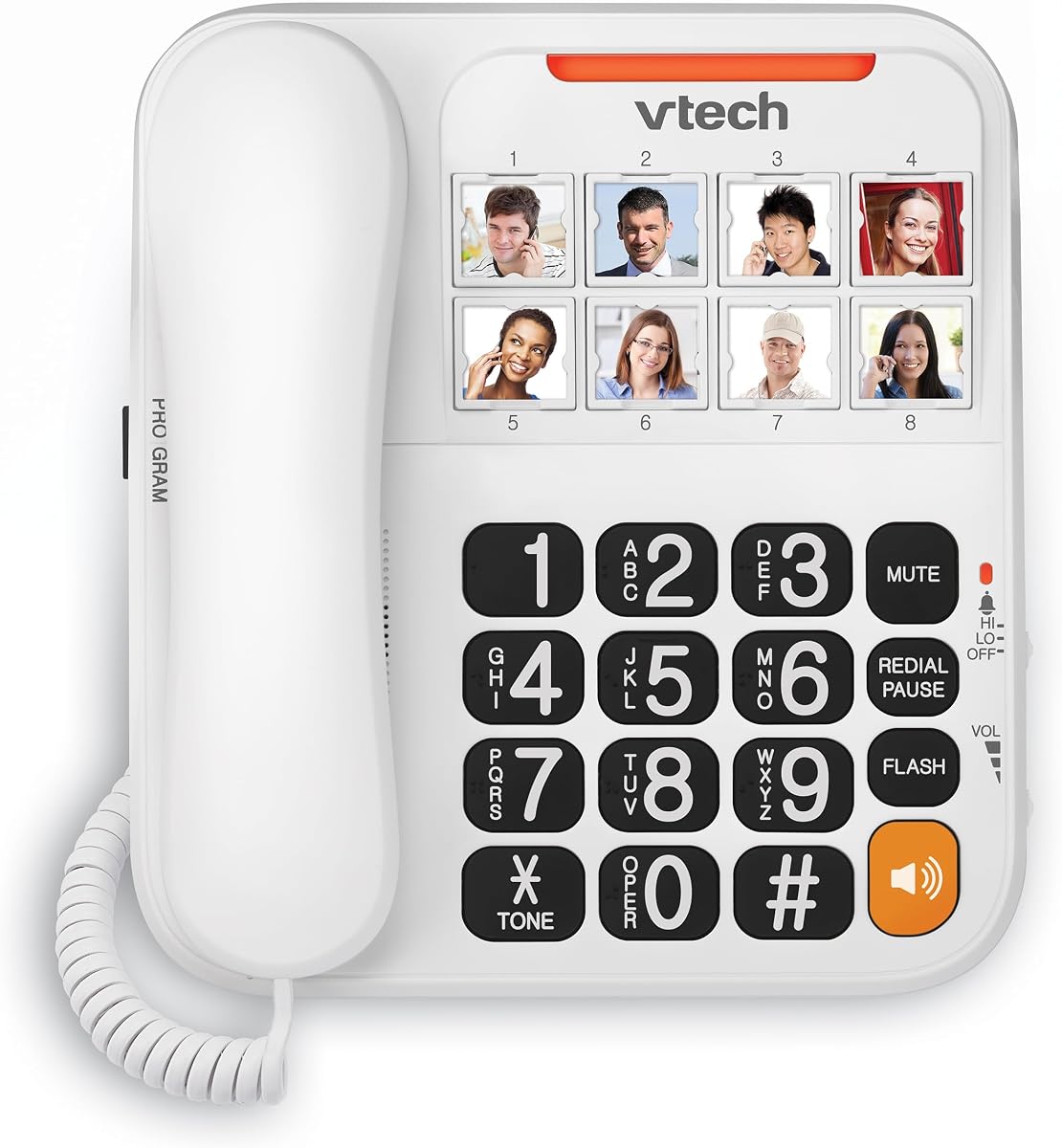
The VTech SN1117 offers unique feedback features like talking digits and a full duplex speaker. It aims to make the dialing process more engaging and error free for seniors.
We may earn a commission when you buy through this link, at no additional cost to you.
Key strengths include the ability to hear the number as you dial which reduces errors. The eight photo speed dial keys provide ample room for important contacts.
While setup might take a moment longer than simpler models the benefits of voice feedback are significant for users with memory loss. It ensures users know exactly what they are pressing.
This phone is suitable for those who benefit from audio cues during dialing. It combines traditional landline reliability with modern accessibility enhancements to improve usability.
The phone announces the number as you dial so users can confirm they pressed the correct button.
Eight large buttons can be programmed with photos for quick access to favorite contacts.
We may earn a commission when you buy through this link, at no additional cost to you.
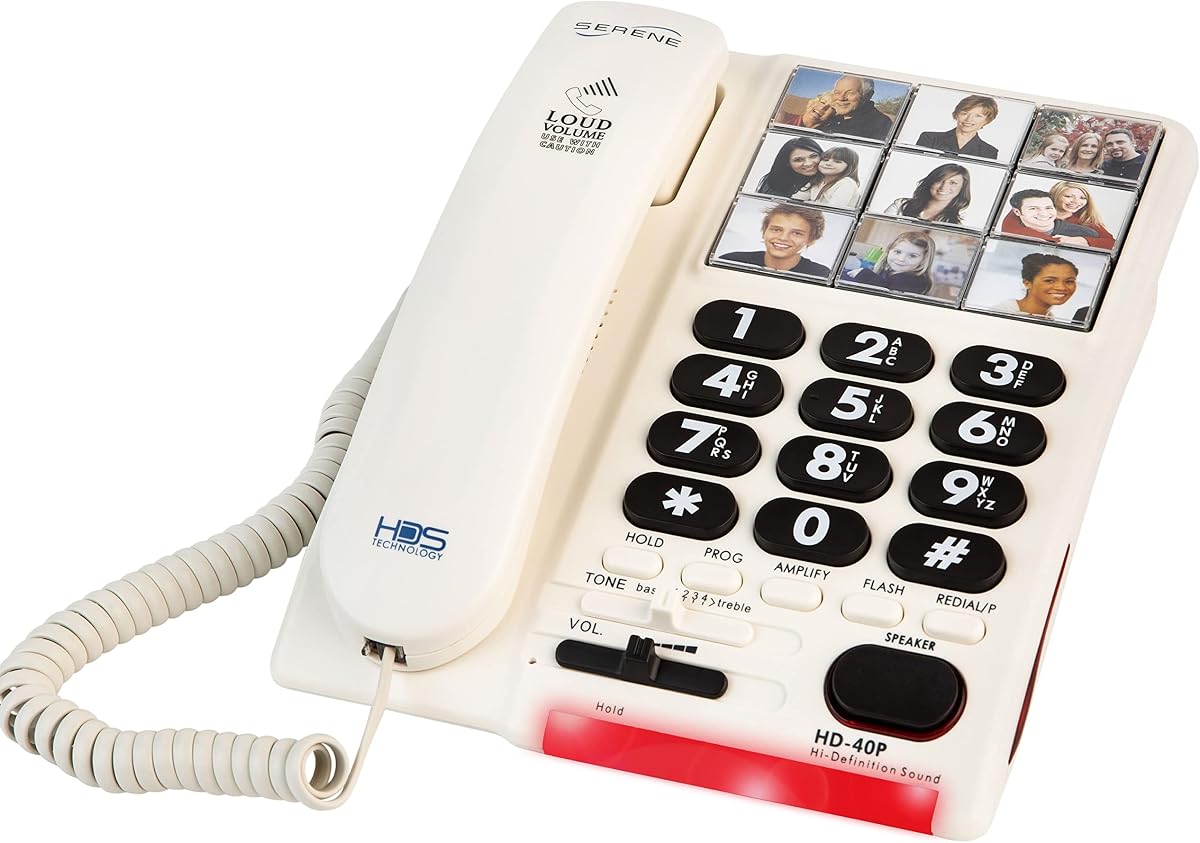
The Serene Innovations Amplified Phone is engineered specifically for seniors with significant hearing or memory impairments. It focuses on clarity and simplicity to bridge communication gaps effectively.
We may earn a commission when you buy through this link, at no additional cost to you.
Its standout feature is the 85 dB ring volume which cuts through background noise and high hearing thresholds. The photo buttons assist those with dementia in recognizing who to call.
While the price is higher than standard models the specialized features justify the cost for those with specific needs. It provides a reassuring solution for families concerned about missed calls.
Buyers looking for a device tailored to dementia or severe hearing loss will find this model valuable. It ensures that even those with cognitive challenges can stay connected with loved ones.
The ring volume reaches 85 dB ensuring that those with significant hearing loss can hear the phone.
Portrait photos on buttons help users identify contacts easily which is vital for those with memory issues.
We may earn a commission when you buy through this link, at no additional cost to you.
The Big Button Phone for Wall or Desk offers flexibility in placement while maintaining accessibility features. It includes a speaker and memory options to support varied usage scenarios.
We may earn a commission when you buy through this link, at no additional cost to you.
Key strengths include the ability to mount it on a wall or place it on a desk which adds convenience. The hands free speaker allows users to talk without holding the handset.
While the memory keys are basic two touch options they provide quick access to frequent contacts. This simplicity helps avoid confusion while still offering functional shortcuts.
This model is great for homes where placement flexibility is needed. It ensures seniors can stay connected regardless of where the phone is located in the house.
The phone is designed to be placed on a desk or mounted on a wall for flexible setup.
Ten memory keys allow users to store contacts that can be dialed quickly with two taps.
We may earn a commission when you buy through this link, at no additional cost to you.
The Excelltel Big Button Phone provides a balanced mix of features including multiple speed dial options and an SOS button. It aims to keep communication simple and direct.
We may earn a commission when you buy through this link, at no additional cost to you.
Its standout qualities include the nine one touch dials and a sync LED light that alerts users to incoming calls. The adjustable volume ensures conversations are comfortable for different hearing levels.
While it lacks a speakerphone the basic functions are well executed for daily use. It focuses on what matters most for seniors: easy calling and safety features.
This phone is a solid option for those wanting a straightforward device with essential safety functions. It delivers reliable performance without unnecessary technical complexity.
The LED light flashes in sync with the ring to visually notify users of incoming calls.
Nine one touch dials allow users to store frequent contacts for immediate access.
We may earn a commission when you buy through this link, at no additional cost to you.
The SWISSVOICE Premium 3355 offers an answering machine and cordless handset which adds versatility for seniors. It is designed to be hearing aid compatible and loud for hard of hearing users.
We may earn a commission when you buy through this link, at no additional cost to you.
Its key strengths include the built in answering machine that captures messages even if calls are missed. The hearing aid compatibility ensures clear audio for users with specific devices.
While the setup can be more complex than basic models the added features provide significant convenience. The cordless handset allows movement while talking which enhances usability.
This model is suitable for seniors who need to capture messages and want a cordless option. It combines advanced features with accessibility in a way that supports independent living.
The phone is compatible with hearing aids reducing feedback and ensuring clear sound quality.
A built in answering machine allows users to listen to messages and stay informed of missed calls.
We may earn a commission when you buy through this link, at no additional cost to you.
Choosing the right phone involves evaluating several key factors to ensure safety and ease of use. This guide outlines what to look for when selecting a model.
Large buttons are essential for seniors with vision issues or dexterity challenges. Look for keys that are at least an inch wide with high contrast markings.
Ensure the layout is simple and buttons are well spaced to prevent accidental presses.
Hearing loss varies widely so the phone should have adjustable volume for both ringtone and earpiece. A ring volume above 85dB is often necessary for safety.
Check for volume boost features that amplify sound for clearer conversations during calls.
For those who are hard of hearing visual alerts are vital. A flashing LED light helps indicate incoming calls immediately.
Bright lights ensure that calls are not missed even in noisy or dark environments.
A dedicated SOS or emergency button can be a lifesaver for seniors living alone. Ensure it is easy to access and clearly marked.
These buttons should connect to a predefined contact list for quick assistance.
Photo memory keys simplify dialing by allowing users to call contacts by pressing an image. This reduces the need to remember numbers.
Look for phones with enough memory slots to store all essential family and medical contacts.
Corded landline phones often run on line power so they work during power outages. This is a critical safety feature.
Ensure the phone does not require batteries for basic operation unless you want backup power.
A hands free speakerphone allows seniors to talk without holding the handset. This is helpful for those with limited mobility.
Check that the speaker volume is adjustable and clear enough for comfortable conversations.
A tilt display with large text helps users see who is calling. This feature helps screen calls effectively.
Caller ID requires batteries but adds useful information for those who want to know the caller.
First ensure your phone is connected to a working RJ11 telephone line. Plug the cord firmly into the back of the device and the wall jack to establish a connection.
Program your speed dial keys or photo buttons by following the manual instructions. Assign your most frequent contacts to these keys for quick access in emergencies.
Keep the phone and keypad clean with a dry cloth to ensure buttons remain responsive. Regularly check the cord for damage to prevent connection issues or hazards.
Most corded landline phones operate using power from the telephone line itself. This means they continue to work even if the electrical power to your home fails. However features caller ID on some models may require batteries.
The Uvital model offers a ring volume reaching up to 120dB. This is significantly louder than standard phones and ensures alerts are heard in noisy environments.
Yes several models include photo memory keys. These allow you to press a button with a picture of a family member to call them instantly without dialing numbers.
Some models like the SWISSVOICE Premium are explicitly designed to be hearing aid compatible. Others offer volume boost features that help with clarity.
Basic calls on corded landline phones do not require batteries. However features features like caller ID on some models may need batteries to function properly.
Programming usually involves holding the button and dialing the contact number then confirming. Refer to the specific manual for step by step instructions for your model.
The Uvital Big Button Phone stands out as the top choice for its balance of photo dialing and loud alerts. It provides a robust solution for most seniors needing reliable communication.
Prioritize features like SOS buttons or visual alerts based on specific needs such as memory loss or hearing impairment. The right device can greatly improve safety and independence.
Always verify current pricing and availability before purchasing. While prices may fluctuate these models remain strong contenders for senior communication needs.