
Penitue 2pcs Mini Portable Laptop Stand
4.6Editor score
Zinc alloy durability
Compact foldable design
Anti-slip stickers included
A laptop kickstand is a simple yet effective accessory designed to elevate your device for better ergonomics and airflow. These small tools help reduce strain on your neck and shoulders while keeping your system cool during long sessions.
We evaluated ten top-rated portable stands based on material quality, adjustability, and stability. Our comparison focuses on how each model performs in real-world scenarios like travel, office work, and casual home use.
Each pick highlights specific strengths and ideal user cases to help you decide. Note that product availability and pricing may change over time, so check current listings before purchasing your preferred model.
4.6Editor score

4.6Editor score

4.7Editor score
As an Amazon Associate we earn from qualifying purchases.
The following table provides a side-by-side overview of the ten selected laptop kickstand models. It highlights key specifications and compatibility to help you quickly identify the right fit for your needs.




This stand offers a balance of stability and cooling performance that makes it a top choice for daily use. Its aluminum construction helps dissipate heat while the open design ensures airflow reaches the laptop bottom.
We may earn a commission when you buy through this link, at no additional cost to you.
The three height settings allow you to find a comfortable typing angle without compromising stability. The increased sticking surface on the bottom prevents the stand from sliding off your device during intense typing sessions.
While the adhesive is strong initially, frequent removal might reduce its effectiveness over time. This is a minor trade-off given the overall stability and cooling benefits provided by the aluminum design.
Ideal for users who need a reliable invisible kickstand for both work and travel. It fits most laptops between 12 and 17 inches and works well with MacBooks and Windows devices alike.
The aluminum material acts as a thermal pad to help cool your laptop during heavy use.
Increased bottom surface area ensures the stand stays secure even on textured laptop cases.
We may earn a commission when you buy through this link, at no additional cost to you.
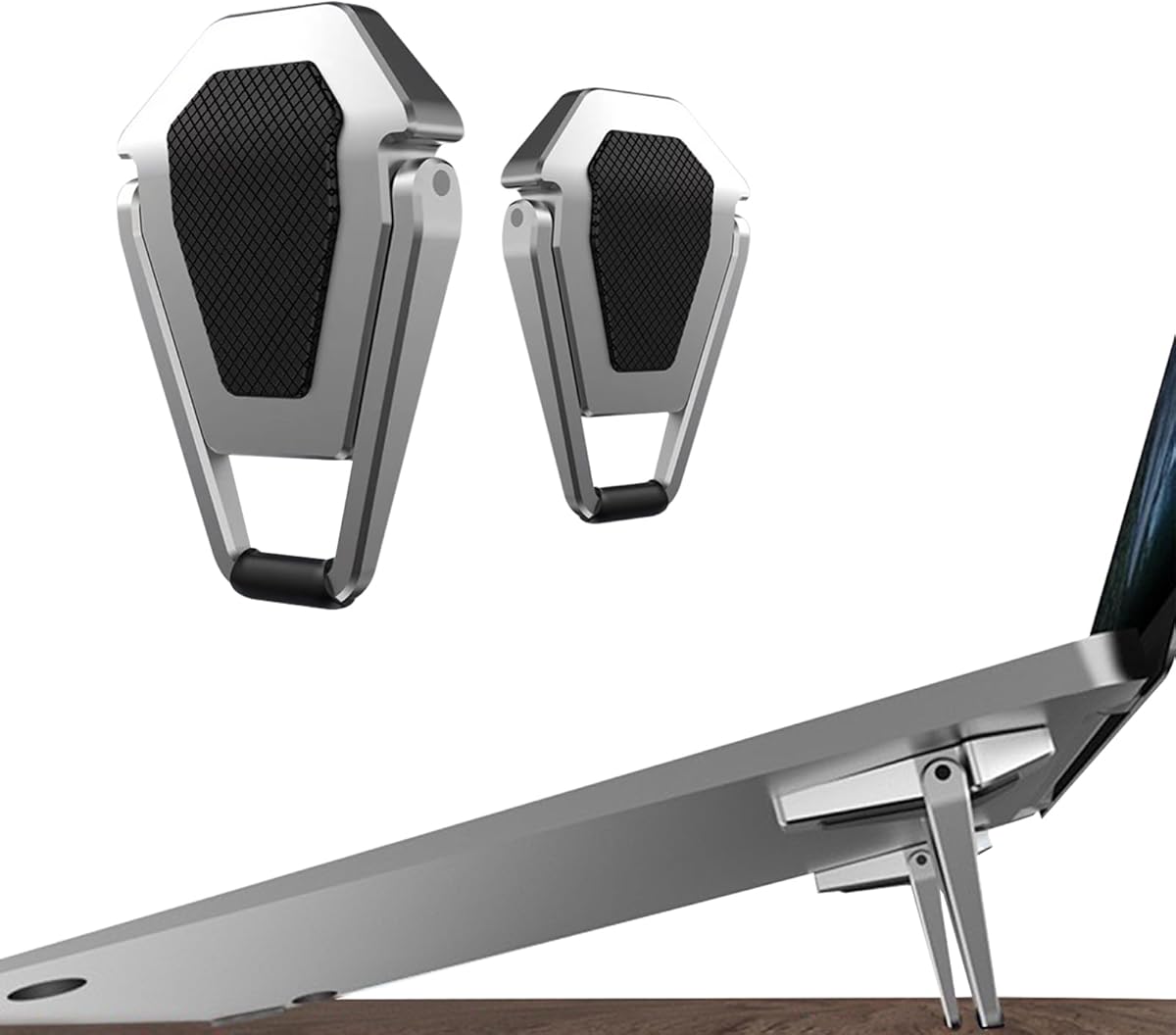
This set of two mini stands provides excellent value for those needing a simple lift for their laptop. The zinc alloy build ensures durability while the foldable design keeps it easy to pack for trips.
We may earn a commission when you buy through this link, at no additional cost to you.
The stands are small but sturdy enough to support typical laptops and tablets. They include extra stickers and tapes so you can easily replace them if needed without buying a new set.
While the height adjustment is limited compared to larger stands, it provides enough lift to improve posture and airflow. It is not ideal for heavy gaming laptops but works great for everyday computing.
Buy this if you want a cost-effective solution that does not sacrifice build quality. It is perfect for students or travelers who need a reliable backup stand in their bag.
Zinc alloy construction offers long-term reliability without breaking your budget.
Folds flat to fit in any bag or pocket for on-the-go protection and comfort.
We may earn a commission when you buy through this link, at no additional cost to you.
Ringke is known for quality accessories and this stand delivers premium build quality and design. The zinc alloy frame is robust while the TPU base protects your laptop from scratches during use.
We may earn a commission when you buy through this link, at no additional cost to you.
Three distinct height levels provide flexibility for different typing preferences. This model is particularly sleek and blends seamlessly with modern laptop designs without looking bulky or out of place.
While it costs more than basic stands, the premium materials justify the price for users seeking long-term reliability. The height range is limited but sufficient for most ergonomic needs in a portable context.
Perfect for professionals who want a refined accessory that matches their high-end device. It offers a stable base for light work or media consumption without adding significant weight to your setup.
Zinc alloy and TPU materials ensure durability and scratch-free contact with your device.
The slim design maintains the clean look of modern laptops while adding functionality.
We may earn a commission when you buy through this link, at no additional cost to you.
These stands are designed to provide a reliable lift for various laptop models. The aluminum alloy ensures they are durable enough to handle daily use without bending or breaking under weight.
We may earn a commission when you buy through this link, at no additional cost to you.
Having two stands in one package is convenient if you switch devices or want backups. The fixed angle helps maintain a consistent ergonomic posture which is helpful for long work sessions.
While the lack of adjustable height might be a downside for some users, the cooling benefit remains significant. It lifts the device enough to allow airflow without requiring complicated setup steps.
Ideal for users who want a simple setup without fiddling with height adjustments. It is a solid choice for home office setups where the angle does not change frequently throughout the day.
No complex adjustments needed, just place them under your laptop for immediate comfort.
Elevating the laptop reduces contact with the desk to aid heat dissipation.
We may earn a commission when you buy through this link, at no additional cost to you.
This stand is optimized for larger laptops ranging up to 20 inches. The zinc alloy construction ensures it can support heavier machines while still maintaining a relatively portable footprint.
We may earn a commission when you buy through this link, at no additional cost to you.
The tilt angle is adjustable between 15 and 25 degrees which gives users some control over their viewing experience. This flexibility is rare in ultra-thin stands and adds significant value for ergonomics.
While it is slightly heavier than the lightest options on this list, it remains easy to carry. The rubber pads provide a secure grip but may need occasional cleaning to maintain effectiveness over time.
Best for users with larger devices who still need a portable solution. It balances stability for bigger screens with enough portability for occasional travel between home and office.
Accommodates laptops from 12 to 20 inches so it grows with your needs.
Tilt adjustment allows you to tailor the angle to your specific comfort needs.
We may earn a commission when you buy through this link, at no additional cost to you.
This set includes two stands plus a privacy shield which adds value for security-conscious users. The ABS plastic is durable enough for light use and keeps the weight low for travelers.
We may earn a commission when you buy through this link, at no additional cost to you.
The dual angle option allows you to switch between casual browsing and ergonomic typing. This small range of movement helps reduce neck strain without making the stand bulky or difficult to carry.
While the plastic build may not feel as premium as metal options, it performs well for its price point. The included webcam cover is a nice bonus that enhances digital privacy during calls.
Recommended for budget-conscious shoppers who want extra features like privacy tools. It is suitable for students or light workers who need a basic lift without breaking the bank.
Includes a free webcam cover to protect your privacy during online meetings.
No tools required just peel stick and lift your laptop into position.
We may earn a commission when you buy through this link, at no additional cost to you.
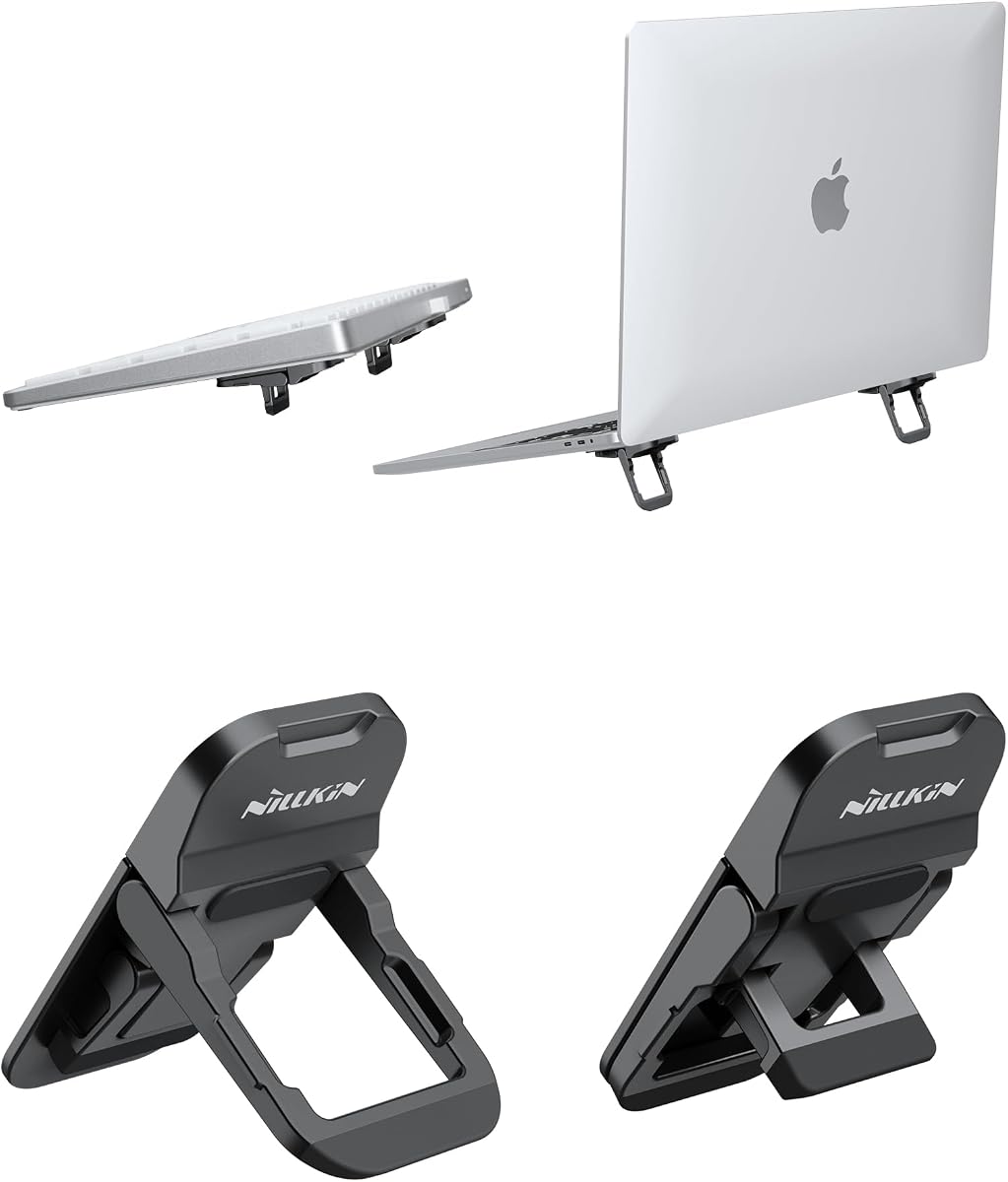
Nillkin focuses on precision with three specific angle options that cater to different typing styles. The zinc alloy construction ensures longevity and helps keep your device cool during long sessions.
We may earn a commission when you buy through this link, at no additional cost to you.
The anti-slip silicone pads keep your laptop secure while typing so it does not slide forward unexpectedly. This stability is crucial for maintaining comfort when using the stand on soft surfaces.
Note that the adhesive works best if left to settle for an hour after initial installation. Once set it provides a strong hold but repeated repositioning may reduce its effectiveness over time.
Great for users who want precise ergonomic control in a portable package. It suits travelers who need multiple height options without carrying a large bulky stand with them.
Three distinct angles let you choose the exact height needed for comfort.
Silicone pads prevent sliding to ensure stable typing on any surface.
We may earn a commission when you buy through this link, at no additional cost to you.
This stand stands out due to its versatility with laptops, tablets, and even phones via magnetic mounts. The aerospace aluminum ensures it remains stable even with heavier devices like gaming laptops.
We may earn a commission when you buy through this link, at no additional cost to you.
Eight distinct height slots give you granular control over your screen position. This level of adjustability is rare in portable stands and helps fine-tune your posture for maximum comfort.
It folds into a compact baton shape which is convenient for travel though slightly larger than the smallest options. The added versatility makes it worth the extra space for users with multiple devices.
Perfect for users who want one stand for all their gadgets. It replaces multiple accessories and is ideal for hybrid workers who use both a laptop and tablet daily.
Functions as a laptop riser tablet easel and phone holder all in one.
Built-in magnets work with MagSafe cases for seamless iPhone integration.
We may earn a commission when you buy through this link, at no additional cost to you.
The unique pop-up mechanism allows you to open and close the stand in seconds without looking. This innovation makes it incredibly convenient for quick adjustments during meetings or travel.
We may earn a commission when you buy through this link, at no additional cost to you.
Solid zinc alloy construction ensures the hinge remains strong even after repeated popping open and closed. The strong adhesive keeps it firmly in place so you do not worry about it falling off.
While the click sound is satisfying it may be distracting in quiet library environments. It is a minor trade-off for the extreme convenience and speed offered by this design.
Ideal for frequent travelers who value speed and convenience. It fits easily in a bag and can be deployed instantly when you set up at a cafe or co-working space.
Spring-loaded design opens in 0.1 seconds for immediate comfort.
Folds to just 4mm thick making it nearly invisible in your laptop sleeve.
We may earn a commission when you buy through this link, at no additional cost to you.
This stand focuses on simplicity with smooth adhesion and soft pads to protect your device surface. It adds virtually no weight to your bag so you barely notice it is there until you need it.
We may earn a commission when you buy through this link, at no additional cost to you.
Installation is instant and requires no tools just apply the adhesive and press firmly. The soft pads prevent scratches which is important for users with premium finishes on their laptops.
Repeated removal may lower adhesive performance so plan your placement carefully initially. If you prefer a minimal footprint and quick setup this is a reliable choice for light users.
Perfect for those who want a set-and-forget solution without bulk. It provides just enough lift to improve airflow and posture without adding complexity to your daily carry.
Adds virtually no weight or bulk to your laptop or travel bag.
Soft slide prevention pads ensure your device surface remains scratch-free.
We may earn a commission when you buy through this link, at no additional cost to you.
Selecting the right laptop kickstand requires considering several key factors including material, size, and intended use. This guide outlines what to look for to ensure you get a product that fits your workflow.
The material of the stand affects both durability and cooling. Zinc and aluminum alloys are preferred as they are sturdy and help dissipate heat from the device bottom. Plastic stands are lighter but may not offer the same level of cooling or longevity.
Look for stands made of zinc alloy or aluminum for the best balance of strength and thermal management.
Most portable stands use adhesives to attach to the laptop base. Ensure the adhesive is high quality so it does not peel off easily. Some models offer double-sided tapes for easy replacement if the original wears out.
Choose a stand with reliable adhesive or removable tape options for long-term stability.
Some stands offer fixed heights while others allow angle or height adjustments. Adjustable stands provide more ergonomic flexibility but may add complexity. Fixed height stands are simpler and often more compact for travel.
Decide if you need multiple height options based on your daily posture requirements.
Portability is key for travelers. Check the folded thickness and weight of the stand. The best models fold flat and weigh less than an ounce so they fit easily into a laptop sleeve or bag pocket.
Prioritize ultra-thin foldable designs if you move frequently with your device.
Ensure the stand supports your device size. Most covers laptops from 10 to 17 inches but some support larger 20 inch models. Check the manufacturer specifications to avoid buying a stand that is too small.
Verify the size range matches your laptop or tablet before purchasing.
Stability is critical to prevent the laptop from sliding. Look for stands with anti-slip pads or wide base surfaces. A stable stand ensures you can type comfortably without the device shifting unexpectedly.
Select models with non-slip features to maintain a secure typing surface.
An open design allows air to flow underneath the laptop which helps prevent overheating. Stands that lift the device significantly create more space for airflow. This is vital for gaming or heavy productivity tasks.
Choose stands with open designs that maximize airflow for better heat dissipation.
A good stand should withstand repeated folding and unfolding without bending. Metal construction generally offers better durability than plastic. If you plan to use it daily ensure it is built to last over time.
Invest in durable materials to ensure the stand lasts through years of use.
To install a self-adhesive stand clean the bottom of your laptop with a dry cloth to remove dust and oils. Press the stand firmly onto the surface for at least thirty seconds to ensure the adhesive bonds properly. Wait an hour before using to allow full adsorption.
When using the stand ensure the laptop is placed evenly to prevent sliding. If you notice reduced stability clean the adhesive pads and replace them with new ones if included. This maintains a secure typing experience.
Store the stand flat in your bag to prevent bending if it is foldable. Avoid exposing the adhesive to direct sunlight or extreme heat which may weaken the bond over time. Regular maintenance ensures long life and consistent performance.
Most stands are designed to work with laptops and tablets ranging from 10 to 17 inches. Check the specific size limits provided by the manufacturer to ensure your device is compatible. Some models also support larger 20 inch laptops.
High-quality stands use nano adhesive that removes without residue. Always check the product description to ensure it is residue-free. If concerned test a small area first to confirm it does not harm your device finish.
Most stands adhere securely to laptop cases made of smooth materials. Rough or textured cases may reduce adhesion so cleaning the surface thoroughly is recommended. If the stand slips try cleaning both surfaces before reapplying.
Yes they improve posture and reduce neck strain during long typing sessions. They also increase airflow to help cool the device which extends its lifespan. For the low cost they are a valuable ergonomic addition.
Use a dry cloth to wipe down the stand and remove dust. If the adhesive pads are dirty replace them with new ones if available. Avoid using water directly on the adhesive to maintain its stickiness.
Metal stands made of zinc or aluminum are generally very durable and resist bending. Plastic options are lighter but may not last as long under heavy use. Check the material specifications to choose based on your durability needs.
An ergonomic angle helps align your screen with your eyes to reduce neck strain. Most stands offer between 10 and 20 degrees of lift. Adjust the height to suit your seated height and keyboard position.
Yes stands are beneficial for home office setups too. They provide a consistent ergonomic height and improve cooling during desktop use. Even stationary setups benefit from the improved airflow and posture.
We highlighted ten top options ranging from budget-friendly mini stands to premium versatile models. The Hagibis, Penitue, and Ringke stands offer excellent value depending on your specific needs and preferences.
Prioritize material and adhesion quality to ensure your stand lasts and protects your device. Consider your travel habits and ergonomic needs to select the right size and adjustability for your workflow.
Always check current product listings for the most recent availability and pricing. Prices may vary over time so verifying the details before purchase ensures you get the best deal available.