
Nektar SE49
4.5Editor score
Plug and play
DAW scripts
Great value
This guide compares the top 49 Key MIDI Keyboards for producers and musicians offering detailed specs ratings and features to help you choose the right
Finding the right 49 Key MIDI Keyboard can transform your music production workflow significantly. These controllers offer the perfect balance between portability and range allowing you to play full chords without taking up too much desk space.
We have analyzed ten leading models based on key feel integration features and included software. Our comparison covers budget friendly options alongside premium controllers to ensure you find a device that matches your specific creative needs and technical requirements.
Each pick highlights specific strengths like DAW integration or keybed quality to help you decide quickly. Please note that pricing and availability fluctuate frequently so check the current details before making your final purchase decision today.
4.5Editor score

4.7Editor score

4.4Editor score
Here is a side by side overview of all ten controllers ranked by their overall performance and value proposition for modern music production environments.




The Novation Launchkey 49 MK4 stands out as the top choice for producers who need deep control over their digital audio workstations. It holds a strong rating of 4.7 stars from users who appreciate its seamless workflow integration.
We may earn a commission when you buy through this link, at no additional cost to you.
Its standout feature is the ability to map controls directly to major DAWs like Ableton Live and Logic Pro without manual setup. The FSR drum pads offer polyphonic aftertouch making them versatile for both drumming and triggering samples.
While it is a significant investment compared to basic models the time saved on mapping controls justifies the cost. The included software from major brands adds immediate value for new users starting their production journey today.
This controller is ideal for intermediate to advanced users who want a single device to handle composition mixing and performance tasks efficiently without needing extra hardware interfaces for their studio setup.
Launchkey works with all major DAWs offering intuitive workflows for Ableton Live Logic Cubase and more for immediate setup.
The FSR pads offer polyphonic aftertouch allowing you to use them as sequencers or chord triggers beyond just drumming.
We may earn a commission when you buy through this link, at no additional cost to you.
The Nektar SE49 delivers exceptional value for musicians on a tight budget who still want essential production features. It maintains a solid 4.5 star rating due to its reliable performance and broad compatibility across different platforms.
We may earn a commission when you buy through this link, at no additional cost to you.
This model includes comprehensive DAW integration that allows you to control transport and volume without digging through menus. It supports all major MIDI music software applications ensuring you can start playing immediately with your favorite tools.
The main trade-off is the lack of advanced features like aftertouch or high-end keybeds which limits dynamic expression. However for beginners or hobbyists focusing on songwriting and basic arrangement this limitation is often acceptable.
You should buy this if you need a reliable controller that just works out of the box with your Mac PC or iOS device without breaking your bank account for your home studio.
Compatible with all MIDI music software applications and works seamlessly on Mac PC and iOS for flexible setups.
Nektar DAW integration scripts for most popular DAWs save time by automating control mappings instantly.
We may earn a commission when you buy through this link, at no additional cost to you.
The Arturia KeyLab mk3 offers premium build quality and advanced features for serious professionals who demand the best from their gear. It holds a 4.4 star rating reflecting its robust construction and extensive control options.
We may earn a commission when you buy through this link, at no additional cost to you.
Key strengths include aftertouch support which allows for expressive modulation after a key is pressed. The twelve pressure-sensitive performance pads give you granular control over clips and samples in modern production environments.
While the price point is high the durability and feature set justify the investment for long term use. The use of USB-C power makes it easier to connect to modern laptops without needing separate power adapters.
This unit is best suited for professional studios or advanced producers who need tactile control over multiple parameters and want a keyboard that will withstand years of heavy daily use.
Aftertouch support allows for expressive modulation after a key is pressed adding nuance to your performance.
Nine encoders and twelve performance pads offer tactile control for mixing and performance tasks.
We may earn a commission when you buy through this link, at no additional cost to you.
The M-AUDIO Oxygen 49 MKV is designed with beat makers and synthesizer enthusiasts in mind offering deep integration with Native Instruments software. It holds a 4.6 star rating indicating strong performance in virtual instrument control scenarios.
We may earn a commission when you buy through this link, at no additional cost to you.
Its standout features include Native Kontrol Standard support which allows you to browse and control presets directly from the keyboard. The eight assignable knobs and nine faders provide hands-on control for tweaking parameters without touching your mouse.
One trade-off is the complexity of fully utilizing all features which may require some initial setup time. However the included bundle from MPC Beats to AIR Music Tech gives you a complete production package right out of the box.
You should consider this model if you rely heavily on Native Instruments sounds or need a versatile controller that can handle complex parameter manipulation for electronic music production efficiently.
Native Kontrol Standard support lets you control Native Instruments presets and sound libraries directly from the keyboard.
Smart Chord and Smart Scale modes help you play the right notes even if you lack formal theory training.
We may earn a commission when you buy through this link, at no additional cost to you.
The Arturia KeyLab Essential mk3 distinguishes itself with an extensive software package including Analog Lab V which offers over 2000 presets. It has earned a 4.5 star rating from users who value the breadth of available sounds.
We may earn a commission when you buy through this link, at no additional cost to you.
Its strengths include creative tools like Scale and Chord modes that simplify songwriting for users who may not be music theory experts. The RGB backlit pads provide visual feedback ensuring you know which controls are active at a glance.
The trade-off is that the hardware is slightly less robust than the full mk3 version which lacks aftertouch. However the included software subscriptions and modern hybrids make it a compelling deal for producers starting out today.
Buy this if you want a controller that doubles as a sound engine and offers immediate access to modern orchestral and synth sounds without needing to buy extra plugins separately.
Scale Mode Chord Mode and Arpeggiator make composition and songwriting more intuitive than ever before.
Users can enjoy unique hybrids modern synths and orchestral sounds beyond just vintage analog tones.
We may earn a commission when you buy through this link, at no additional cost to you.
This 49-Key MIDI Keyboard Controller serves as an entry-level option for those who need a simple tool for melody practice. It is designed with a compact ABS profile that fits easily into small desktop workspaces or home studios.
We may earn a commission when you buy through this link, at no additional cost to you.
Its primary strength is its affordability and portability making it ideal for travel or tight budgets. The simple black finish keeps it unobtrusive while providing the necessary connectivity for recording and arranging activities.
You will miss out on advanced controls like faders or aftertouch which limits its use to basic composition. However for someone just wanting to input notes into a DAW without extra complexity this is a practical choice.
Choose this model if you need a no-frills keyboard to practice scales or draft ideas without investing in expensive professional features you may not need yet.
Measures approximately 66 × 11.4 × 3.5 cm making it convenient for desktop or small music rooms.
ABS material offers a structured and practical design convenient for regular handling and storage.
We may earn a commission when you buy through this link, at no additional cost to you.
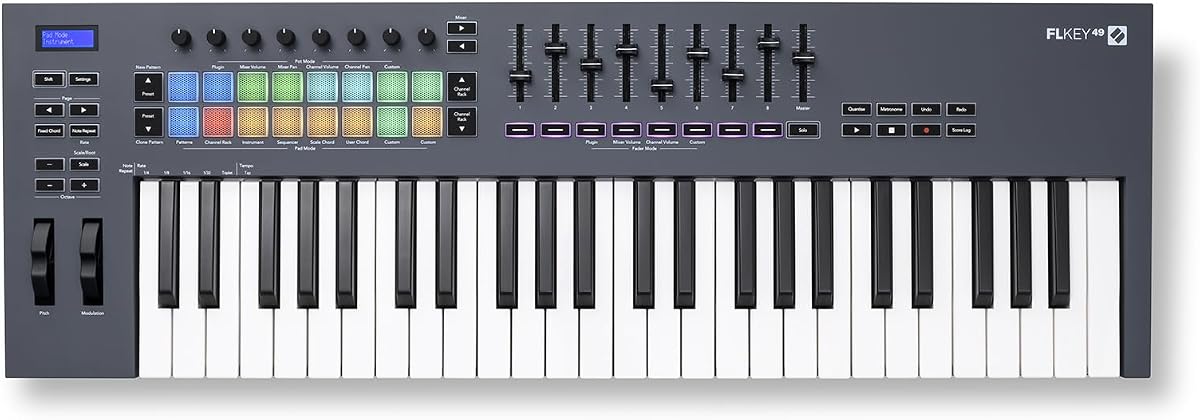
The Novation FLkey 49 is specifically tailored for users of FL Studio bringing mixer and channel rack controls directly onto the hardware. It holds a 4.6 star rating among producers who prioritize workflow efficiency within that ecosystem.
We may earn a commission when you buy through this link, at no additional cost to you.
Its standout feature is the automatic mapping that removes the need to manually assign controls. The sequencer mode maps pads to the step sequencer allowing you to program beats with a real human feel quickly.
The trade-off is that it is less optimized for other DAWs which might limit you if you plan to switch software later. However if you are committed to FL Studio the dedicated features save valuable time during sessions.
This controller is the best choice for FL Studio users who want to minimize mouse interaction and maximize hands-on control over their production and performance workflow.
No need to assign controls manually as FLkey integrates seamlessly with FL Studio for immediate control.
Pads map to FL Studio step sequencer allowing you to change patterns directly from the pads.
We may earn a commission when you buy through this link, at no additional cost to you.
The M-AUDIO Oxygen Pro 49 is a full-featured controller designed for users who need professional connectivity and tactile control. It holds a 4.5 star rating for its reliable build quality and extensive feature set.
We may earn a commission when you buy through this link, at no additional cost to you.
It stands out with its 5-pin MIDI output allowing you to connect to external hardware synthesizers directly without a computer interface. The sixteen RGB backlit pads offer precise control for clip launching and drum sequencing.
One trade-off is the higher price point which makes it an investment reserved for advanced users. However the semi-weighted keys with aftertouch provide a superior playing experience for expressive performances and recording.
Buy this if you need to interface with legacy MIDI gear and want a high-end keyboard that offers complete control over your entire music production setup.
5-pin MIDI Output allows you to connect to external synthesizers and gear without needing a computer.
Semi weighted keys with aftertouch deliver natural response and expressive control for virtual instruments.
We may earn a commission when you buy through this link, at no additional cost to you.
The midiplus AK490 offers a straightforward approach to MIDI control focusing on essential features for recording input. It has a 4.3 star rating from users who appreciate its simplicity and low cost.
We may earn a commission when you buy through this link, at no additional cost to you.
It includes a MIDI DIN Jack which is rare for budget controllers and allows direct connection to hardware without a USB hub. The 49-note velocity sensitive keys ensure dynamic expression without requiring complex setup or drivers.
The main limitation is the lack of included software or advanced integration scripts found in higher-end models. However for a simple input device to record piano parts into a DAW it performs reliably.
Choose this if you need a basic keyboard controller to plug into an audio interface or computer without needing extra buttons or faders.
MIDI out Din Jack allows connection to hardware synthesizers without needing a computer interface.
Pitch and modulation wheels plus octave buttons provide standard control for performance and recording.
We may earn a commission when you buy through this link, at no additional cost to you.
The M-AUDIO Keystation 49 MK3 is a classic choice for beginners seeking a reliable keyboard for studio and performance use. It holds a 4.5 star rating for its consistent performance and user-friendly design.
We may earn a commission when you buy through this link, at no additional cost to you.
Its key strengths are plug-and-play connectivity which means no drivers or external power supply are required to start using it. The 49 full-size velocity-sensitive keys capture subtle nuances of your performance providing a natural feel.
A trade-off is the limited control surface which lacks assignable faders or complex knobs for mixing. However the included software suite with MPC Beats and Ableton Live Lite makes it a complete starting package.
This controller is best for beginners who want a simple and efficient way to control their DAW without worrying about complex setup or additional power requirements.
Easy plug-and-play connection to your Mac or PC with no drivers or power supply required.
49 full-size velocity-sensitive keys provide a natural feel that captures every subtle nuance of your performance.
We may earn a commission when you buy through this link, at no additional cost to you.
Selecting the right MIDI keyboard involves considering several technical factors that impact your workflow and creative output.
The keybed determines how the keyboard feels under your fingers. Look for velocity sensitivity to capture dynamic nuances. Semi-weighted keys offer a piano-like resistance which is better for expressive playing.
Prioritize a keybed that feels natural to your playing style.
Many controllers come with software scripts that map controls to specific Digital Audio Workstations. This saves time by automating volume and transport controls. Ensure the keyboard supports your main DAW.
Choose a keyboard with scripts for your primary software.
The number of knobs faders and pads dictates how much you can control without touching your mouse. Faders are useful for mixing while knobs help tweak synth parameters. Pads assist with drumming.
Decide if you need mixing tools or just basic playback controls.
USB is standard but some controllers offer 5-pin MIDI outputs for hardware gear. Ensure it supports your computer OS like Mac or PC. Some models also allow iOS connectivity for mobile production.
Check ports match your existing hardware setup.
Manufacturers often bundle DAW versions and virtual instruments. This adds value especially for beginners. Check if the software is a full version or a lite version that requires upgrades later.
Look for comprehensive bundles to maximize value.
A 49-key keyboard is a balance between range and size. Consider the weight and dimensions if you travel. Lightweight plastic models are easier to carry than heavy metal ones.
Ensure the size fits your desk and transport needs.
Aftertouch allows you to add effects like vibrato by pressing keys harder after striking them. It adds expression but is often found in premium models. If you play synth leads this is useful.
Consider if you need expressive modulation features.
Prices vary significantly from basic models to high-end controllers. Determine your max spend before looking. Sometimes saving money on a higher tier model means losing essential software or features.
Balance features with your financial limits.
Connect your keyboard to your computer via USB to begin. Most modern keyboards are class compliant meaning no driver installation is needed for basic functionality. Once connected launch your DAW software and check the MIDI input settings.
To configure control mappings look for the dedicated software tool provided by the manufacturer. This tool allows you to assign knobs and faders to specific parameters in your digital audio workstation. If no tool exists you can map controls manually using MIDI learn.
Maintain your keyboard by keeping it away from dust and direct sunlight. Use a soft dry cloth to clean the keys regularly. Store it in a padded case if you transport it often to prevent damage to the keybed or casing.
Most modern keyboards require a computer or mobile device to function as they send MIDI data to a DAW. However some have built-in sounds so they can function as standalone synthesizers if connected to external gear.
Velocity measures how hard you strike a key to control volume and dynamics. Aftertouch measures pressure applied after the key is held to trigger effects like vibrato or filter modulation.
Forty-nine keys offer a good middle ground allowing you to play full chords comfortably without taking up too much desk space. It is often ideal for producers who need both melody and harmony.
No many controllers are class compliant and work plug and play via USB. Some advanced models may need drivers for extra features like firmware updates or specialized software integration.
Many support iOS devices if you use a USB to Camera Adapter. Check the specs to confirm if power is required via the camera adapter for the controller to function properly.
Yes once installed the hardware functions offline. Software activation might require internet initially but you can produce music without being connected to the internet afterward.
We have reviewed ten top options ranging from budget-friendly models to premium controllers. Each offers unique features to suit different needs whether you are a beginner or an experienced producer.
Focus on your primary workflow needs like DAW integration or specific keybed qualities. A controller that matches your software ecosystem will save time and help you focus on creativity.
Prices and availability change often so verify current details on the retailer page. Taking the time to choose correctly ensures a smoother and more inspiring production experience.