
Hamile for iPad Case
4.5Editor score
Rechargeable long life battery
7 color backlit keys
Magnetically detachable design
Finding the right keyboard case for your 8th Generation iPad can transform how you work and create on the go. A good case offers protection, typing comfort, and extra functionality like trackpads or pencil holders. It is essential to choose one that matches your specific workflow needs and budget constraints effectively.
We have carefully compared ten top-rated options based on compatibility, build quality, battery performance, and user feedback. Each product listed here supports the 10.2 inch model and includes essential features like backlighting or detachable keyboards. Our goal is to provide a clear view of what each option brings to the table for diverse users.
Every pick below highlights specific strengths such as premium materials, smart trackpads, or budget-friendly pricing. You will see detailed specs and honest pros and cons for each item to aid your decision. Please note that prices and availability can change frequently, so always verify current details before purchasing your next accessory.
4.5Editor score

4.4Editor score

4.4Editor score
As an Amazon Associate we earn from qualifying purchases.
This side-by-side comparison highlights the key specifications and unique features of each keyboard case option. We focus on compatibility, battery life, and special additions like trackpads or pencil holders to help you decide quickly.



This TUNKARMOR case is highly rated for offering a complete typing solution at a very reasonable price point. It supports multiple iPad generations and includes a bonus Bluetooth mouse which adds significant value for users who prefer cursor control over touchpads.
We may earn a commission when you buy through this link, at no additional cost to you.
The keyboard features a magnetic detachable design with 7 color backlighting options making it versatile for different environments. The case provides full 360 degree protection with a honeycomb pattern inside to help dissipate heat and prevent overheating during extended use sessions.
While it lacks a built-in trackpad which some users might prefer, the included mouse compensates well for this omission. The viewing angles are adjustable and it holds the pencil securely which is a nice touch for students or creatives who need quick access.
If you need a reliable and affordable keyboard case that offers extra functionality like a mouse, this is a top contender. It is perfect for those who want a laptop-like experience without spending too much on accessories.
The honeycomb grid pattern inside the case helps prevent overheating by increasing airflow around the device while providing cushioning against drops.
The magnetic keyboard attaches firmly but can be removed for portable typing, turning your tablet into a mini laptop instantly.
We may earn a commission when you buy through this link, at no additional cost to you.
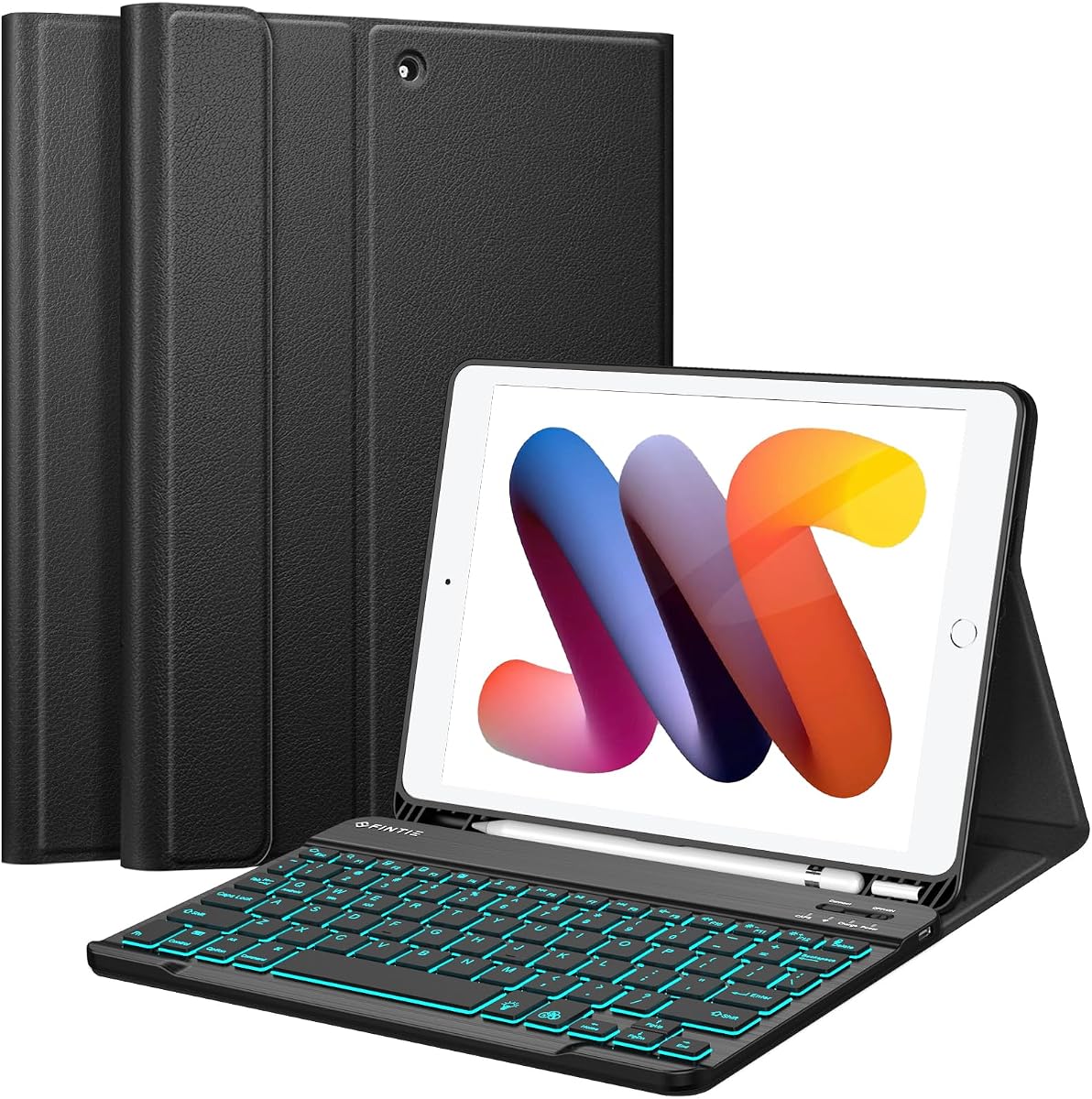
The FINTIE keyboard case stands out with its impressive battery life that can last up to 230 hours on a single charge. This makes it ideal for users who travel frequently or work away from power sources for long periods without worrying about recharging often.
We may earn a commission when you buy through this link, at no additional cost to you.
Its mechanical scissor keys reduce noise significantly which is perfect for quiet environments like libraries or offices. The case also features a bright 7 color backlight and durable PU leather protection with a soft TPU back shell to keep your iPad safe from bumps and scratches.
Typing experience is comfortable and quiet due to the ergonomic design of the keys. The pencil holder allows easy access to your stylus and the case supports auto sleep wake functions to help manage power consumption efficiently during daily use.
For those prioritizing battery longevity and a quiet typing experience, this case is an excellent choice. It balances durability with functionality offering a reliable typing surface without adding too much bulk to your device.
The case automatically switches to energy-saving mode after 10 minutes of inactivity extending standby time for worry-free usage over many days.
The flexible TPU back shell protects the iPad from shocks and impacts while the PU leather cover adds a premium feel and scratch resistance.
We may earn a commission when you buy through this link, at no additional cost to you.
The typecase Touch Keyboard Case is designed for users who want a true laptop experience with its precision trackpad and 360 degree rotating hinge. This allows you to use your iPad in multiple modes including typing, watching videos, or reading comfortably without removing the case.
We may earn a commission when you buy through this link, at no additional cost to you.
Its illuminated typing feature includes a laser-etched key row and a 10 color RGB LED backlight that shines through for a visually appealing and functional experience. The trackpad supports multi-gesture controls which makes navigating the web and editing documents much faster and more intuitive.
The hinge is stress tested for 20000 cycles ensuring long-term durability even with frequent adjustments. It also includes a holder for the Apple Pencil so it stays secure and out of the way while you type or draw on your device screen.
If you need maximum versatility and a high-quality trackpad, this case is worth the investment. It transforms the iPad into a powerful productivity tool with features that rival traditional laptops for professional and student use cases.
Navigate your iPad with multi-gesture controls that allow for scrolling, tapping, and selecting with unprecedented speed and precision.
The patented hinge lets you use your iPad for any task from typing notes to watching videos in native tablet mode comfortably.
We may earn a commission when you buy through this link, at no additional cost to you.
The Hamile keyboard case is one of the most affordable options available while still offering essential features like a long-life battery and backlit keys. It is designed to be lightweight and portable making it easy to carry in a bag for work or school.
We may earn a commission when you buy through this link, at no additional cost to you.
Its mechanical scissor keys provide a tactile typing experience that is comfortable for long hours of writing or note-taking. The honeycomb heat dissipation design helps keep your iPad cool during extended use which protects the device from overheating and extends its lifespan.
The magnetic detachable keyboard allows you to remove it when you just want to watch videos or read. A pencil holder is built into the design so you never lose your stylus and the case fits snugly to protect against scratches and minor drops.
If you are on a tight budget but still need a reliable keyboard solution this case is a great choice. It offers solid performance and protection without the premium price tag making it accessible for many users.
The large capacity 400mAh battery ensures you can use the keyboard for at least 180 hours on a single charge.
The pencil holder and pen slot on top make it easy to carry your stylus with your device without it getting lost.
We may earn a commission when you buy through this link, at no additional cost to you.
The Divufus keyboard case is a robust option that supports iOS Windows and Android systems which makes it versatile for different devices. It features a honeycomb grid design on the back to prevent overheating and extend the service life of your iPad significantly.
We may earn a commission when you buy through this link, at no additional cost to you.
The durable PU leather cover with a magnetic buckle keeps your iPad safe from various angles and the non-slip rubber lining ensures stability during typing. It includes full shortcut keys for iPads which help improve efficiency when working on documents or managing media content.
While the battery life is shorter than some competitors it still offers enough usage for daily tasks and enters sleep mode automatically to save power. The case is slim yet protective and comes with a limited warranty to give you peace of mind during your purchase.
For those who need a cross-platform compatible keyboard with good thermal protection this case is a solid pick. It balances essential features with a reasonable price making it a practical choice for many users.
Just press Fn and corresponding keys to change the keyboard system for iOS Android or Windows allowing versatile usage.
The honeycomb grid design prevents overheating and can extend service life by more than 30 percent for better longevity.
We may earn a commission when you buy through this link, at no additional cost to you.
The Logitech Slim Folio is a premium keyboard case known for its exceptional battery life that can last up to four years on two coin cell batteries. It is designed for comfort with large well-spaced keys that stretch edge-to-edge to reduce hand crowding during long typing sessions.
We may earn a commission when you buy through this link, at no additional cost to you.
Its Bluetooth Low Energy connectivity ensures a reliable and efficient connection to your iPad without draining power quickly. The case provides all-around protection against bumps scratches and spills while maintaining a slim profile that does not add unnecessary bulk to your tablet.
A convenient holder keeps your Apple Pencil or Logitech Crayon securely in place so it does not get lost or in the way. The keyboard includes a full row of iOS shortcut keys for quick access to volume controls and media functions enhancing overall usability.
If you prioritize reliability and long-term value over advanced features like backlighting this case is an excellent investment. It offers a polished typing experience and robust protection that suits professional users who need a tool they can count on.
The smart-power management system allows you to use the keyboard for up to 4 years without needing to replace batteries.
A full row of iOS shortcut keys provides one-tap access to media volume controls and other essential functions.
We may earn a commission when you buy through this link, at no additional cost to you.
The KBCASE Light Blue keyboard case is a stylish and lightweight option that adds a touch of color to your device. It is slim enough to fit easily in a briefcase or backpack while still offering comprehensive protection through a solid keyboard case and wave shock absorption design.
We may earn a commission when you buy through this link, at no additional cost to you.
Its mechanical scissor-structure keys are spacious and tactile providing a relaxed typing experience for notes or document editing. The honeycomb grid pattern design helps release heat and prevents skids which is useful for keeping your device cool and stable on desks.
Multiple viewing angles can be adjusted through slot fixing to find a comfortable position for work or watching videos. A built-in pencil holder makes it easy to carry your stylus with the device so you can switch between typing and drawing quickly.
For users who want a functional yet stylish case that keeps things simple this option is a good fit. It protects well and supports basic typing needs without overwhelming features which might be preferred by casual users.
The ultra-thin case is easy to carry and fits into a briefcase or handbag without adding bulk to your daily setup.
Solid construction and shock absorption provide protection for your tablet from scratches and damage during travel.
We may earn a commission when you buy through this link, at no additional cost to you.
The Dexnor keyboard case features a unique floating cantilever stand design that allows for customizable angles tailored for different tasks. This transforms your tablet into a laptop instantly with a sturdy aluminum alloy hinge that guarantees a reliable magnetic connection for your device.
We may earn a commission when you buy through this link, at no additional cost to you.
It includes a built-in trackpad that supports multi-finger gestures for seamless navigation and control without touching the screen. The backlit keys with 7 solid colors and adjustable brightness levels make typing comfortable in various lighting conditions from flights to dim rooms.
The long-lasting 650mAh battery provides up to 200 hours of working time on a single charge which is excellent for heavy users. It also comes with lifetime technical support and a manufacturer warranty to ensure you have help if needed in the future.
If you need a modern design with a strong stand and trackpad this case is a standout choice. It offers high-end features and good battery life for those who want a sophisticated typing setup for professional work.
The durable aluminum alloy hinge guarantees a sturdy magnetic connection transforming your tablet into a laptop instantly.
Revolutionize your iPad experience with an ultra-precise smart touchpad supporting multi-finger gestures for control.
We may earn a commission when you buy through this link, at no additional cost to you.
The INFILAND keyboard case delivers zero-lag magnetic keyboard performance that ensures instant key response with satisfying keystrokes. It is designed to make your iPad feel like a true mini laptop so you can write emails or take notes without frustrating delays.
We may earn a commission when you buy through this link, at no additional cost to you.
A built-in precision trackpad allows you to navigate scroll and select smoothly which brings a laptop-like control experience to your tablet. The backlight keys offer 7 colors and 3 brightness levels to match your environment making typing comfortable in any lighting condition.
The keyboard locks firmly into place with strong magnets ensuring it stays secure during use and stores neatly when closed. Precise cutouts provide full access to all ports and buttons while the case shields your iPad from scratches and minor bumps during travel.
For users who need a responsive typing experience with modern conveniences like a trackpad this case is a great match. It combines functionality with a polished look that makes it a thoughtful gift for professionals or creatives.
The magnetic Bluetooth keyboard delivers instant key response with stable keystrokes so your iPad feels like a mini laptop.
Navigate scroll and select with a responsive trackpad that brings smooth cursor control to your iPad for multitasking.
We may earn a commission when you buy through this link, at no additional cost to you.
The KBCASE Touchpad Keyboard Case in Light Purple offers a unique rotatable design that supports 360 degree swivel and 180 degree flip for multiple viewing angles. This allows you to use your device comfortably for typing viewing or reading without needing to reposition the case constantly.
We may earn a commission when you buy through this link, at no additional cost to you.
It comes with a touchpad that allows you to control your cursor like a laptop without touching the screen which is convenient for editing documents or browsing. The hardshell design protects all sides of your tablet keeping it free from scratches and dust while allowing full access to ports.
The keyboard shortcut switch for trackpad access is easy to use and enhances productivity for daily tasks. A pencil holder keeps your stylus secure and within reach so you can switch from typing to sketching quickly without interrupting your workflow.
If you like a modern design that offers flexible viewing angles and touchpad control this case is worth considering. It provides all-around protection and a stylish look that suits users who want a versatile and practical accessory.
The keyboard case supports 360 degree swivel providing multiple viewing angles for typing viewing or reading comfortably.
The touch keyboard allows you to control your cursor like a laptop without touching the screen or using an additional mouse.
We may earn a commission when you buy through this link, at no additional cost to you.
Choosing the right keyboard case involves considering several factors beyond basic compatibility. This guide covers essential aspects to help you select a case that matches your specific needs and budget effectively.
Ensure the case specifically supports the 8th Generation iPad 10.2 inch model to avoid fit issues. Check the model numbers like A2270 or A2430 listed in the product description before purchasing. Some cases support multiple generations which adds value but verify the exact fit for your device.
Always confirm the model number listed in the product description before purchasing to ensure it fits your device correctly.
Look for cases with rechargeable batteries that offer long usage times such as 180 hours or more. Some models use replaceable coin cells which can last for years without needing frequent recharging. Consider how often you use your device to determine if a long-life battery is necessary.
Opt for rechargeable batteries with long usage times if you plan to use the keyboard frequently without frequent recharging.
Evaluate the key spacing and mechanism to ensure comfortable typing for long periods. Scissor keys or mechanical-like switches provide better feedback and noise reduction compared to flat membrane keys. Testing the keyboard in store or checking reviews can help assess the tactile feel.
Choose a keyboard with comfortable key spacing and good feedback to ensure typing remains pleasant during extended sessions.
The case should offer all-around protection including the back and sides of your iPad. Materials like PU leather with soft TPU interiors provide durability and shock absorption. Features like anti-slip rubber lining and precise cutouts enhance safety and accessibility for ports.
Select a case that provides full protection against bumps and scratches while allowing easy access to all ports and buttons.
Some cases include additional tools like built-in trackpads mouse pointers or pencil holders. These features can enhance productivity and convenience but might increase the price or weight. Decide which extras are necessary for your workflow to avoid paying for unused functionality.
Consider if features like trackpads or pencil holders are essential to your workflow before choosing a feature-rich model.
A slim and lightweight design is important if you carry your iPad in a bag daily. Detachable keyboards allow you to remove the typing component for easier transport or reading. Balance the need for protection with the desire for a lightweight setup for travel.
Prioritize slim and lightweight designs if you need to carry your device frequently for work or school.
Adjustable stand options allow you to find the best angle for typing or watching videos. Cases with multiple slots or rotating hinges offer more versatility than fixed stands. Check if the stand can hold the iPad securely without tipping over during use.
Look for adjustable stand options to ensure you can find the best angle for various tasks and viewing preferences.
Backlit keys are useful if you work in low-light environments or at night. Options with multiple color choices or brightness levels offer more flexibility for personal preference. Ensure the lighting does not drain the battery too quickly during use.
Backlit keys are useful for low-light environments so check for adjustable brightness to balance visibility and battery life.
To start using your keyboard case first ensure your iPad is properly snapped into the protective shell. Connect the keyboard to your device via Bluetooth following the pairing instructions on the back of the keyboard. Adjust the viewing angle to your comfort and begin typing with the shortcut keys active.
Clean the keyboard case regularly with a soft dry cloth to remove dust and oils. Avoid using harsh chemicals or excessive moisture on the key surfaces or the screen. If your case has a removable keyboard detach it carefully before cleaning the iPad surface to prevent debris accumulation.
Store your device in a cool dry place when not in use to preserve battery life and material integrity. Activate the sleep mode if available to save power when the case is closed. Regularly check the battery status and charge it via the provided cable to maintain optimal performance.
Most of the cases listed include a dedicated pencil holder designed for the Apple Pencil 1st Generation. This allows you to carry the stylus with your device without it getting lost or in the way during use. Note that the pencil itself is usually not included in the package.
Battery life varies by model but many offer between 180 to 230 hours of continuous use on a single charge. Some premium models use replaceable batteries that can last for years depending on daily usage patterns. Check the specific battery details for each case to find what fits your needs.
These keyboard cases are specifically designed for the 8th Generation iPad 10.2 inch model. Some also support 7th and 9th generations but compatibility should be verified with your specific model number. Using them with other models may lead to poor fit or missing cutouts.
Many of the wireless keyboards support iOS Windows and Android systems with switchable layouts. You can usually change the system by pressing specific shortcut keys like Fn and corresponding letter keys. This makes them versatile if you use multiple devices across different platforms.
Backlit keyboards allow you to type comfortably in dim or dark environments without straining your eyes. They often come with multiple color options and brightness levels to suit your personal preference or mood. This feature is particularly useful for travelers or night owls who work late.
Most cases provide robust protection with materials like PU leather and flexible TPU to absorb shocks. The interior often includes soft lining to prevent scratches and dents during accidental drops. However protection levels vary so choose a case that offers full coverage for better safety.
Only certain models include a built-in trackpad for cursor control like the typecase or INFILAND options. Others rely on touch input or include a separate mouse which offers similar functionality without a trackpad. Decide if a trackpad is necessary for your workflow before purchasing.
Most keyboards come with a Type-C or USB cable to charge the built-in battery. Connect the cable to the keyboard or case depending on the model design. Charging times usually range from 2 to 3 hours for a full charge to last several days.
We have explored ten excellent keyboard cases offering different features from budget-friendly options to premium choices with trackpads. Whether you need long battery life robust protection or a lightweight design there is a pick on this list for your needs. The top selections provide a blend of value and performance to enhance your iPad experience.
When choosing a case prioritize what matters most to you such as typing comfort portability or advanced features like backlighting. Consider how you use your device daily whether for work school or creative tasks to find the best fit. A good keyboard case can transform your iPad into a versatile workhorse for any situation.
Prices and availability change frequently so be sure to check current details before making your purchase. We hope this guide helps you make an informed decision to get the most out of your 8th Generation iPad. Thank you for reading and happy typing with your new accessory.