
Typewriter Wired Mechanical Gaming Keyboard
4.3Editor score
Affordable price point
Classic round keycaps
Metal panel durability
Discover the top keyboards that sound like a typewriter for authentic clicks. We compare features, switches, and designs to find the perfect retro typing tool.
Finding a keyboard that sounds like a typewriter brings nostalgia and satisfaction to modern typing. These mechanical devices combine vintage aesthetics with reliable performance for writers and enthusiasts who crave tactile feedback.
We compared ten top models based on switch types, build quality, connectivity, and overall typing experience. Each product offers unique retro designs ranging from wireless options to full-size layouts with customizable lighting.
Every pick highlights key features like hot-swappable switches, ergonomic designs, and device compatibility. Prices and availability may change so check current listings before purchasing to ensure you get the best deal available today.
4.3Editor score

4.4Editor score

4.2Editor score
This side-by-side comparison highlights the distinct features of each model so you can choose the right fit for your workspace and typing style preferences.



This Retro Typewriter Wireless Keyboard delivers an authentic mechanical typing experience with satisfying blue switches and round keycaps. It holds a solid rating for its blend of vintage style and modern functionality.
We may earn a commission when you buy through this link, at no additional cost to you.
The hot-swappable design allows users to customize switches without tools while the multi-mode connectivity supports seamless switching between laptops and tablets. The ergonomic layout reduces hand fatigue during long typing sessions.
While it lacks a numeric keypad which might inconvenience data entry users the compact size frees up desk space effectively. The backlight options add visual flair without distracting from work tasks.
Ideal for writers and gamers seeking a nostalgic feel with reliable performance. Its versatile connectivity makes it a strong pick for hybrid work setups needing multiple device support.
Hot-swappable sockets let you tailor tactile feedback and sound to your exact typing preference instantly.
Switch between PC laptop and phone effortlessly using Bluetooth or USB-C connections for a streamlined workflow.
We may earn a commission when you buy through this link, at no additional cost to you.
The YUNZII QL75 offers retro aesthetics with modern programmability at a competitive price point. It is highly rated for its balance of style and functional customization options.
We may earn a commission when you buy through this link, at no additional cost to you.
Its hot-swappable design supports various switch types while the tri-mode connectivity ensures seamless transitions between multiple devices. The built-in stand saves desk space by holding phones or tablets securely.
QMK VIA support adds depth but may require time to learn for casual users. RGB lighting enhances the setup but can be turned off for professional environments needing minimal distraction.
Great for enthusiasts wanting customization without breaking the bank. This keyboard suits those who value both retro style and advanced programming features equally.
QMK VIA compatibility allows deep key remapping and macro creation for tailored productivity and gaming setups.
Integrated holder for tablets and phones keeps your desk organized while maintaining access to secondary screens.
We may earn a commission when you buy through this link, at no additional cost to you.
FINEDAY Keyboard 2.0 combines robust build quality with distinctive retro controls that mimic classic typewriters. It earns praise for its premium materials and unique functional design elements.
We may earn a commission when you buy through this link, at no additional cost to you.
The aluminum wheels control brightness and volume precisely while the left lever offers an authentic Enter key feel. A large battery ensures uninterrupted typing across multiple devices via wireless pairing.
Its size may occupy significant desk space which could challenge users with limited work areas. The price reflects high-end materials but may be steep for budget-conscious shoppers seeking similar vibes.
Best for professionals valuing premium build and nostalgic interaction. This keyboard stands out for those wanting an authentic typing ritual with modern reliability and connectivity features.
Solid aluminum levers and wheels replicate tactile interactions found on vintage machines for a true retro feel.
Large capacity battery supports weeks of wireless typing before needing a recharge for sustained productivity.
We may earn a commission when you buy through this link, at no additional cost to you.
This YUNZII QL108 delivers a full-size typing experience with robust metal construction and retro aesthetic appeal. It is well-rated for its durability and comprehensive feature set.
We may earn a commission when you buy through this link, at no additional cost to you.
Hot-swappable switches allow easy customization while the metal shell ensures stability during intense typing. The south-facing RGB lighting maintains retro legends while adding vivid visual effects to your setup.
Lack of wireless connectivity limits portability but ensures zero lag for wired gaming or data entry tasks. Weight may deter users seeking portable solutions but adds solid desk presence.
Ideal for office workers needing full layouts and reliability. This model suits users prioritizing tactile feedback and build quality over wireless convenience.
Dedicated numeric keypad supports efficient data entry and spreadsheet work without switching input modes.
Solid metal frame resists flexing and ensures consistent key alignment over years of heavy daily use.
We may earn a commission when you buy through this link, at no additional cost to you.
This Typewriter Style Mechanical Keyboard offers vintage styling with modern mechanical reliability at an accessible price. It provides a simple solution for retro aesthetics without complex programming.
We may earn a commission when you buy through this link, at no additional cost to you.
Features like adjustable tilt and volume knobs enhance comfort and usability while the detachable cable aids portability. Bright LED backlighting ensures visibility in low-light conditions during night typing sessions.
Some users note linear switches lack tactile feedback compared to clicky options. Consistent build quality varies but it remains a functional choice for budget-focused retro enthusiasts.
Recommended for casual users seeking basic mechanical retro typing. It suits those prioritizing aesthetics over advanced customization or tactile intensity.
Vintage steampunk round keycaps and LED lighting create an immersive nostalgic ambiance on any desk.
Tilt feet and volume controls allow personalized ergonomic setup and easy media management during work.
We may earn a commission when you buy through this link, at no additional cost to you.
The Wireless Typewriter Pink model delivers exceptional reliability with its high rating and robust wireless features. It is favored for its blend of charm and functional connectivity options.
We may earn a commission when you buy through this link, at no additional cost to you.
Tri-mode connectivity supports seamless device switching while the large battery ensures weeks of use between charges. Premium metal construction adds longevity and a polished look to modern workspaces.
Backlighting is limited to white tones which may not suit users wanting RGB customization. Higher cost reflects quality materials but may be a barrier for those seeking basic functionality.
Perfect for creative professionals valuing aesthetics and seamless connectivity. This keyboard is a top choice for those wanting a polished retro device with minimal fuss.
Curved concave keycaps reduce finger strain and improve accuracy during extended typing sessions comfortably.
Bluetooth and wireless modes enable quick switching between work devices without physical cable reconnection.
We may earn a commission when you buy through this link, at no additional cost to you.
This wireless set offers practical comfort with a magnetic wrist rest and matching RGB mouse for ergonomic support. It earns solid ratings for daily usability and convenience.
We may earn a commission when you buy through this link, at no additional cost to you.
The wrist rest and phone holder reduce strain and keep devices accessible while multi-color backlighting adapts to lighting needs. Plug-and-play setup ensures immediate use across different operating systems.
Mechanical switches may feel less tactile than dedicated retro boards but remain sufficient for light typing. The combo nature is useful but limits individual component upgrades later.
Great for general office users needing comfort and simplicity. This set suits those prioritizing ergonomic support and a complete setup out of the box.
Magnetic wrist rest provides soft support to reduce fatigue during long working hours at the desk.
Included RGB mouse matches keyboard aesthetics and functionality for a unified visual desktop experience.
We may earn a commission when you buy through this link, at no additional cost to you.
This Typewriter Wired Mechanical Keyboard offers a budget-friendly route into retro typing with reliable blue switches and solid build quality. It is well-regarded for performance relative to cost.
We may earn a commission when you buy through this link, at no additional cost to you.
Metal panels provide durability while RGB modes allow customization of ambient lighting. Anti-ghosting features ensure smooth gaming input making it suitable for mixed work and play tasks.
Lack of wireless options restricts mobility but ensures stable signal for data entry or gaming. Basic packaging does not reflect premium quality but delivers functional value for the price.
Recommended for students or casual users needing a cost-effective solution. It offers excellent value for those prioritizing tactile feedback over wireless features.
Affordable pricing with premium metal features make it accessible for those entering mechanical keyboards.
Full N-key rollover guarantees accurate inputs even during rapid multi-key commands or gaming scenarios.
We may earn a commission when you buy through this link, at no additional cost to you.
Redragon K710 merges retro aesthetics with tri-mode connectivity and robust software support for customization. It receives high praise for stability and feature depth in wireless setups.
We may earn a commission when you buy through this link, at no additional cost to you.
Metal panels ensure durability while groovey RGB lighting offers 16 preset modes for varied ambiance. Macro programming expands utility for productivity workflows beyond basic typing tasks.
Software integration requires some setup effort but unlocks significant utility for power users. Weight contributes to stability but may be less portable for travel-focused professionals.
Best for users needing versatility and reliable wireless performance. This model suits those who want retro style combined with advanced programmability for complex tasks.
Software support allows macro creation and key remapping for personalized workflows and efficient multitasking.
Tri-mode connectivity ensures stable performance across PC Mac and mobile devices with minimal latency issues.
We may earn a commission when you buy through this link, at no additional cost to you.
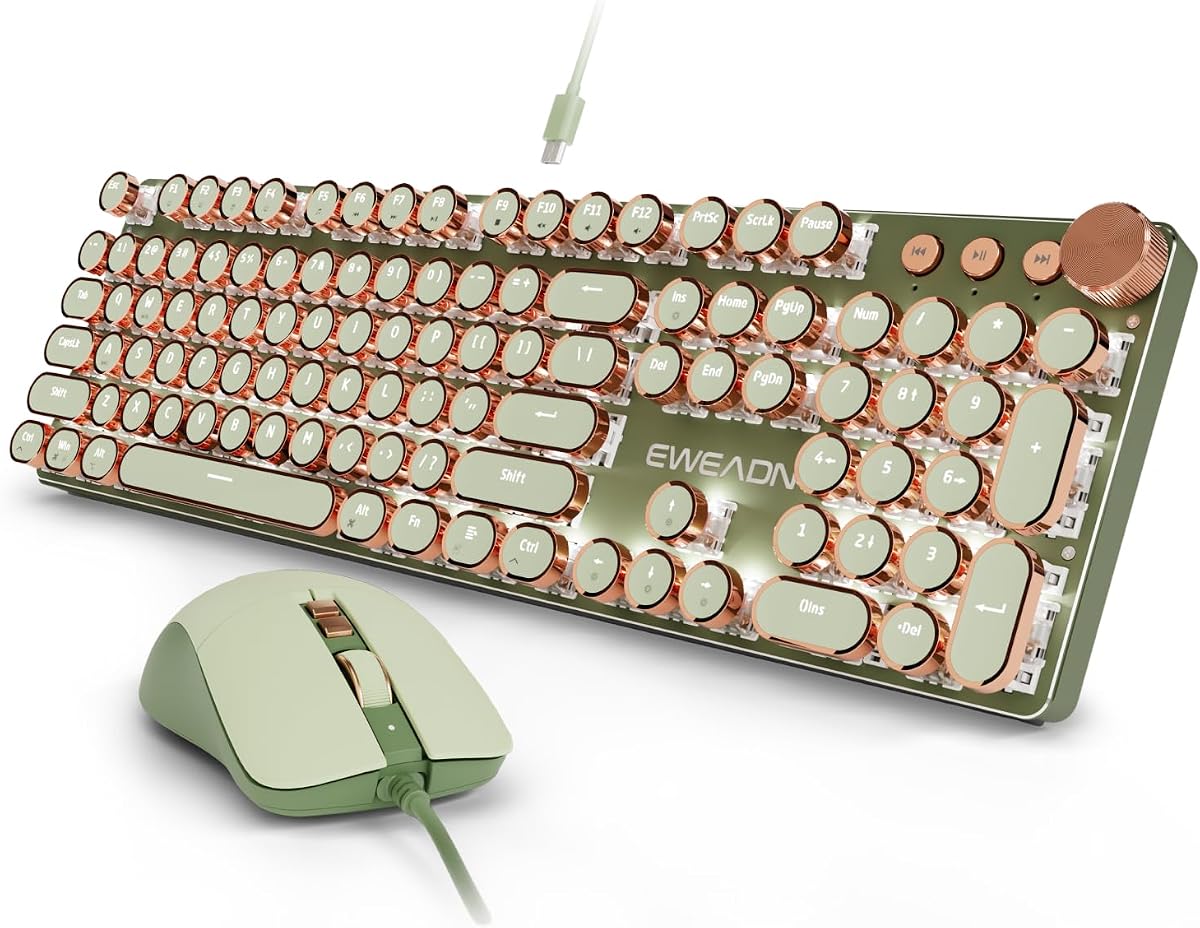
This Wired Typewriter Keyboard and Mouse Combo provides a cost-effective complete setup with soft noise profiles and unique design. It is valued for its quiet operation and practical ergonomics.
We may earn a commission when you buy through this link, at no additional cost to you.
Pink switches reduce noise while the rotary knob simplifies media control. The ergonomic mouse and high DPI options support precise cursor tracking suitable for office tasks and light gaming.
Wired connection ensures consistent performance but limits desk organization. Key feel differs from mechanical switches offering smooth typing without distinct tactile feedback preferred by enthusiasts.
Ideal for office environments where noise and comfort are priorities. This combo is a smart pick for those wanting a ready-made set with aesthetic appeal.
Low-noise switches prevent distraction in shared spaces while maintaining satisfying tactile response feedback.
Integrated rotary knob allows quick volume adjustments without interrupting typing or navigating menus manually.
We may earn a commission when you buy through this link, at no additional cost to you.
Selecting the right retro keyboard involves balancing aesthetics with technical specs like switches connectivity and build quality for your specific needs.
Clicky blue switches mimic the traditional typewriter sound while providing tactile feedback essential for rhythmic typing. Users seeking quieter environments might prefer pink or brown switches that still offer some feedback with less noise.
Prioritize switches that match your preferred sound profile to ensure long-term satisfaction with the keyboard feel.
Wired models guarantee zero lag and consistent power ideal for gaming and stationary work. Wireless options add flexibility and reduce cable clutter which helps maintain a clean retro aesthetic on modern desks.
Choose connectivity based on whether mobility or reliability matters more for your daily workflow setup.
Metal frames and panels provide durability and stability preventing keyboard movement during intense typing sessions. Plastic shells may reduce weight but can feel less premium compared to sturdy aluminum constructions.
Invest in models with metal components to ensure longevity and a premium tactile experience over time.
Round keycaps are iconic to typewriters but affect finger placement and comfort differently than square standard keys. Full-size layouts include number pads for data entry while compact versions save valuable desk space.
Verify layout dimensions and keycap shape to ensure they fit your hand size and workspace requirements.
Hot-swappable switches allow you to change tactile feel without soldering offering flexibility to customize later. RGB lighting and macro support add functionality that can enhance productivity beyond simple typing.
Look for programmable features if you need customized shortcuts or lighting effects for personal workflow optimization.
Ergonomic layouts and adjustable feet help maintain proper wrist posture reducing strain during prolonged typing sessions. Integrated stands and wrist rests offer additional comfort that complements the vintage styling.
Prioritize models with ergonomic support to prevent fatigue and maintain health during long work hours.
Wireless keyboards depend on battery capacity which affects usage time between charges. High-capacity batteries like 5000mAh ensure weeks of use while reducing the hassle of frequent recharging.
Check battery specifications to ensure the keyboard meets your usage patterns without constant power interruptions.
Budget models offer core retro features at lower costs but may lack advanced customization or durability. Premium options justify higher prices with robust materials unique controls and extensive programmability.
Balance your budget against feature needs to find the best value without overpaying for unused capabilities.
Connect the keyboard using the provided cable or Bluetooth pairing to your computer and install any driver software for full functionality. Ensure you select the correct layout settings within your operating system for accurate key mapping.
Clean the round keycaps regularly with compressed air and a soft brush to remove dust and debris that can affect switch performance. Avoid using harsh chemicals that might damage the retro finishes or paint on the casing.
For wireless models keep the device in a cool dry place when not in use to preserve battery life. Adjust lighting and volume settings using dedicated knobs to match your workspace environment comfort and style.
Yes many models offer anti-ghosting and high N-key rollover to ensure every keystroke registers accurately. The tactile feedback can also enhance gaming precision but some users may prefer linear switches for faster actuation.
Several options include Bluetooth and 2.4GHz wireless connections allowing you to switch between multiple devices easily. Wired models exist too for stable uninterrupted performance especially useful for competitive gaming or data entry.
Many models feature hot-swappable PCBs allowing you to change switches without soldering. Check product specs to confirm compatibility with 3-pin or 5-pin switches for easy customization later.
Clicky mechanical switches and round keycaps replicate the sound and feel of vintage typewriters. This acoustic feedback adds a rhythmic quality to typing which many users find satisfying and nostalgic.
Most keyboards support both Windows and macOS with built-in function keys for easy switching. Always verify specific key mapping compatibility if you rely heavily on special macOS shortcuts for productivity.
Wireless models with large capacities can last weeks on a single charge depending on lighting usage. Models with efficient power management reduce frequency of recharging ensuring uninterrupted typing sessions.
This guide highlighted ten top keyboards offering unique blends of retro aesthetics and modern functionality. From budget wired options to premium wireless models each provides distinct features to suit different typing preferences.
Prioritize switches and connectivity based on your workflow needs whether it is quiet typing or multi-device support. Comfort and build quality also play major roles in ensuring long-term satisfaction and ergonomic health.
Prices and stock levels fluctuate so always check current listings before purchasing. Choosing the right model ensures you enjoy the nostalgic charm of typewriting with the reliability of modern technology.