
Computer Fan Stand
4.4Editor score
Fits 120mm and 140mm fans
360 degree adjustable airflow
Heavy duty metal construction
This guide compares the top ten computer fan stand models for cooling laptops and PCs, featuring detailed specs and expert insights to help you choose the
Choosing the right computer fan stand is essential for maintaining optimal device performance during extended use. These devices help dissipate heat efficiently, preventing overheating and extending the lifespan of your valuable technology. Whether you are a gamer, professional, or student, finding a reliable stand with effective cooling capabilities can significantly enhance your workflow and comfort.
We evaluated ten leading computer fan stand models based on cooling performance, build quality, adjustability, and user feedback. Our analysis considers factors like fan count, noise levels, material durability, and ergonomic design to ensure each recommendation meets diverse needs. This comprehensive list covers options ranging from basic cooling pads to advanced adjustable mounts for various electronic devices.
Each pick in this guide highlights specific strengths and ideal use cases to help you make an informed decision. We include detailed reviews, comparison tables, and a buying guide to simplify your search process. Please note that availability and specifications may change over time, so verify current details before purchasing to ensure the best fit for your setup.
4.4Editor score
4.6Editor score

4.0Editor score
This table provides a side by side overview of all ten computer fan stand models evaluated in this guide. It highlights key specifications and features to help you quickly identify the model that best suits your specific cooling and ergonomic requirements for your desk setup.


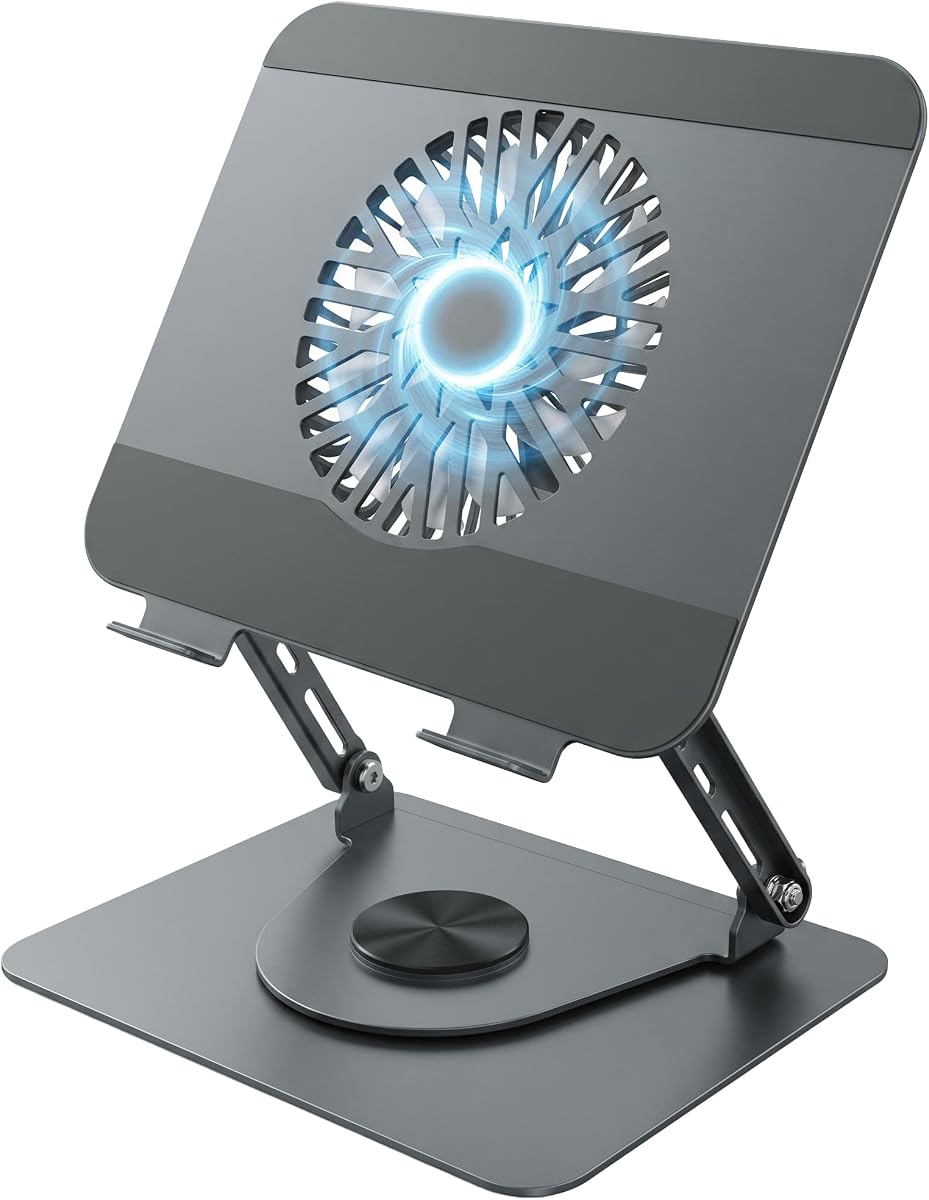
This laptop stand combines ergonomic elevation with active cooling to prevent heat buildup during demanding sessions. It holds a strong rating due to its versatile rotation and adjustable height features that cater to various work styles. The integrated fan ensures consistent airflow under the device for sustained performance.
We may earn a commission when you buy through this link, at no additional cost to you.
The standout quality is its 360-degree rotating base which allows effortless screen sharing without moving the stand. Adjustable height and angle settings help achieve an eye-level position that reduces neck strain. Non-slip silicone pads keep the laptop secure while the elevated platform creates storage space underneath.
Trade-offs include the lack of removable fan components which limits customization options for advanced users. Fan speed control is also minimal compared to standalone cooling pads. These are acceptable given the focus on ergonomics and general desktop organization rather than high-performance thermal management.
Buy this if you need a comprehensive solution that improves posture and keeps your laptop cool simultaneously. It suits professionals and students who value a clean desk setup and reliable device protection during long work hours.
Adjustable height and angle settings help align the screen with eye level to reduce neck strain during extended work sessions.
An integrated central fan keeps air moving under the device to help maintain optimal operating temperatures during heavy loads.
We may earn a commission when you buy through this link, at no additional cost to you.
This stand offers an affordable entry into targeted cooling solutions for various electronic devices. It earns a solid rating for its robust metal construction and ability to fit standard 120mm and 140mm PC fans. Users appreciate the straightforward setup and flexible airflow options.
We may earn a commission when you buy through this link, at no additional cost to you.
Key strengths include the heavy-duty all-metal construction which ensures stability even with high-speed fans. The 360-degree adjustable airflow direction allows precise cooling placement for PCs, routers, or 3D printers. Tool-free installation with thumb screws makes assembly quick and accessible for everyone.
Trade-offs involve the need to purchase a fan separately and a basic look that may not suit all decor styles. These are acceptable for users focused on function over form who already own compatible cooling fans. The value proposition remains strong for DIY cooling projects.
Buy this if you need a reliable mount to direct airflow to specific hotspots without spending much. It suits hobbyists and tech enthusiasts looking for a sturdy permanent desktop cooling setup.
Solid steel build with a weighted base delivers excellent stability even with high-speed or industrial PC fans in use.
Vertical rotation allows precise airflow control upward downward or angled for targeted cooling of various electronic devices.
We may earn a commission when you buy through this link, at no additional cost to you.
This mount stands out for its high-quality aluminum construction and broad compatibility with larger fan sizes up to 180mm. It receives attention for its precision CNC machining and smooth multi-angle adjustments. Users value the refined look and stable base for custom PC builds.
We may earn a commission when you buy through this link, at no additional cost to you.
Key strengths include the three precision damped pivot hinges that enable free angle adjustment and secure holding. The wide stable base with anti-slip pads prevents unwanted movement during operation. The premium aluminum build offers excellent corrosion resistance and a sleek elegant aesthetic for any desk.
Trade-offs include the higher price compared to steel alternatives and the requirement to buy a fan separately. These are acceptable for users seeking a durable and visually appealing solution for custom cooling setups. The build quality justifies the investment for long-term use.
Buy this if you want a robust and stylish mount that accommodates various fan sizes with precise control. It suits enthusiasts building custom cooling systems who prioritize aesthetics and durability.
Crafted from high-quality aluminum alloy via precision CNC machining for a refined texture with excellent corrosion resistance.
Fits 120mm 140mm and 180mm PC cooling fans offering versatile integration for custom PC builds and cooling upgrades.
We may earn a commission when you buy through this link, at no additional cost to you.
This cooling pad delivers strong thermal performance with five quiet fans and multiple control options for airflow. It is well-regarded for combining cooling with ergonomic support and additional connectivity through a dual USB hub. The adjustable height settings enhance comfort for various tasks.
We may earn a commission when you buy through this link, at no additional cost to you.
Key strengths include the five built-in fans with blue LEDs and two switches for flexible fan control. Dual USB hubs add convenience for peripherals while the ergonomic design offers six height adjustments. Secure stoppers prevent slipping ensuring laptop stability during use.
Trade-offs involve some cable management complexity with the USB-to-USB connection and LED control limitations. These are acceptable given the comprehensive feature set and affordable price. The device delivers reliable cooling and comfort for everyday laptop users.
Buy this if you want a feature-rich cooling solution with ergonomic support and extra USB ports. It suits gamers and professionals needing efficient heat dissipation and connectivity convenience.
Enjoy a noise-free and interference-free environment with super quiet fans allowing focus on work or entertainment without distractions.
The laptop cooling pad features 5 built-in fans with 2 On/Off switches enabling simultaneous control of all fans and LEDs.
We may earn a commission when you buy through this link, at no additional cost to you.
This stand blends portable design with active cooling and RGB aesthetics for a versatile workspace solution. It is praised for its lightweight foldable structure and premium aluminum alloy build. The height adjustable ergonomic design supports comfortable viewing angles for various activities.
We may earn a commission when you buy through this link, at no additional cost to you.
Key strengths include 2 ultra-quiet fans with advanced RGB lighting and 3-speed adjustable cooling. The foldable design makes it ideal for travel and small desks while anti-slip silicone pads secure laptops up to 16 inches. The aluminum construction ensures durability without adding weight.
Trade-offs involve limited compatibility with larger laptops and dependency on USB power for RGB features. These are acceptable for users prioritizing portability and visual appeal. The combination of cooling and style makes it a compelling choice for mobile setups.
Buy this if you need a portable and stylish cooling solution that adapts to different environments. It suits travelers and creative professionals who value aesthetics and performance.
Features 2 ultra-quiet fans and advanced RGB lighting to help maintain optimal laptop temperature during gaming or work.
Lightweight and foldable design makes it easy to carry and store ideal for travel small desks or space-saving setups.
We may earn a commission when you buy through this link, at no additional cost to you.
This laptop stand delivers active cooling with a foldable open-frame design suitable for various laptop sizes. It holds a strong rating for its adjustable load capacity and compatibility with accessories like phones and USB devices. The lightweight structure supports easy storage and transport.
We may earn a commission when you buy through this link, at no additional cost to you.
Key strengths include an open-frame design preventing overheating during long sessions and screw adjustments for load capacity up to 5kg. The foldable design measures just 1.3 inches thick for easy storage. Additional ports and a phone mount enhance desk organization.
Trade-offs involve the need for assembly using tools and limited control over the cooling fan. These are acceptable given the robust build and versatility. The device provides reliable cooling and ergonomic support for daily use.
Buy this if you want a versatile cooling stand that integrates well with your existing accessories. It suits users needing reliable heat dissipation and flexible desk arrangements.
Open-frame laptop desk stand prevents overheating during long sessions to maintain device performance and reliability.
Lightweight portable laptop stand with non-slip base design ensures stability while remaining easy to transport and store.
We may earn a commission when you buy through this link, at no additional cost to you.
This cooling pad offers a family-friendly solution with silent fans and ergonomic adjustments for diverse users. It is recognized for durable materials and added convenience like a phone holder and extra USB ports. The 5-level height adjustment ensures comfort across different sitting postures.
We may earn a commission when you buy through this link, at no additional cost to you.
Key strengths include three large ultra-silent fans and a simple wheel switch for speed control without confusion. Built-in phone holders and extra USB ports support multitasking while the anti-slip pads prevent slips. Sturdy ABS and stainless steel construction ensure longevity.
Trade-offs involve a basic design aesthetic and limited height adjustment options compared to premium stands. These are acceptable for families prioritizing function and durability over style. The device supports multiple users effectively.
Buy this if you need a reliable cooling solution that works well for various household members and tasks. It suits families needing durable and versatile laptop support.
Equipped with three large ultra-silent fans that rapidly cool down any laptop while staying about 40dB maximum noise.
Main body uses heat-resistant ABS material and mask is crafted from sturdy stainless steel mesh for top-notch heat dissipation.
We may earn a commission when you buy through this link, at no additional cost to you.
This mount provides a lightweight aluminum option for standard 120mm fans with smooth airflow redirection. It holds a solid rating for rust-proof durability and easy assembly. The upgraded design ensures stability even when running fans at higher speeds.
We may earn a commission when you buy through this link, at no additional cost to you.
Key strengths include full-aluminum construction that resists rust and provides lightweight portability. 360-degree vertical rotation channels airflow wherever needed for maximum cooling flexibility. Tool-free installation with thumb screws makes setup quick without extra hardware.
Trade-offs include limitation to 120mm fans and basic aesthetic appeal. These are acceptable for users needing a simple and durable mount. The device offers reliable performance for targeted cooling.
Buy this if you want a durable and lightweight solution for 120mm fans with flexible airflow. It suits users needing a stable and rust-proof desk mount.
Full-Aluminum construction makes it rust-proof and durable with heavy-duty build ensuring stability at high fan speeds.
With 360-degree vertical rotation it easily channels airflow wherever needed up down sideways or at an angle.
We may earn a commission when you buy through this link, at no additional cost to you.
This mount offers a reliable heavy-duty solution for standard 120mm and 140mm fans. It is noted for stable metal construction and flexible airflow control. Tool-free installation with thumb screws makes it accessible for various cooling needs.
We may earn a commission when you buy through this link, at no additional cost to you.
Key strengths include heavy-duty metal construction ensuring stability even at high fan speeds. 360-degree vertical rotation delivers ultimate cooling flexibility by directing airflow upward downward or sideways. Compatible with most square frame fans for broad utility.
Trade-offs involve a basic design and potential minor hardware inconsistencies. These are acceptable given the core focus on stability and function. The device provides a robust platform for DIY cooling setups.
Buy this if you need a stable and simple mount for multiple fan sizes. It suits users prioritizing functionality and durability in desktop cooling.
Heavy-duty metal construction ensures stability even at high fan speeds with 360-degree vertical rotation for ultimate cooling flexibility.
Compatible with most square frame 120 and 140mm PC fans ensuring broad utility for various projects.
We may earn a commission when you buy through this link, at no additional cost to you.
This mount delivers outstanding stability and versatility with a solid metal frame and full vertical rotation. It earns top marks for eliminating vibration and shaking during operation. Quick assembly and universal compatibility make it a top choice for diverse cooling needs.
We may earn a commission when you buy through this link, at no additional cost to you.
Key strengths include sturdy all-metal construction that eliminates vibration and shaking even with high-RPM fans. Quick assembly with large textured thumb knobs allows mounting without tools. Multi-scene desktop cooling solution supports laptops routers and modems effectively.
Trade-offs involve the exclusion of a fan and basic surface finish. These are acceptable for users prioritizing structural integrity. The device offers exceptional performance for desktop ventilation.
Buy this if you need a rock-solid and versatile mount for standard PC fans. It suits enthusiasts and professionals requiring reliable cooling across multiple devices.
Built with thick solid metal frame bracket to stay rock-solid even when running high-RPM PC fans without wobbling or buzzing.
Fully vertical 360-degree rotating design lets you tilt lift angle or swivel your fan to blow air upward or downward freely.
We may earn a commission when you buy through this link, at no additional cost to you.
Selecting the right computer fan stand requires considering several factors to ensure optimal performance and usability. This guide outlines key aspects to evaluate before making your purchase.
Ensure the stand accommodates your device dimensions or fan sizes. Many laptop stands fit specific inch ranges while PC mounts suit standard 120mm or 140mm fans. Checking these specs prevents returns and ensures a secure fit for your equipment.
Always verify compatibility with your exact model size before buying.
Look for multiple fans or active cooling systems to dissipate heat efficiently. More fans usually mean better airflow but may increase noise. Evaluate the balance between cooling power and acoustic comfort based on your environment.
Prioritize models with adjustable fan speeds for better control.
Ergonomic stands offer height and angle adjustments to improve posture during long sessions. Flexible designs reduce neck and eye strain. Consider stands with multiple settings that allow you to find the optimal viewing position for daily tasks.
Adjustable height and tilt are essential for comfort.
Materials like aluminum alloy or heavy-duty steel ensure longevity and stability. Metal builds resist rust and support heavier devices better than plastic. Check construction quality and anti-slip features to prevent device movement and potential damage.
Choose metal or reinforced materials for long-term reliability.
Foldable or lightweight designs are ideal if you move your setup often. Compact stands save desk space and fit easily into bags. Evaluate weight and dimensions if portability is a priority for your workflow.
Foldable features enhance convenience for mobile users.
Some stands include USB hubs phone holders or RGB lighting for added functionality. Extra ports simplify cable management and connectivity. Identify which extra features truly benefit your daily tasks to avoid unnecessary costs.
Select stands with only the features you will use regularly.
Tool-free assembly with thumb screws or quick locks simplifies initial setup. Avoid complex designs requiring extra tools or time. A straightforward installation process helps you start using the stand immediately without frustration.
Opt for tool-free assembly options for convenience.
Quiet operation is vital in shared or quiet environments. Check decibel ratings or user reviews regarding noise. Look for fans designed for whisper-quiet performance to maintain focus during work or leisure.
Low noise operation ensures a distraction-free environment.
Place the stand on a flat stable surface to ensure maximum support for your device. Adjust the height or angle to align your screen with your eye level for better ergonomics. Secure your device properly to prevent slipping or accidental movement during use.
Clean the stand regularly with a soft cloth to remove dust from fans and surfaces. Avoid using water directly on electrical components and ensure everything is dry before plugging in. This practice keeps airflow efficient and extends the lifespan of the cooling system.
Inspect screws and joints periodically to ensure stability over time. Tighten any loose parts gently to avoid damaging the material. Following these simple care steps helps maintain safe and effective operation throughout your use.
Most stands specify compatible sizes such as 12 to 17 inches so you must check the product details. Larger gaming laptops may need stands with higher load capacity. Always match your laptop dimensions with the stand's specifications for safety and stability.
Many laptop cooling pads allow fan replacement but PC fan mounts generally do not. Check the product description for modularity or maintenance options. Some models offer universal mounts but others have integrated fans that cannot be swapped.
Quality stands aim for under 40 decibels during operation for minimal distraction. Look for models labeled whisper-quiet or ultra-silent if noise is a concern. Higher fan speeds will increase sound so adjustable settings help manage noise levels.
Yes many stands support tablets routers modems or 3D printers if within size limits. Universal compatibility depends on weight capacity and base stability. Always verify the product supports your specific device type before purchasing.
Most computer fan stands draw power via USB from your laptop or desktop PC. Some premium models may include AC adapters for standalone use. Check included cables and power requirements to ensure you have the right setup.
Aluminum alloy and steel provide superior durability and heat dissipation compared to plastic. These materials also offer better stability for heavier devices. Prioritize metal builds if you plan to use the stand daily for long periods.
Stands improve airflow and reduce heat buildup but cannot eliminate overheating from hardware faults. They work best when combined with clean vents and software optimization. Use them as part of a broader cooling strategy for best results.
Yes most stands are compatible with MacBooks and provide safe support. Ensure anti-slip pads and weight limits match your MacBook model. Using a stand designed for your device type ensures secure placement and protection.
We have explored ten top computer fan stand options that balance performance features and reliability for diverse needs. From portable cooling pads to sturdy PC mounts each pick offers unique benefits for specific use cases. Selecting the right one depends on your device size and priority features.
Consider ergonomics build quality and fan compatibility when finalizing your decision. Investing in a durable stand protects your devices and improves comfort significantly. Don't overlook additional features like USB hubs that simplify your desk setup.
Remember to check current availability and confirm details before purchasing to ensure the best fit. Technology updates may change specs so always verify the latest information. With careful choice your computer fan stand will enhance performance and daily workflow.